
About
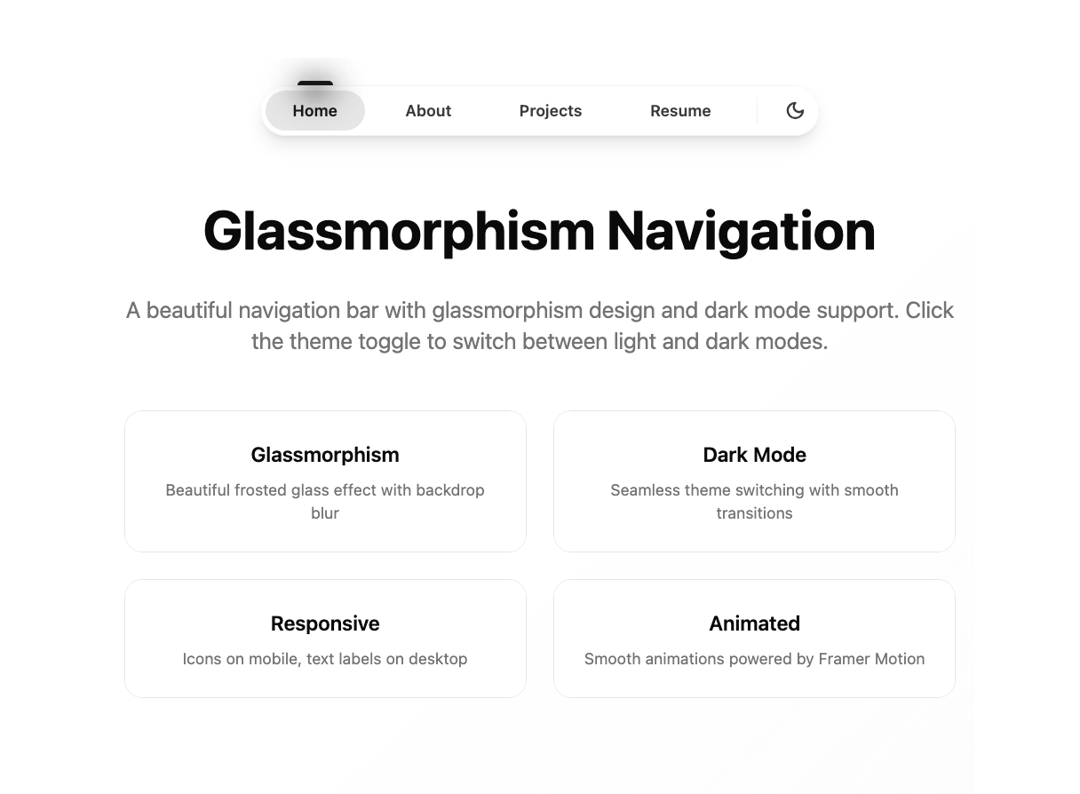
Glassmorphism Navigation
Built with React and Tailwind. Copy the prompt and paste it into Claude Code, Cursor or Lovable: your agent adds Glassmorphism Navigation to your project and fits it to your theme.
Code
How Glassmorphism Navigation is used: the demo's code. The component's own source comes with a free account.
Usage.tsx
"use client"

import React, { useState, useEffect, useRef } from "react"
import { motion } from "framer-motion"
import { Home, User, Briefcase, FileText, Moon, Sun } from "lucide-react"
import { cn } from "@/lib/utils"

interface NavItem {
  name: string
  url: string
  icon: React.ElementType
}

interface GlassmorphismNavBarProps {
  items?: NavItem[]
  className?: string
  defaultTheme?: "light" | "dark"
  onThemeChange?: (theme: "light" | "dark") => void
}

export function GlassmorphismNavBar({
  items = [
    { name: "Home", url: "#", icon: Home },
    { name: "About", url: "#", icon: User },
    { name: "Projects", url: "#", icon: Briefcase },
    { name: "Resume", url: "#", icon: FileText },
  ],
  className,
  defaultTheme = "light",
  onThemeChange,
}: GlassmorphismNavBarProps) {
  const [activeTab, setActiveTab] = useState(items[0].name)
  const [isMobile, setIsMobile] = useState(false)
  const [theme, setTheme] = useState<"light" | "dark">(defaultTheme)
  const [isHovered, setIsHovered] = useState(false)

  useEffect(() => {
    const handleResize = () => {
      setIsMobile(window.innerWidth < 768)
    }

    handleResize()
    window.addEventListener("resize", handleResize)
    return () => window.removeEventListener("resize", handleResize)
  }, [])

  useEffect(() => {
    if (typeof document !== "undefined") {
      if (theme === "dark") {
        document.documentElement.classList.add("dark")
      } else {
        document.documentElement.classList.remove("dark")
      }
    }
  }, [theme])

  const toggleTheme = () => {
    const newTheme = theme === "light" ? "dark" : "light"
    setTheme(newTheme)
    onThemeChange?.(newTheme)
  }

  return (
    <div
      className={cn(
        "fixed bottom-0 sm:top-0 left-1/2 -translate-x-1/2 z-50 mb-6 sm:pt-6",
        className
      )}
    >
      <div
        className={cn(
          "flex items-center gap-3 py-1 px-1 rounded-full shadow-lg transition-all duration-300",
          theme === "dark"
            ? "bg-background/40 border border-white/10 backdrop-blur-xl"
            : "bg-background/30 border border-black/5 backdrop-blur-xl"
        )}
        style={{
          backdropFilter: "blur(20px) saturate(180%)",
          WebkitBackdropFilter: "blur(20px) saturate(180%)",
        }}
      >
        {items.map((item) => {
          const Icon = item.icon
          const isActive = activeTab === item.name

          return (
            <button
              key={item.name}
              onClick={() => setActiveTab(item.name)}
              className={cn(
                "relative cursor-pointer text-sm font-semibold px-6 py-2 rounded-full transition-all duration-300",
                theme === "dark"
                  ? "text-foreground/70 hover:text-primary"
                  : "text-foreground/80 hover:text-primary",
                isActive &&
                  (theme === "dark"
                    ? "bg-white/10 text-primary"
                    : "bg-black/5 text-primary")
              )}
            >
              <span className="hidden md:inline">{item.name}</span>
              <span className="md:hidden">
                <Icon size={18} strokeWidth={2.5} />
              </span>
              {isActive && (
                <motion.div
                  layoutId="lamp"
                  className={cn(
                    "absolute inset-0 w-full rounded-full -z-10",
                    theme === "dark" ? "bg-primary/10" : "bg-primary/5"
                  )}
                  initial={false}
                  transition={{
                    type: "spring",
                    stiffness: 300,
                    damping: 30,
                  }}
                >
                  <div
                    className={cn(
                      "absolute -top-2 left-1/2 -translate-x-1/2 w-8 h-1 rounded-t-full",
                      theme === "dark" ? "bg-primary/80" : "bg-primary"
                    )}
                  >
                    <div
                      className={cn(
                        "absolute w-12 h-6 rounded-full blur-md -top-2 -left-2",
                        theme === "dark" ? "bg-primary/30" : "bg-primary/20"
                      )}
                    />
                    <div
                      className={cn(
                        "absolute w-8 h-6 rounded-full blur-md -top-1",
                        theme === "dark" ? "bg-primary/30" : "bg-primary/20"
                      )}
                    />
                    <div
                      className={cn(
                        "absolute w-4 h-4 rounded-full blur-sm top-0 left-2",
                        theme === "dark" ? "bg-primary/30" : "bg-primary/20"
                      )}
                    />
                  </div>
                </motion.div>
              )}
            </button>
          )
        })}

        <div className="w-px h-6 bg-border/50 mx-1" />

        <button
          onClick={toggleTheme}
          onMouseEnter={() => setIsHovered(true)}
          onMouseLeave={() => setIsHovered(false)}
          className={cn(
            "relative cursor-pointer p-2 rounded-full transition-all duration-300",
            theme === "dark"
              ? "text-foreground/70 hover:text-primary hover:bg-white/10"
              : "text-foreground/80 hover:text-primary hover:bg-black/5"
          )}
          aria-label={
            theme === "light" ? "Switch to dark mode" : "Switch to light mode"
          }
        >
          <motion.div
            initial={false}
            animate={{
              scale: isHovered ? 1.1 : 1,
              rotate: theme === "dark" ? 180 : 0,
            }}
            transition={{
              type: "spring",
              stiffness: 200,
              damping: 15,
            }}
          >
            {theme === "light" ? (
              <Moon size={18} strokeWidth={2.5} />
            ) : (
              <Sun size={18} strokeWidth={2.5} />
            )}
          </motion.div>
        </button>
      </div>
    </div>
  )
}

export default function Demo() {
  const navItems = [
    { name: "Home", url: "#", icon: Home },
    { name: "About", url: "#", icon: User },
    { name: "Projects", url: "#", icon: Briefcase },
    { name: "Resume", url: "#", icon: FileText },
  ]

  return (
    <div className="min-h-screen bg-gradient-to-br from-background via-background to-muted/20 transition-colors duration-300">
      <GlassmorphismNavBar
        items={navItems}
        defaultTheme="light"
        onThemeChange={(theme) => console.log("Theme changed to:", theme)}
      />
      <div className="container mx-auto px-4 pt-32 pb-16">
        <div className="max-w-4xl mx-auto text-center space-y-8">
          <h1 className="text-5xl font-bold text-foreground">
            Glassmorphism Navigation
          </h1>
          <p className="text-xl text-muted-foreground">
            A beautiful navigation bar with glassmorphism design and dark mode
            support. Click the theme toggle to switch between light and dark
            modes.
          </p>
          <div className="grid grid-cols-1 md:grid-cols-2 gap-6 mt-12">
            <div className="p-6 rounded-2xl bg-card border border-border backdrop-blur-sm">
              <h3 className="text-lg font-semibold mb-2">Glassmorphism</h3>
              <p className="text-sm text-muted-foreground">
                Beautiful frosted glass effect with backdrop blur
              </p>
            </div>
            <div className="p-6 rounded-2xl bg-card border border-border backdrop-blur-sm">
              <h3 className="text-lg font-semibold mb-2">Dark Mode</h3>
              <p className="text-sm text-muted-foreground">
                Seamless theme switching with smooth transitions
              </p>
            </div>
            <div className="p-6 rounded-2xl bg-card border border-border backdrop-blur-sm">
              <h3 className="text-lg font-semibold mb-2">Responsive</h3>
              <p className="text-sm text-muted-foreground">
                Icons on mobile, text labels on desktop
              </p>
            </div>
            <div className="p-6 rounded-2xl bg-card border border-border backdrop-blur-sm">
              <h3 className="text-lg font-semibold mb-2">Animated</h3>
              <p className="text-sm text-muted-foreground">
                Smooth animations powered by Framer Motion
              </p>
            </div>
          </div>
        </div>
      </div>
    </div>
  )
}