
About
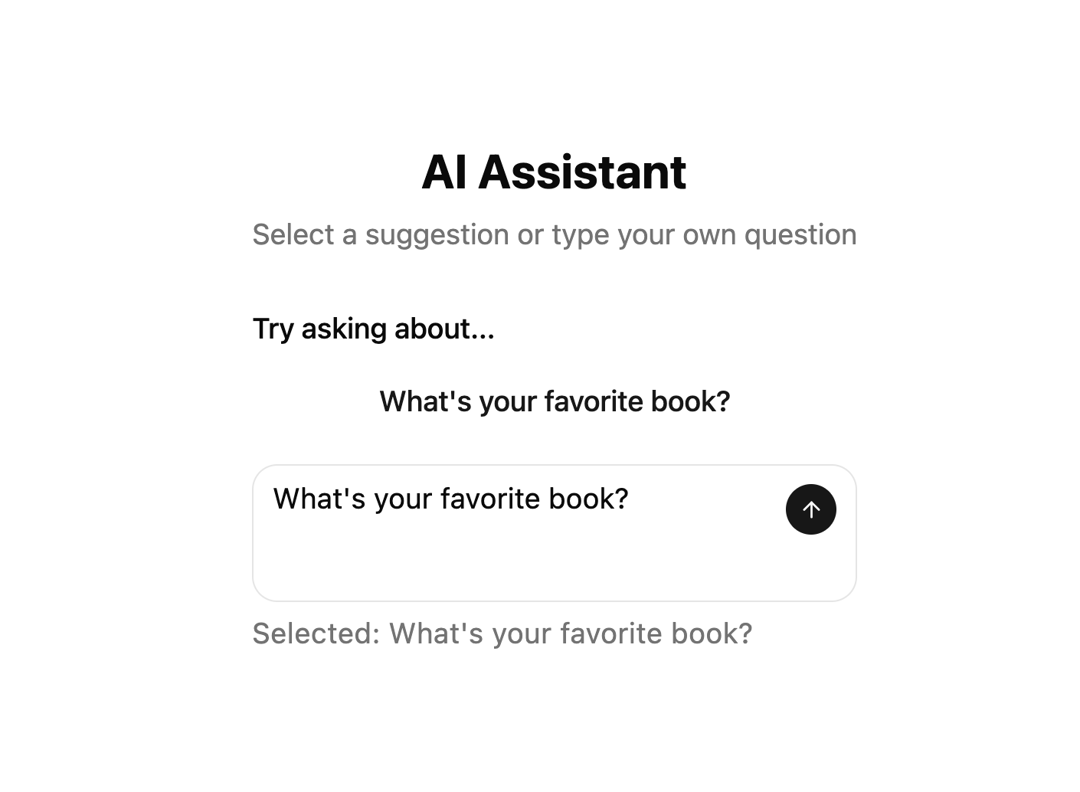
A component for implementing interactive prompt suggestions into AI interfaces. Suggestions for prompts slide into view using animation that transitions between multiple items, creating an engaging looping effect
Built with React and Tailwind. Copy the prompt and paste it into Claude Code, Cursor or Lovable: your agent adds Rotating Prompts to your project and fits it to your theme.
Code
How Rotating Prompts is used: the demo's code. The component's own source comes with a free account.
Usage.tsx
import React, { useState, useEffect, useRef, useCallback, Children } from "react";
import { motion, AnimatePresence, Transition, Variants } from "framer-motion";
import { Sparkles, Lightbulb, Code, Palette, MessageSquare, ArrowUp } from "lucide-react";
import { cn } from "@/lib/utils";

// Utility function
const cn2 = (...inputs: any[]) => {
  return inputs.filter(Boolean).join(' ');
};

// Textarea component
const Textarea = React.forwardRef<
  HTMLTextAreaElement,
  React.ComponentProps<'textarea'>
>(({ className, ...props }, ref) => {
  return (
    <textarea
      className={cn2(
        "flex min-h-[80px] w-full rounded-md border border-input bg-background px-3 py-2 text-sm ring-offset-background placeholder:text-muted-foreground focus-visible:outline-none focus-visible:ring-2 focus-visible:ring-ring focus-visible:ring-offset-2 disabled:cursor-not-allowed disabled:opacity-50",
        className
      )}
      ref={ref}
      {...props}
    />
  );
});
Textarea.displayName = "Textarea";

// Auto-resize textarea hook
function useAutoResizeTextarea({
  minHeight,
  maxHeight,
}: {
  minHeight: number;
  maxHeight?: number;
}) {
  const textareaRef = useRef<HTMLTextAreaElement>(null);

  const adjustHeight = useCallback(
    (reset?: boolean) => {
      const textarea = textareaRef.current;
      if (!textarea) return;

      if (reset) {
        textarea.style.height = `${minHeight}px`;
        return;
      }

      textarea.style.height = `${minHeight}px`;

      const newHeight = Math.max(
        minHeight,
        Math.min(
          textarea.scrollHeight,
          maxHeight ?? Number.POSITIVE_INFINITY
        )
      );

      textarea.style.height = `${newHeight}px`;
    },
    [minHeight, maxHeight]
  );

  useEffect(() => {
    const textarea = textareaRef.current;
    if (textarea) {
      textarea.style.height = `${minHeight}px`;
    }
  }, [minHeight]);

  useEffect(() => {
    const handleResize = () => adjustHeight();
    window.addEventListener("resize", handleResize);
    return () => window.removeEventListener("resize", handleResize);
  }, [adjustHeight]);

  return { textareaRef, adjustHeight };
}

// TextLoop component adapted from reference
type TextLoopProps = {
  children: React.ReactNode[];
  className?: string;
  interval?: number; // in seconds
  transition?: Transition;
  variants?: Variants;
  onIndexChange?: (index: number) => void;
};

function TextLoop({
  children,
  className,
  interval = 5, // Default to 5 seconds as per user request
  transition = { duration: 0.3 },
  variants,
  onIndexChange,
}: TextLoopProps) {
  const [currentIndex, setCurrentIndex] = useState(0);
  const items = Children.toArray(children);

  useEffect(() => {
    const intervalMs = interval * 1000;

    const timer = setInterval(() => {
      setCurrentIndex((current) => {
        const next = (current + 1) % items.length;
        onIndexChange?.(next);
        return next;
      });
    }, intervalMs);
    return () => clearInterval(timer);
  }, [items.length, interval, onIndexChange]);

  const motionVariants: Variants = {
    initial: { y: 20, opacity: 0 },
    animate: { y: 0, opacity: 1 },
    exit: { y: -20, opacity: 0 },
  };

  return (
    <div className={cn('relative inline-block whitespace-nowrap overflow-hidden', className)}>
      <AnimatePresence mode='popLayout' initial={false}>
        <motion.div
          key={currentIndex}
          initial='initial'
          animate='animate'
          exit='exit'
          transition={transition}
          variants={variants || motionVariants}
        >
          {items[currentIndex]}
        </motion.div>
      </AnimatePresence>
    </div>
  );
}

// Prompt suggestions data
const DEFAULT_SUGGESTIONS = [
  "Seen any good shows lately?",
  "What app do you use nonstop?",
  "If stuck eating one cuisine forever, which?",
  "What’s the last photo you snapped?",
  "You a morning person or night owl?",
  "What little treat do you indulge in?",
  "Podcasts or music—which do you pick?",
  "How do you chill after workdays?",
  "If you could teleport now, where?",
  "What’s the best advice you’ve gotten?",
];

interface InteractivePromptSuggestionsProps {
  suggestions?: string[]; // Changed to string[] as per user request
  onSuggestionSelect?: (suggestion: string) => void;
  onSubmit?: (text: string) => void;
  placeholder?: string;
  rotationInterval?: number; // in seconds
  className?: string;
}

export function InteractivePromptSuggestions({
  suggestions = DEFAULT_SUGGESTIONS,
  onSuggestionSelect,
  onSubmit,
  placeholder = "Ask me anything...",
  rotationInterval = 5, // Default to 5 seconds as per user request
  className
}: InteractivePromptSuggestionsProps) {
  const [inputValue, setInputValue] = useState("");
  const [selectedSuggestion, setSelectedSuggestion] = useState<string | null>(null);

  const { textareaRef, adjustHeight } = useAutoResizeTextarea({
    minHeight: 56,
    maxHeight: 200,
  });

  const handleSuggestionClick = (suggestion: string) => {
    setInputValue(suggestion);
    setSelectedSuggestion(suggestion);
    onSuggestionSelect?.(suggestion);

    // Focus textarea and adjust height
    setTimeout(() => {
      textareaRef.current?.focus();
      adjustHeight();
    }, 100);
  };

  const handleSubmit = () => {
    if (inputValue.trim()) {
      onSubmit?.(inputValue);
      setInputValue("");
      setSelectedSuggestion(null);
      adjustHeight(true);
    }
  };

  const handleKeyDown = (e: React.KeyboardEvent) => {
    if (e.key === "Enter" && !e.shiftKey) {
      e.preventDefault();
      handleSubmit();
    }
  };

  return (
    <div className={cn("w-full max-w-2xl mx-auto space-y-6", className)}>
      {/* Rotating Suggestions */}
      <div className="space-y-3">
        <h3 className="text-lg font-medium text-foreground mb-4">
          Try asking about...
        </h3>

        <div className="relative h-8 flex items-center justify-center"> {/* Fixed height for TextLoop */}
          <TextLoop interval={rotationInterval}>
            {suggestions.map((suggestion, index) => (
              <motion.button
                key={index}
                onClick={() => handleSuggestionClick(suggestion)}
                className={cn(
                  "text-lg font-medium text-muted-foreground hover:text-foreground transition-colors duration-200",
                  "focus:outline-none focus-visible:ring-2 focus-visible:ring-ring focus-visible:ring-offset-2",
                  "block w-full text-center", // Ensure it takes full width and centers text
                  selectedSuggestion === suggestion && "text-primary"
                )}
              >
                {suggestion}
              </motion.button>
            ))}
          </TextLoop>
        </div>
      </div>

      {/* Input Field */}
      <div className="relative">
        <div className="relative border border-border rounded-2xl bg-background/50 backdrop-blur-sm focus-within:border-primary/50 transition-colors">
          <Textarea
            ref={textareaRef}
            placeholder={placeholder}
            value={inputValue}
            onChange={(e) => {
              setInputValue(e.target.value);
              adjustHeight();
            }}
            onKeyDown={handleKeyDown}
            className="border-none bg-transparent resize-none focus-visible:ring-0 focus-visible:ring-offset-0 pr-12 min-h-[56px]"
          />

          <button
            onClick={handleSubmit}
            disabled={!inputValue.trim()}
            className={cn(
              "absolute right-3 top-3 p-2 rounded-full transition-all duration-200",
              "bg-primary text-primary-foreground hover:bg-primary/90",
              "disabled:opacity-50 disabled:cursor-not-allowed",
              inputValue.trim() ? "scale-100 opacity-100" : "scale-90 opacity-60"
            )}
          >
            <ArrowUp className="w-4 h-4" />
          </button>
        </div>

        {selectedSuggestion && (
          <motion.div
            initial={{ opacity: 0, y: 10 }}
            animate={{ opacity: 1, y: 0 }}
            className="mt-2 text-xs text-muted-foreground"
          >
            Selected: {selectedSuggestion}
          </motion.div>
        )}
      </div>
    </div>
  );
}

// Demo component
export function InteractivePromptSuggestionsDemo() {
  const handleSuggestionSelect = (suggestion: string) => {
    console.log("Selected suggestion:", suggestion);
  };

  const handleSubmit = (text: string) => {
    console.log("Submitted:", text);
  };

  const customSuggestions = [
    "What's your favorite book?",
    "Tell me about your day.",
    "Suggest a new recipe.",
    "Explain the concept of AI.",
    "Recommend a good movie.",
  ];

  return (
    <div className="min-h-screen bg-background p-8 flex items-center justify-center">
      <div className="w-full max-w-4xl">
        <div className="text-center mb-8">
          <h1 className="text-3xl font-bold text-foreground mb-2">
            AI Assistant
          </h1>
          <p className="text-muted-foreground">
            Select a suggestion or type your own question
          </p>
        </div>

        <InteractivePromptSuggestions
          onSuggestionSelect={handleSuggestionSelect}
          onSubmit={handleSubmit}
          rotationInterval={5} // 5 seconds as requested
          suggestions={customSuggestions}
        />
      </div>
    </div>
  );
}

export default InteractivePromptSuggestionsDemo;More in Text
View all

Vertical Cut Reveal Characters
103
Motion Blur Text
36

NeonRGBTextEffect
144
Text Reveal
27
Random Letter Swap
46

Rainbow Text Effect
47
Text Color
545

Blur Reveal
300