
About
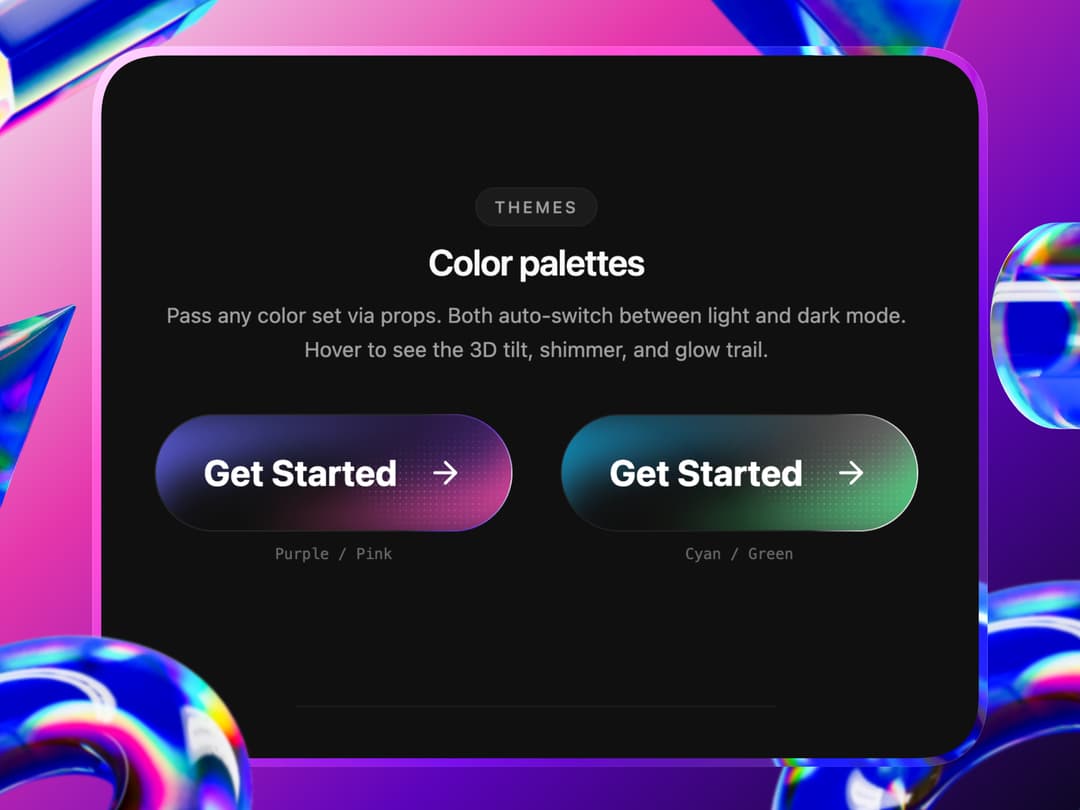
CTA button inspired from shiny button.
Built with React and Tailwind. Copy the prompt and paste it into Claude Code, Cursor or Lovable: your agent adds CTA Button to your project and fits it to your theme.
Code
How CTA Button is used: the demo's code. The component's own source comes with a free account.
Usage.tsx
"use client"
import { GlowCTA } from "@/components/ui/cta-button"
import type { GlowCTAProps } from "@/components/ui/cta-button"
import { useState } from "react"
/* ━━━ Presets ━━━ */
type ColorPreset = Pick<
GlowCTAProps,
| "glowColorLeft" | "glowColorRight"
| "darkGlowColorLeft" | "darkGlowColorRight"
| "highlightColor" | "highlightSubtle" | "glassColor"
| "darkHighlightColor" | "darkHighlightSubtle" | "darkGlassColor"
>
const presets: Record<string, ColorPreset> = {
purple: {
glowColorLeft: "#8B5CF6",
glowColorRight: "#F472B6",
darkGlowColorLeft: "#6366F1",
darkGlowColorRight: "#EC4899",
highlightColor: "#8B5CF6",
highlightSubtle: "#C4B5FD",
glassColor: "rgba(180,180,210,0.25)",
darkHighlightColor: "#7C3AED",
darkHighlightSubtle: "#A78BFA",
darkGlassColor: "rgba(255,255,255,0.1)",
},
cyan: {
glowColorLeft: "#009CD0",
glowColorRight: "#39D47A",
darkGlowColorLeft: "#009CD0",
darkGlowColorRight: "#39D47A",
highlightColor: "#0EA5E9",
highlightSubtle: "#67E8F9",
glassColor: "rgba(0,180,200,0.15)",
darkHighlightColor: "rgba(255,255,255,1)",
darkHighlightSubtle: "rgba(255,255,255,0.5)",
darkGlassColor: "rgba(255,255,255,0.08)",
},
}
/* ━━━ Demo ━━━ */
export default function GlowCTADemo() {
const [theme, setTheme] = useState<"purple" | "cyan">("purple")
const [radius, setRadius] = useState(353)
const [border, setBorder] = useState(1)
const [size, setSize] = useState<"sm" | "md" | "default" | "lg">("default")
const [speed, setSpeed] = useState(3)
const [arrow, setArrow] = useState(true)
const [weight, setWeight] = useState(700)
const sizeMap = {
sm: { fontSize: 14, paddingX: 24, paddingY: 14, gap: 12 },
md: { fontSize: 18, paddingX: 28, paddingY: 18, gap: 16 },
default: { fontSize: 24, paddingX: 32, paddingY: 24, gap: 20 },
lg: { fontSize: 28, paddingX: 40, paddingY: 28, gap: 24 },
}
const colors = presets[theme]
const s = sizeMap[size]
return (
<div className="min-h-screen w-full bg-[#F4F4F4] dark:bg-[#101010]">
<div className="mx-auto flex max-w-5xl flex-col items-center px-6 py-16">
{/* ── Header ── */}
<div className="flex flex-col items-center gap-4 text-center">
<div className="inline-flex items-center gap-1.5 rounded-full border border-border/40 bg-muted/50 px-3 py-1">
<span className="relative flex h-2 w-2">
<span className="absolute inline-flex h-full w-full animate-ping rounded-full bg-violet-400 opacity-75" />
<span className="relative inline-flex h-2 w-2 rounded-full bg-violet-500" />
</span>
<span className="text-[11px] font-medium text-muted-foreground">Interactive Preview</span>
</div>
<h1 className="text-3xl font-bold tracking-tight text-foreground sm:text-4xl">
Glow CTA Button
</h1>
<p className="max-w-sm text-sm leading-relaxed text-muted-foreground">
3D tilt, shimmer sweep, animated gradient border, and a cursor-following glow.
Use the controls below to customize.
</p>
</div>
{/* ── Hero Button ── */}
<div className="mt-16 mb-20 flex items-center justify-center">
<GlowCTA
{...colors}
borderRadius={radius}
borderWidth={border}
fontSize={s.fontSize}
paddingX={s.paddingX}
paddingY={s.paddingY}
gap={s.gap}
fontWeight={weight}
animationDuration={speed}
showArrow={arrow}
>
Get Started Now
</GlowCTA>
</div>
{/* ── Controls ── */}
<div className="w-full max-w-2xl rounded-2xl border border-border/40 bg-background/60 p-6 backdrop-blur-md">
<div className="mb-6 flex items-center justify-between">
<div className="flex items-center gap-2">
<div className="h-2 w-2 rounded-full bg-violet-500" />
<span className="text-sm font-semibold tracking-tight text-foreground">
Customize
</span>
</div>
<button
onClick={() => {
setTheme("purple")
setRadius(353)
setBorder(1)
setSize("default")
setSpeed(3)
setArrow(true)
setWeight(700)
}}
className="text-[11px] font-medium text-muted-foreground hover:text-foreground transition-colors"
>
Reset All
</button>
</div>
<div className="grid grid-cols-1 gap-5 sm:grid-cols-2">
<Control label="Color Theme">
<ToggleGroup
options={["purple", "cyan"]}
labels={["Purple / Pink", "Cyan / Green"]}
value={theme}
onChange={(v) => setTheme(v as "purple" | "cyan")}
/>
</Control>
<Control label="Border Radius">
<ToggleGroup
options={["0", "8", "16", "353"]}
labels={["Square", "8px", "16px", "Pill"]}
value={String(radius)}
onChange={(v) => setRadius(Number(v))}
/>
</Control>
<Control label="Border Width">
<ToggleGroup
options={["1", "2", "3", "4"]}
labels={["1px", "2px", "3px", "4px"]}
value={String(border)}
onChange={(v) => setBorder(Number(v))}
/>
</Control>
<Control label="Button Size">
<ToggleGroup
options={["sm", "md", "default", "lg"]}
labels={["Small", "Medium", "Default", "Large"]}
value={size}
onChange={(v) => setSize(v as typeof size)}
/>
</Control>
<Control label="Animation Speed">
<ToggleGroup
options={["6", "3", "1.5", "0.8"]}
labels={["Slow", "Default", "Fast", "Hyper"]}
value={String(speed)}
onChange={(v) => setSpeed(Number(v))}
/>
</Control>
<Control label="Font Weight">
<ToggleGroup
options={["400", "500", "600", "700"]}
labels={["Regular", "Medium", "Semibold", "Bold"]}
value={String(weight)}
onChange={(v) => setWeight(Number(v))}
/>
</Control>
<Control label="Arrow Icon">
<ToggleGroup
options={["true", "false"]}
labels={["Visible", "Hidden"]}
value={String(arrow)}
onChange={(v) => setArrow(v === "true")}
/>
</Control>
</div>
</div>
{/* ── Footer ── */}
<p className="mt-10 text-xs text-muted-foreground/50">
Hover the button for 3D tilt, shimmer & glow trail · Toggle your site theme for light / dark
</p>
</div>
</div>
)
}
/* ━━━ Control primitives ━━━ */
function Control({ label, children }: { label: string; children: React.ReactNode }) {
return (
<div className="flex flex-col gap-2">
<span className="text-xs font-medium text-muted-foreground">
{label}
</span>
{children}
</div>
)
}
function ToggleGroup({
options,
labels,
value,
onChange,
}: {
options: string[]
labels?: string[]
value: string
onChange: (v: string) => void
}) {
return (
<div className="flex flex-wrap gap-2">
{options.map((opt, i) => {
const active = opt === value
return (
<button
key={opt}
onClick={() => onChange(opt)}
className={`rounded-md border px-3 py-1.5 text-xs font-medium transition-all ${
active
? "border-foreground/20 bg-foreground text-background"
: "border-border/50 text-muted-foreground hover:border-foreground/30 hover:text-foreground"
}`}
>
{labels?.[i] ?? opt}
</button>
)
})}
</div>
)
}Dependencies
More in Buttons
View all
Button Save
46

Button
20

Eclipse Button
5

Button
6

Button
14

Button Group
37

Button
32
Split Button
32

