
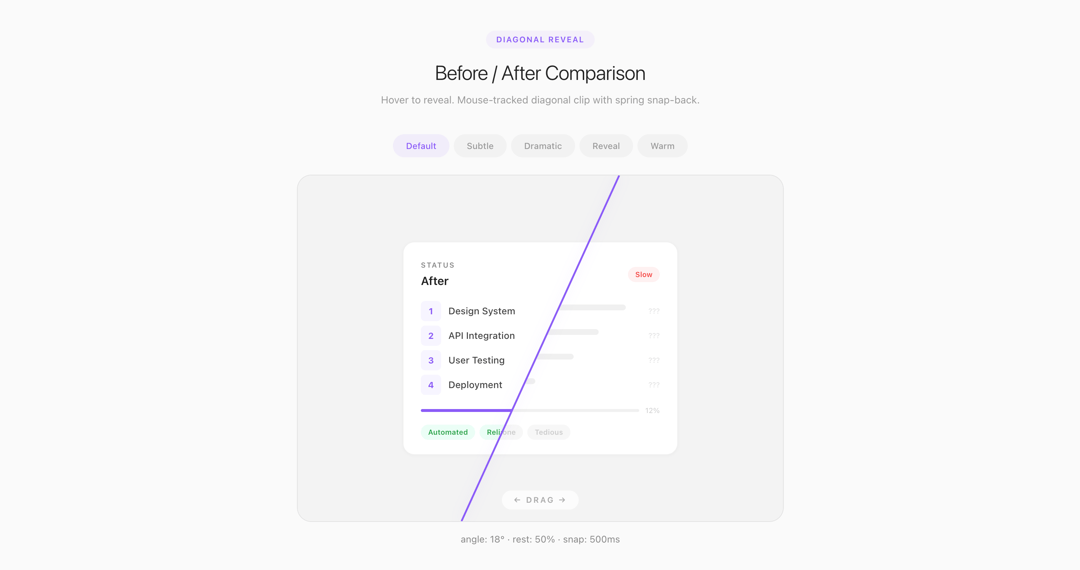
About
A mouse-tracked before/after comparison component with a diagonal clip-path divider. Hover to reveal — the line follows your cursor and snaps back with spring easing on mouse leave. Pure React + CSS, no dependencies.
Built with React and Tailwind. Copy the prompt and paste it into Claude Code, Cursor or Lovable: your agent adds Diagonal Hover Reveal to your project and fits it to your theme.
Code
How Diagonal Hover Reveal is used: the demo's code. The component's own source comes with a free account.
Usage.tsx
import { useState, useRef, useCallback } from "react";

/* ═══════════════════════════════════════════════════════════════════════════ */
/*  DiagonalReveal                                                            */
/* ═══════════════════════════════════════════════════════════════════════════ */

function DiagonalReveal({
  after,
  before,
  caption,
  angle = 18,
  rest = 50,
  lineColor = "#8b5cf6",
  lineWidth = 2.5,
  height = 480,
  borderRadius = 20,
  showHint = true,
  hintText = "← drag →",
  snapDuration = 500,
}) {
  const [pos, setPos] = useState(rest);
  const [hovering, setHovering] = useState(false);
  const ref = useRef(null);
  const skew = Math.tan((angle * Math.PI) / 180) * 50;
  const snap = `${snapDuration}ms cubic-bezier(0.16,1,0.3,1)`;

  const calc = useCallback(
    (cx) => {
      if (!ref.current) return pos;
      const r = ref.current.getBoundingClientRect();
      return Math.max(1, Math.min(99, ((cx - r.left) / r.width) * 100));
    },
    [pos]
  );

  const handleTouch = useCallback(
    (e) => {
      if (e.touches.length > 0) setPos(calc(e.touches[0].clientX));
    },
    [calc]
  );

  return (
    <div style={{ display: "flex", flexDirection: "column", alignItems: "center", gap: 14 }}>
      <div
        ref={ref}
        style={{
          position: "relative", width: "100%", height, borderRadius,
          border: "1px solid rgba(0,0,0,0.07)", background: "#f3f3f3",
          overflow: "hidden", cursor: "ew-resize", userSelect: "none", touchAction: "none",
        }}
        onMouseEnter={() => setHovering(true)}
        onMouseMove={(e) => setPos(calc(e.clientX))}
        onMouseLeave={() => { setHovering(false); setPos(rest); }}
        onTouchStart={(e) => { setHovering(true); handleTouch(e); }}
        onTouchMove={handleTouch}
        onTouchEnd={() => { setHovering(false); setPos(rest); }}
      >
        <div style={{ position: "absolute", inset: 0, zIndex: 0 }}>{before}</div>
        <div style={{
          position: "absolute", inset: 0, zIndex: 1,
          clipPath: `polygon(0 0, ${pos + skew}% 0, ${pos - skew}% 100%, 0 100%)`,
          transition: hovering ? "none" : `clip-path ${snap}`,
        }}>{after}</div>
        <svg style={{
          position: "absolute", inset: 0, width: "100%", height: "100%",
          zIndex: 2, pointerEvents: "none",
          transition: hovering ? "none" : `all ${snap}`,
        }}>
          <line
            x1={`${pos + skew}%`} y1="0" x2={`${pos - skew}%`} y2="100%"
            stroke={lineColor} strokeWidth={lineWidth}
            style={{ filter: `drop-shadow(0 0 8px ${lineColor}30)` }}
          />
        </svg>
        {showHint && (
          <div style={{
            position: "absolute", bottom: 16, left: "50%", transform: "translateX(-50%)",
            zIndex: 3, pointerEvents: "none",
            opacity: hovering ? 0 : 1, transition: "opacity 400ms ease",
          }}>
            <span style={{
              display: "inline-block", padding: "5px 16px", borderRadius: 99,
              fontSize: 11, fontWeight: 600, letterSpacing: "0.18em",
              textTransform: "uppercase", color: "#aaa",
              background: "rgba(255,255,255,0.75)", backdropFilter: "blur(6px)",
            }}>{hintText}</span>
          </div>
        )}
      </div>
      {caption && (
        <p style={{ fontSize: 13, color: "#888", textAlign: "center", margin: 0 }}>{caption}</p>
      )}
    </div>
  );
}

/* ═══════════════════════════════════════════════════════════════════════════ */
/*  Generic Before / After Layers                                             */
/* ═══════════════════════════════════════════════════════════════════════════ */

const layerBase = {
  width: "100%", height: "100%",
  display: "flex", alignItems: "center", justifyContent: "center",
  padding: 32, fontFamily: "-apple-system, BlinkMacSystemFont, 'Segoe UI', sans-serif",
};

function BeforeLayer() {
  return (
    <div style={{ ...layerBase, background: "#f3f3f3" }}>
      <div style={{
        width: 380, background: "white", borderRadius: 16,
        border: "1px solid rgba(0,0,0,0.06)", padding: "24px 24px 20px",
        boxShadow: "0 1px 4px rgba(0,0,0,0.03)",
      }}>
        <div style={{ display: "flex", justifyContent: "space-between", alignItems: "center", marginBottom: 16 }}>
          <div>
            <div style={{ fontSize: 10, fontWeight: 600, letterSpacing: "0.12em", textTransform: "uppercase", color: "#ccc" }}>Status</div>
            <div style={{ fontSize: 16, fontWeight: 600, color: "#ccc", marginTop: 2 }}>Before</div>
          </div>
          <span style={{
            padding: "3px 10px", borderRadius: 99, fontSize: 10, fontWeight: 600,
            background: "rgba(239,68,68,0.08)", color: "#ef4444",
          }}>Slow</span>
        </div>

        <div style={{ display: "flex", flexDirection: "column", gap: 6, marginBottom: 14 }}>
          {[0.92, 0.78, 0.65, 0.45].map((w, i) => (
            <div key={i} style={{ display: "flex", alignItems: "center", gap: 10 }}>
              <div style={{ width: 28, height: 28, borderRadius: 6, background: "#f5f5f5", flexShrink: 0 }} />
              <div style={{ flex: 1 }}>
                <div style={{ height: 8, borderRadius: 4, background: "#f0f0f0", width: `${w * 100}%` }} />
                <div style={{ height: 6, borderRadius: 3, background: "#f5f5f5", width: `${w * 60}%`, marginTop: 4 }} />
              </div>
              <div style={{ fontSize: 10, color: "#ddd" }}>???</div>
            </div>
          ))}
        </div>

        <div style={{ display: "flex", gap: 8, alignItems: "center", marginBottom: 12 }}>
          <div style={{ flex: 1, height: 4, borderRadius: 99, background: "#f0f0f0" }}>
            <div style={{ width: "12%", height: "100%", borderRadius: 99, background: "#ddd" }} />
          </div>
          <span style={{ fontSize: 10, color: "#ccc" }}>12%</span>
        </div>

        <div style={{ display: "flex", gap: 6 }}>
          {["Manual", "Error-prone", "Tedious"].map(t => (
            <span key={t} style={{
              padding: "3px 10px", borderRadius: 99, fontSize: 10, fontWeight: 600,
              background: "rgba(0,0,0,0.03)", color: "#ccc",
            }}>{t}</span>
          ))}
        </div>
      </div>
    </div>
  );
}

function AfterLayer({ accent = "#8b5cf6" }) {
  return (
    <div style={{ ...layerBase, background: "#f3f3f3" }}>
      <div style={{
        width: 380, background: "white", borderRadius: 16,
        border: "1px solid rgba(0,0,0,0.06)", padding: "24px 24px 20px",
        boxShadow: "0 1px 4px rgba(0,0,0,0.03)",
      }}>
        <div style={{ display: "flex", justifyContent: "space-between", alignItems: "center", marginBottom: 16 }}>
          <div>
            <div style={{ fontSize: 10, fontWeight: 600, letterSpacing: "0.12em", textTransform: "uppercase", color: "#888" }}>Status</div>
            <div style={{ fontSize: 16, fontWeight: 600, color: "#222", marginTop: 2 }}>After</div>
          </div>
          <span style={{
            padding: "3px 10px", borderRadius: 99, fontSize: 10, fontWeight: 600,
            background: accent + "12", color: accent,
          }}>Instant</span>
        </div>

        <div style={{ display: "flex", flexDirection: "column", gap: 6, marginBottom: 14 }}>
          {[
            ["Design System", "Completed"],
            ["API Integration", "Completed"],
            ["User Testing", "Completed"],
            ["Deployment", "Completed"],
          ].map(([label, status], i) => (
            <div key={i} style={{ display: "flex", alignItems: "center", gap: 10 }}>
              <div style={{
                width: 28, height: 28, borderRadius: 6,
                background: accent + "10", display: "flex", alignItems: "center", justifyContent: "center",
                fontSize: 12, color: accent, fontWeight: 700, flexShrink: 0,
              }}>{i + 1}</div>
              <div style={{ flex: 1, fontSize: 13, color: "#444", fontWeight: 500 }}>{label}</div>
              <span style={{ fontSize: 10, color: "#16a34a", fontWeight: 600 }}>✓ {status}</span>
            </div>
          ))}
        </div>

        <div style={{ display: "flex", gap: 8, alignItems: "center", marginBottom: 12 }}>
          <div style={{ flex: 1, height: 4, borderRadius: 99, background: "#f0f0f0" }}>
            <div style={{ width: "100%", height: "100%", borderRadius: 99, background: accent }} />
          </div>
          <span style={{ fontSize: 10, color: accent, fontWeight: 600 }}>100%</span>
        </div>

        <div style={{ display: "flex", gap: 6 }}>
          {["Automated", "Reliable", "Fast"].map(t => (
            <span key={t} style={{
              padding: "3px 10px", borderRadius: 99, fontSize: 10, fontWeight: 600,
              background: "#ecfdf5", color: "#16a34a",
            }}>{t}</span>
          ))}
        </div>
      </div>
    </div>
  );
}

/* ═══════════════════════════════════════════════════════════════════════════ */
/*  Playground                                                                */
/* ═══════════════════════════════════════════════════════════════════════════ */

const presets = [
  { label: "Default",  angle: 18, rest: 50, color: "#8b5cf6", snap: 500 },
  { label: "Subtle",   angle: 8,  rest: 50, color: "#6366f1", snap: 600 },
  { label: "Dramatic", angle: 24, rest: 50, color: "#ec4899", snap: 400 },
  { label: "Reveal",   angle: 18, rest: 75, color: "#0ea5e9", snap: 500 },
  { label: "Warm",     angle: 14, rest: 40, color: "#f59e0b", snap: 450 },
];

export default function App() {
  const [preset, setPreset] = useState(0);
  const p = presets[preset];

  return (
    <div style={{
      minHeight: "100vh", background: "#fafafa",
      fontFamily: "-apple-system, BlinkMacSystemFont, 'Segoe UI', sans-serif",
    }}>
      <div style={{ maxWidth: 720, margin: "0 auto", padding: "48px 24px" }}>

        {/* Header */}
        <div style={{ textAlign: "center", marginBottom: 36 }}>
          <div style={{
            display: "inline-block", padding: "4px 14px", borderRadius: 99,
            fontSize: 11, fontWeight: 600, letterSpacing: "0.1em",
            background: p.color + "10", color: p.color, marginBottom: 12,
            transition: "all 300ms ease",
          }}>DIAGONAL REVEAL</div>
          <h1 style={{
            fontSize: 28, fontWeight: 300, letterSpacing: "-0.02em",
            color: "#222", margin: "0 0 6px",
          }}>Before / After Comparison</h1>
          <p style={{ fontSize: 14, color: "#999", margin: 0, lineHeight: 1.6 }}>
            Hover to reveal. Mouse-tracked diagonal clip with spring snap-back.
          </p>
        </div>

        {/* Preset tabs */}
        <div style={{
          display: "flex", flexWrap: "wrap", justifyContent: "center",
          gap: 6, marginBottom: 24,
        }}>
          {presets.map((pr, i) => (
            <button
              key={pr.label}
              onClick={() => setPreset(i)}
              style={{
                padding: "7px 18px", borderRadius: 99, border: "none",
                fontSize: 12, fontWeight: 500, cursor: "pointer",
                background: preset === i ? pr.color + "15" : "rgba(0,0,0,0.03)",
                color: preset === i ? pr.color : "#999",
                transition: "all 200ms ease",
              }}
            >{pr.label}</button>
          ))}
        </div>

        {/* Component */}
        <DiagonalReveal
          before={<BeforeLayer />}
          after={<AfterLayer accent={p.color} />}
          angle={p.angle}
          rest={p.rest}
          lineColor={p.color}
          height={480}
          snapDuration={p.snap}
          caption={`angle: ${p.angle}° · rest: ${p.rest}% · snap: ${p.snap}ms`}
        />

        {/* Prop display */}
        <div style={{
          marginTop: 36, padding: "20px 24px", borderRadius: 12,
          background: "white", border: "1px solid rgba(0,0,0,0.06)",
        }}>
          <div style={{ fontSize: 11, fontWeight: 600, letterSpacing: "0.1em", textTransform: "uppercase", color: "#bbb", marginBottom: 12 }}>Current Props</div>
          <div style={{ display: "grid", gridTemplateColumns: "1fr 1fr 1fr", gap: "10px 16px" }}>
            {[
              ["angle", `${p.angle}°`],
              ["rest", `${p.rest}%`],
              ["lineColor", p.color],
              ["snapDuration", `${p.snap}ms`],
              ["height", "480px"],
              ["borderRadius", "20px"],
            ].map(([k, v]) => (
              <div key={k} style={{ display: "flex", justifyContent: "space-between", alignItems: "center" }}>
                <span style={{ fontSize: 12, color: "#999" }}>{k}</span>
                <span style={{
                  fontSize: 12, fontWeight: 600, fontFamily: "monospace",
                  color: k === "lineColor" ? p.color : "#444",
                }}>{v}</span>
              </div>
            ))}
          </div>
        </div>
      </div>
    </div>
  );
}