
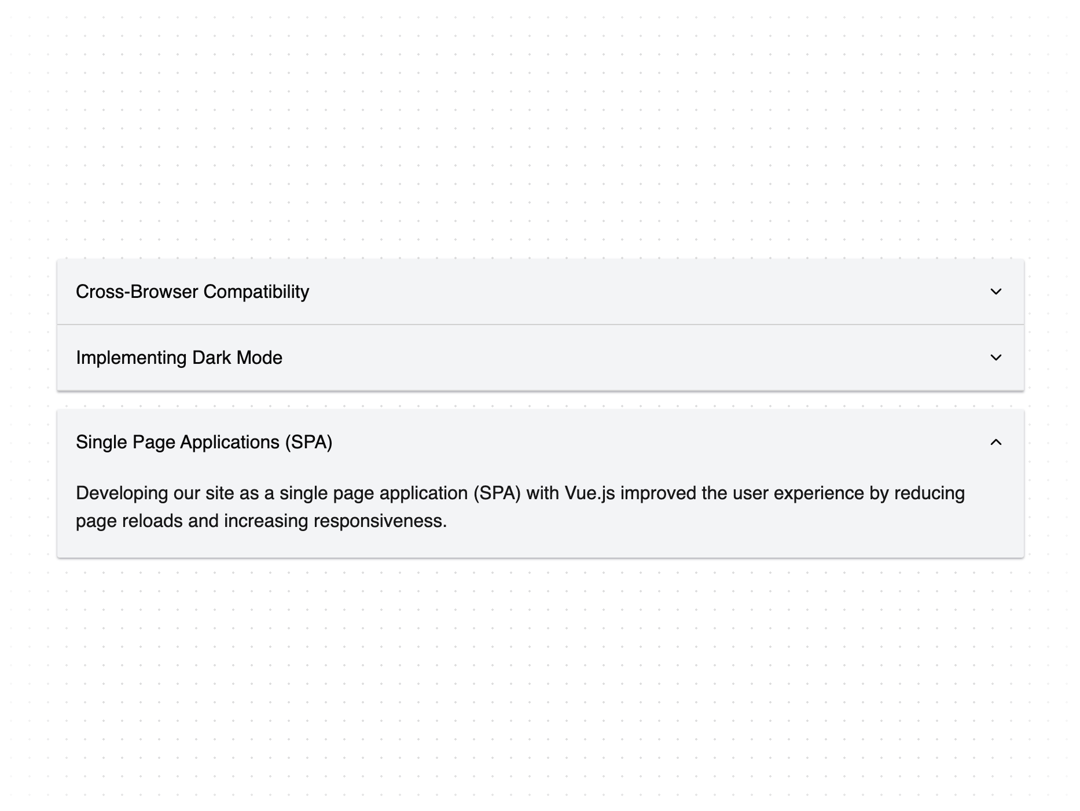
The Accordion component is a flexible and accessible UI element built using Radix UI primitives. It allows for the creation of collapsible sections, ideal for organizing content in a compact and user-friendly manner. The component supports both single and multiple expanded items, making it versatile for various use cases. Key features include: Radix UI Integration: Utilizes Radix UI for robust accessibility and state management. Customizable Styles: Easily style the accordion using Tailwind CSS classes. Animation Support: Smooth open and close animations enhance the user experience. To enable animations, add the following to your tailwind.config.js: { theme: { extend: { keyframes: { "accordion-down": { from: { height: "0" }, to: { height: "var(--radix-accordion-content-height)" }, }, "accordion-up": { from: { height: "var(--radix-accordion-content-height)" }, to: { height: "0" }, }, }, animation: { "accordion-down": "accordion-down 0.2s ease-out", "accordion-up": "accordion-up 0.2s ease-out", }, }, }, } This component is ideal for creating FAQ sections, feature lists, or any content that benefits from being organized in an expandable format.
Built with React and Tailwind. Copy the prompt and paste it into Claude Code, Cursor or Lovable: your agent adds Accordion to your project and fits it to your theme.
Code
How Accordion is used: the demo's code. The component's own source comes with a free account.
Usage.tsx
"use client"

import { Accordion, AccordionContent, AccordionItem, AccordionTrigger } from "@/components/ui/accordion"

type AccordionData = {
  title: string
  text: string
  defaultExpanded?: boolean
}

function MultipleAccordionDemo() {
  const accordions: AccordionData[] = [
    {
      title: "Try light/dark modes",
      text: "Our components provide the best user experience in both dark and light modes.",
    },
    {
      title: "Implementing Responsive Design",
      text: "To ensure our website looks great on all devices, we utilized a responsive design approach with CSS media queries and flexible grid layouts.",
    },
    {
      title: "Optimizing Performance",
      text: "By lazy-loading images and leveraging browser caching, we significantly improved the performance and loading speed of our web application.",
    },
  ]

  return (
    <div className="z-10 w-full">
      <Accordion type="multiple">
        {accordions.map(({ title, text }) => (
          <AccordionItem key={title} value={title}>
            <AccordionTrigger>{title}</AccordionTrigger>
            <AccordionContent>{text}</AccordionContent>
          </AccordionItem>
        ))}
      </Accordion>
    </div>
  )
}

function SingleAccordionDemo() {
  const accordions: AccordionData[] = [
    {
      title: "Cross-Browser Compatibility",
      text: "Ensuring cross-browser compatibility, we tested our web application on multiple browsers and platforms to provide a consistent user experience.",
    },
    {
      title: "Implementing Dark Mode",
      text: "We added a dark mode toggle to our website, allowing users to switch between light and dark themes based on their preferences.",
    },
    {
      title: "Single Page Applications (SPA)",
      text: "Developing our site as a single page application (SPA) with Vue.js improved the user experience by reducing page reloads and increasing responsiveness.",
    },
  ]

  return (
    <div className="z-10 w-full">
      <Accordion type="single" collapsible>
        {accordions.map(({ title, text }) => (
          <AccordionItem key={title} value={title}>
            <AccordionTrigger>{title}</AccordionTrigger>
            <AccordionContent>{text}</AccordionContent>
          </AccordionItem>
        ))}
      </Accordion>
    </div>
  )
}

export { MultipleAccordionDemo, SingleAccordionDemo }
Dependencies
More by Edil Ozi
View all
Scroll Velocity
458
Horizontal Scroll Carousel
109
Custom Checkbox
95
Toggle
73
Pricing Card
30
Drawer
10
Infinite Scroll
9