
About
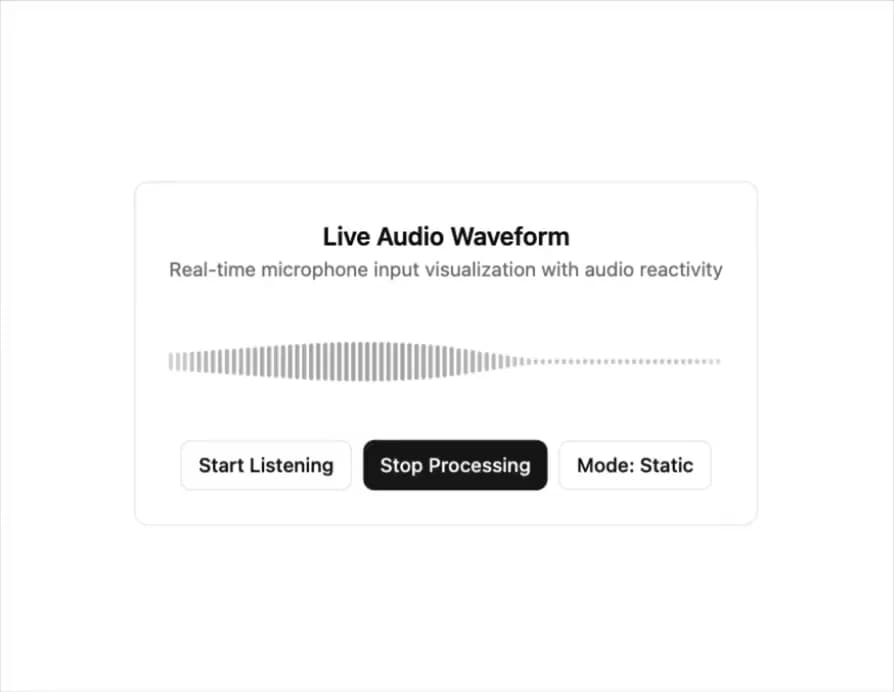
Here is Live Waveform component
Built with React and Tailwind. Copy the prompt and paste it into Claude Code, Cursor or Lovable: your agent adds Live Waveform to your project and fits it to your theme.
Code
How Live Waveform is used: the demo's code. The component's own source comes with a free account.
Usage.tsx
"use client"

import { useState } from "react"
import { Button } from "@/components/ui/button"
import { LiveWaveform } from "@/components/ui/live-waveform"

export default function LiveWaveformDemo() {
  const [active, setActive] = useState(false)
  const [processing, setProcessing] = useState(false)
  const [mode, setMode] = useState<"static" | "scrolling">("static")

  const handleToggleActive = () => {
    setActive(!active)
    if (!active) {
      setProcessing(false)
    }
  }

  const handleToggleProcessing = () => {
    setProcessing(!processing)
    if (!processing) {
      setActive(false)
    }
  }

  return (
    <div className="flex justify-center">
      <div className="bg-card w-full max-w-md rounded-lg border p-6">
        <div className="mb-4 text-center">
          <h3 className="text-lg font-semibold">Live Audio Waveform</h3>
          <p className="text-muted-foreground text-sm">
            Real-time microphone input visualization with audio reactivity
          </p>
        </div>

        <div className="space-y-4">
          <LiveWaveform
            active={active}
            processing={processing}
            height={80}
            barWidth={3}
            barGap={2}
            mode={mode}
            fadeEdges={true}
            barColor="gray"
            historySize={120}
          />

          <div className="flex flex-wrap justify-center gap-2">
            <Button
              size="sm"
              variant={active ? "default" : "outline"}
              onClick={handleToggleActive}
            >
              {active ? "Stop" : "Start"} Listening
            </Button>
            <Button
              size="sm"
              variant={processing ? "default" : "outline"}
              onClick={handleToggleProcessing}
            >
              {processing ? "Stop" : "Start"} Processing
            </Button>
            <Button
              size="sm"
              variant="outline"
              onClick={() => setMode(mode === "static" ? "scrolling" : "static")}
            >
              Mode: {mode === "static" ? "Static" : "Scrolling"}
            </Button>
          </div>
        </div>
      </div>
    </div>
  )
}
More by ElevenLabs
View all
Orb
223
Bar Visualizer
121
Waveform
94
Shimmering Text
90
Audio Player
53
Voice Picker
46
Response
35
Speaker
More in Buttons
View all
Button Save
46

Button
20

Eclipse Button
5

Button
32

Button
6

Button
14

Button Group
37
Split Button
32

