
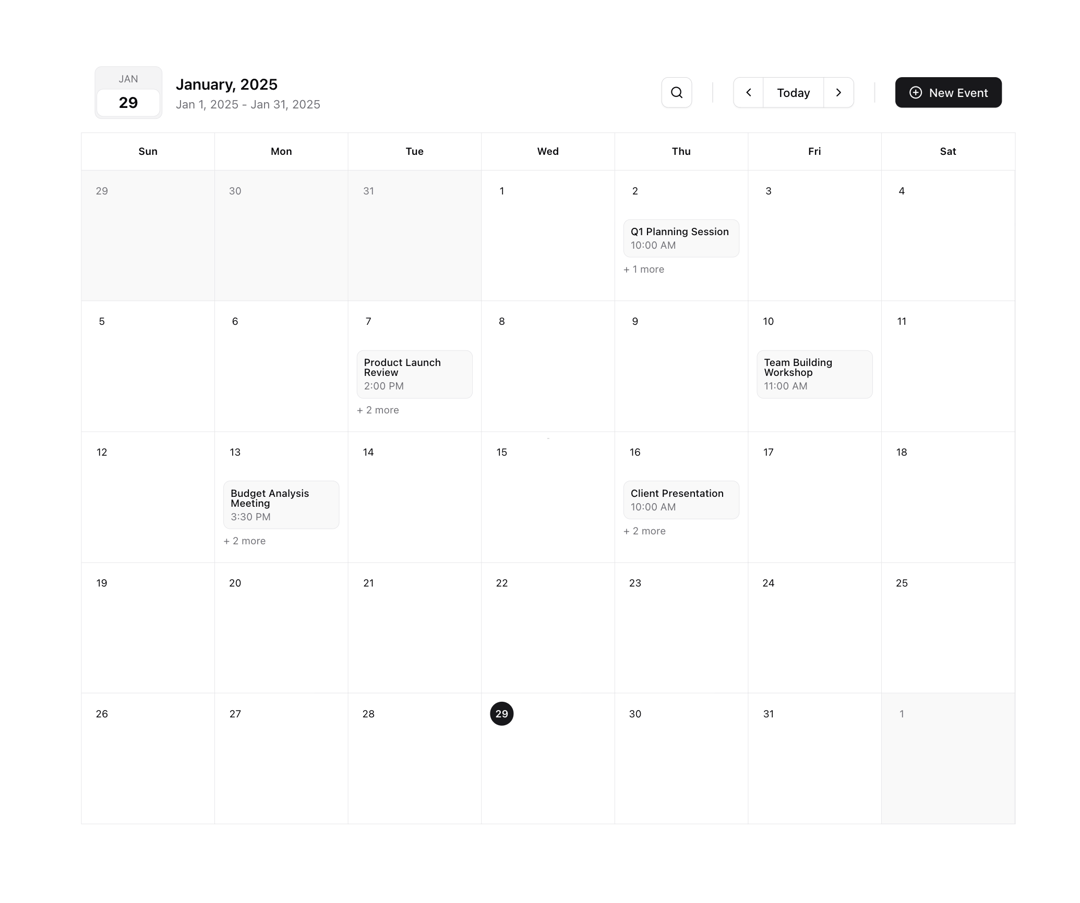
A clean and responsive fullscreen calendar component for React applications. Built with TypeScript and Tailwind CSS, it provides a spacious layout perfect for displaying events or navigating through dates. Features Fullscreen layout with generous day cells for content Easy month navigation with previous/next controls "Today" quick access button Responsive grid layout that adapts to screen size Visual highlighting for current date and selected dates Built with TypeScript and Tailwind CSS Perfect for building event dashboards, scheduling interfaces, or any application requiring a prominent calendar view.
Built with React and Tailwind. Copy the prompt and paste it into Claude Code, Cursor or Lovable: your agent adds Fullscreen Calendar to your project and fits it to your theme.
Code
How Fullscreen Calendar is used: the demo's code. The component's own source comes with a free account.
Usage.tsx
"use client"

import { FullScreenCalendar } from "@/components/ui/fullscreen-calendar"

const dummyEvents = [
  {
    day: new Date("2025-01-02"),
    events: [
      {
        id: 1,
        name: "Q1 Planning Session",
        time: "10:00 AM",
        datetime: "2025-01-02T00:00",
      },
      {
        id: 2,
        name: "Team Sync",
        time: "2:00 PM",
        datetime: "2025-01-02T00:00",
      },
    ],
  },
  {
    day: new Date("2025-01-07"),
    events: [
      {
        id: 3,
        name: "Product Launch Review",
        time: "2:00 PM",
        datetime: "2025-01-07T00:00",
      },
      {
        id: 4,
        name: "Marketing Sync",
        time: "11:00 AM",
        datetime: "2025-01-07T00:00",
      },
      {
        id: 5,
        name: "Vendor Meeting",
        time: "4:30 PM",
        datetime: "2025-01-07T00:00",
      },
    ],
  },
  {
    day: new Date("2025-01-10"),
    events: [
      {
        id: 6,
        name: "Team Building Workshop",
        time: "11:00 AM",
        datetime: "2025-01-10T00:00",
      },
    ],
  },
  {
    day: new Date("2025-01-13"),
    events: [
      {
        id: 7,
        name: "Budget Analysis Meeting",
        time: "3:30 PM",
        datetime: "2025-01-14T00:00",
      },
      {
        id: 8,
        name: "Sprint Planning",
        time: "9:00 AM",
        datetime: "2025-01-14T00:00",
      },
      {
        id: 9,
        name: "Design Review",
        time: "1:00 PM",
        datetime: "2025-01-14T00:00",
      },
    ],
  },
  {
    day: new Date("2025-01-16"),
    events: [
      {
        id: 10,
        name: "Client Presentation",
        time: "10:00 AM",
        datetime: "2025-01-16T00:00",
      },
      {
        id: 11,
        name: "Team Lunch",
        time: "12:30 PM",
        datetime: "2025-01-16T00:00",
      },
      {
        id: 12,
        name: "Project Status Update",
        time: "2:00 PM",
        datetime: "2025-01-16T00:00",
      },
    ],
  },
]

function CalendarDemo() {
  return (
    <div className="flex h-screen flex-1 flex-col scale-90">
      <FullScreenCalendar data={dummyEvents} />
    </div>
  )
}

export { CalendarDemo }
Dependencies
More by Ahmed Mayara
View all
Notifications Menu
644
AI Assistant Card
284
Enable 2FA Card
185
Category Bar Chart
160
Conversion Funnel Area Chart
130
Stock Market Tracker Chart
120
Area Chart Analytics Card
114
Total Sales Chart
107
More in Dashboards
View all
Dashboard with Collapsible Sidebar
2.4K

Sidebar
234

SaaS Template
2.4K

Chat template
598
Stats Bento
1.1K

Financial Bento Grid
71

Statistics Card 2
264

Course Design Cards
1.1K

