
About
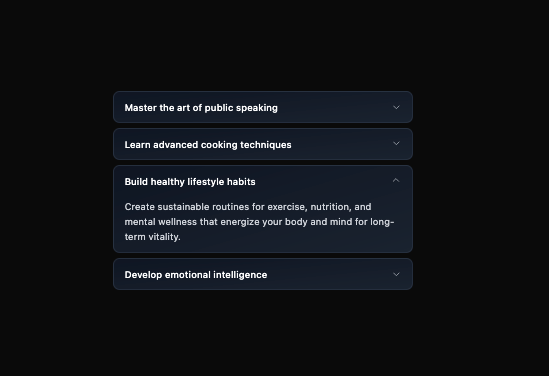
Here is Accordion component
Built with React and Tailwind. Copy the prompt and paste it into Claude Code, Cursor or Lovable: your agent adds Accordion to your project and fits it to your theme.
Code
How Accordion is used: the demo's code. The component's own source comes with a free account.
Usage.tsx
import { Accordion } from "@ark-ui/react/accordion";
import { ChevronDownIcon } from "lucide-react";

export default function TabsWithChevronAccordion() {
  const items = [
    {
      id: "public-speaking",
      title: "Master the art of public speaking",
      content:
        "Transform your communication skills by practicing vocal techniques, body language, and storytelling that captivate any audience with confidence.",
    },
    {
      id: "cooking-techniques",
      title: "Learn advanced cooking techniques",
      content:
        "Elevate your culinary skills with knife work, flavor pairing, and professional techniques that turn simple ingredients into extraordinary dishes.",
    },
    {
      id: "healthy-lifestyle",
      title: "Build healthy lifestyle habits",
      content:
        "Create sustainable routines for exercise, nutrition, and mental wellness that energize your body and mind for long-term vitality.",
    },
    {
      id: "emotional-intelligence",
      title: "Develop emotional intelligence",
      content:
        "Strengthen your ability to understand and connect with others through empathy, active listening, and thoughtful communication skills.",
    },
  ];

  return (
    <Accordion.Root
      defaultValue={["healthy-lifestyle"]}
      collapsible
      className="w-full max-w-md mx-auto"
    >
      {items.map((item) => (
        <Accordion.Item
          key={item.id}
          value={item.id}
          className="group border border-gray-300/50 dark:border-gray-700/50 rounded-lg mb-2 last:mb-0 bg-linear-to-br from-gray-100/80 to-gray-200/80 dark:from-gray-900/80 dark:to-gray-800/80 backdrop-blur-xs"
        >
          <Accordion.ItemTrigger className="w-full px-4 py-3 flex items-center justify-between text-left hover:bg-linear-to-r hover:from-blue-500/5 hover:to-purple-500/5 transition-all duration-200">
            <span className="font-medium text-gray-900 dark:text-white text-sm">
              {item.title}
            </span>
            <Accordion.ItemIndicator className="ml-2 transition-transform duration-200 data-[state=open]:rotate-180">
              <ChevronDownIcon className="w-4 h-4 text-gray-600 dark:text-gray-400" />
            </Accordion.ItemIndicator>
          </Accordion.ItemTrigger>
          <Accordion.ItemContent className="px-4 pb-3 text-sm text-gray-700 dark:text-gray-300 leading-relaxed">
            <div className="pt-1">{item.content}</div>
          </Accordion.ItemContent>
        </Accordion.Item>
      ))}
    </Accordion.Root>
  );
}
Dependencies
More by Abraham
View all

Signature Pad
106
Carousel
81
timeline-animation
65
Basic Toast
56
Calendar
54
QR Code
51
Menu
50
Steps
43