
About
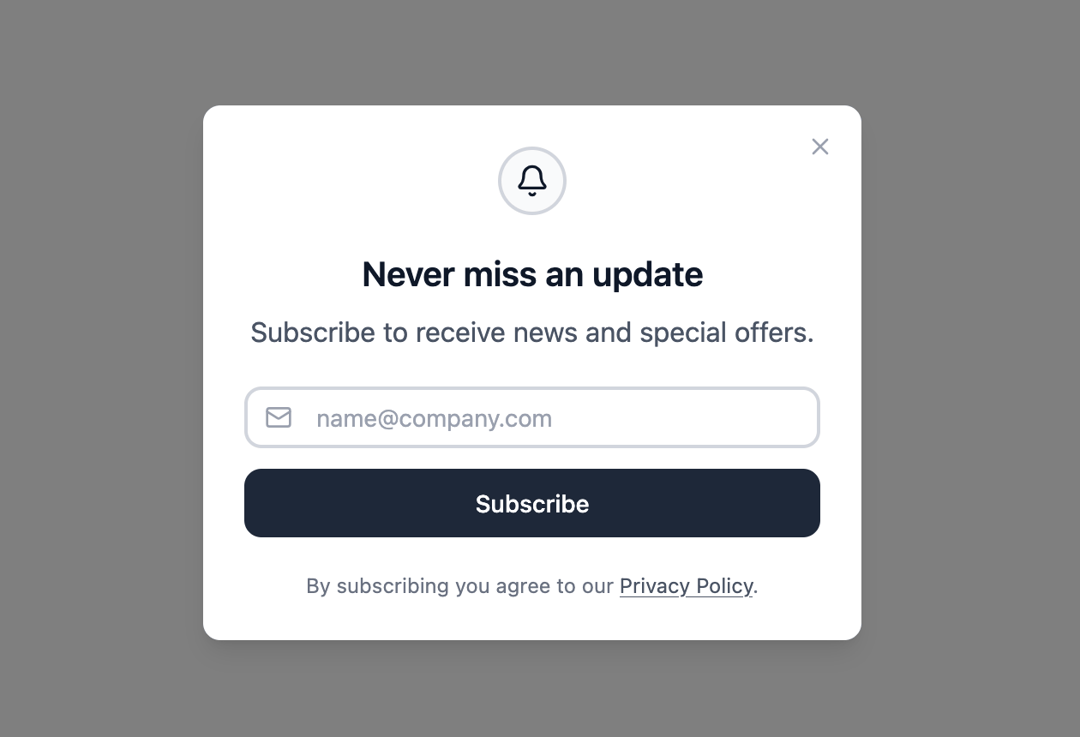
Here is Dialog component
Built with React and Tailwind. Copy the prompt and paste it into Claude Code, Cursor or Lovable: your agent adds Dialog to your project and fits it to your theme.
Code
How Dialog is used: the demo's code. The component's own source comes with a free account.
Usage.tsx
"use client";

import { Dialog } from "@ark-ui/react/dialog";
import { Portal } from "@ark-ui/react/portal";
import { Bell, Mail, X } from "lucide-react";
import { useState } from "react";

export default function NewsletterDialog() {
  const [email, setEmail] = useState("");

  return (
    <Dialog.Root>
      <Dialog.Trigger asChild>
        <button className="rounded-lg border border-gray-300 dark:border-gray-600 bg-white dark:bg-gray-800 px-4 py-2 text-sm text-gray-900 dark:text-gray-100 hover:bg-gray-50 dark:hover:bg-gray-700 transition-colors cursor-pointer inline-flex items-center justify-center">
          Newsletter
        </button>
      </Dialog.Trigger>
      <Portal>
        <Dialog.Backdrop className="data-[state=open]:animate-backdrop-in data-[state=closed]:animate-backdrop-out fixed inset-0 z-50 bg-black/50 backdrop-blur-xs" />
        <Dialog.Positioner className="fixed inset-0 z-50 flex items-center justify-center p-4">
          <Dialog.Content className="data-[state=open]:animate-dialog-in data-[state=closed]:animate-dialog-out relative w-full max-w-sm rounded-lg bg-white dark:bg-gray-900 p-6 shadow-lg">
            <Dialog.CloseTrigger asChild>
              <button className="absolute right-3 top-3 p-1 text-gray-400 dark:text-gray-400 hover:text-gray-600 dark:hover:text-gray-300 transition-colors cursor-pointer">
                <X className="h-4 w-4" />
              </button>
            </Dialog.CloseTrigger>

            <div className="flex flex-col items-center space-y-5 text-center">
              <div className="flex h-10 w-10 items-center justify-center rounded-full border-2 border-gray-300 dark:border-gray-600 bg-gray-50 dark:bg-gray-800">
                <Bell className="h-5 w-5 text-gray-900 dark:text-white" />
              </div>

              <div className="space-y-2">
                <Dialog.Title className="text-xl font-semibold text-gray-900 dark:text-white">
                  Never miss an update
                </Dialog.Title>
                <Dialog.Description className="text-gray-600 dark:text-gray-400">
                  Subscribe to receive news and special offers.
                </Dialog.Description>
              </div>

              <div className="w-full space-y-3">
                <div className="relative">
                  <Mail className="absolute left-3 top-1/2 transform -translate-y-1/2 h-4 w-4 text-gray-400 dark:text-gray-400" />
                  <input
                    type="email"
                    placeholder="name@company.com"
                    value={email}
                    onChange={(e) => setEmail(e.target.value)}
                    className="w-full pl-10 pr-3 py-1.5 text-sm border-2 border-gray-300 dark:border-gray-600 rounded-lg bg-white dark:bg-gray-800 text-gray-900 dark:text-white placeholder-gray-400 dark:placeholder-gray-400 focus:outline-hidden focus:border-gray-500 dark:focus:border-gray-500 transition-colors"
                  />
                </div>

                <Dialog.CloseTrigger asChild>
                  <button className="w-full px-4 py-2.5 text-sm bg-gray-900 dark:bg-white text-white dark:text-gray-900 hover:bg-gray-800 dark:hover:bg-gray-100 rounded-lg transition-colors cursor-pointer inline-flex items-center justify-center font-medium">
                    Subscribe
                  </button>
                </Dialog.CloseTrigger>
              </div>

              <p className="text-xs text-gray-500 dark:text-gray-500">
                By subscribing you agree to our{" "}
                <a
                  href="#"
                  className="text-gray-600 dark:text-gray-400 hover:text-gray-800 dark:hover:text-gray-300 underline transition-colors"
                >
                  Privacy Policy
                </a>
                .
              </p>
            </div>
          </Dialog.Content>
        </Dialog.Positioner>
      </Portal>
    </Dialog.Root>
  );
}
Dependencies
More by Abraham
View all

Signature Pad
107
Carousel
81
timeline-animation
65
Basic Toast
56
Calendar
54
QR Code
51
Menu
50
Steps
43
More in Forms
View all

Premium Auth
500

Login 1
52
Authentication Card
47

Book A Demo 3
83
Book A Demo 1
69

Contact Card
1K

Login Card
32

Login 2
7
