
About
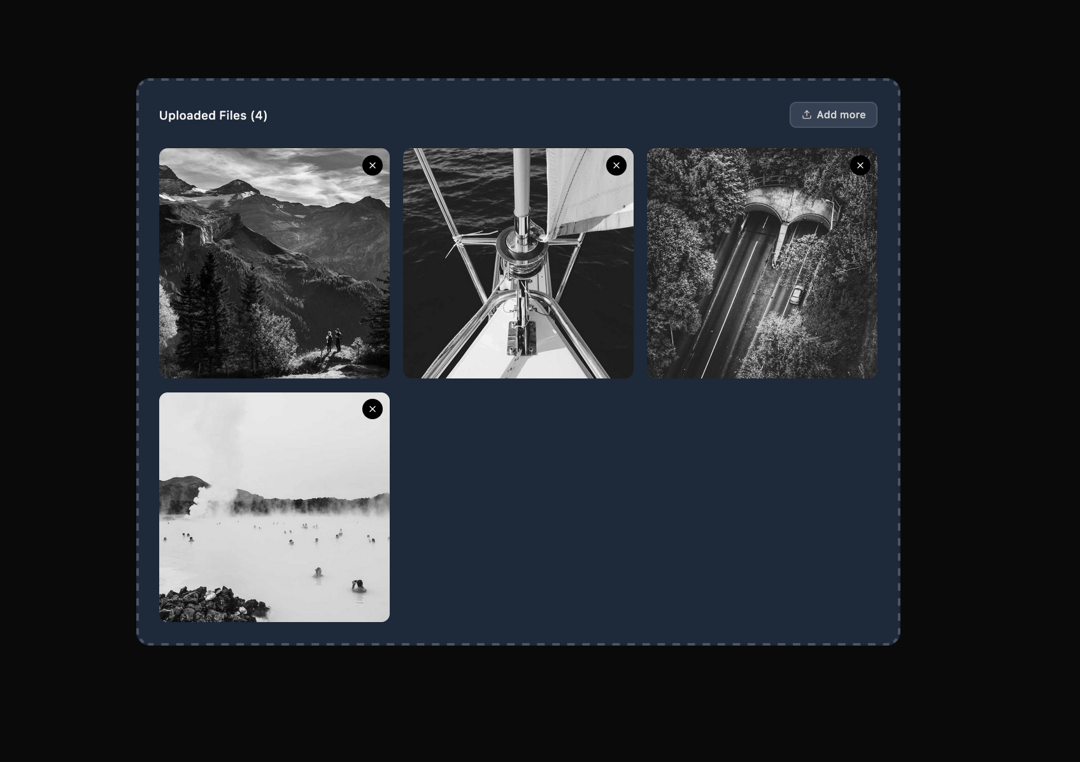
Here is File Upload component
Built with React and Tailwind. Copy the prompt and paste it into Claude Code, Cursor or Lovable: your agent adds File Upload to your project and fits it to your theme.
Code
How File Upload is used: the demo's code. The component's own source comes with a free account.
Usage.tsx
"use client";

import { FileUpload } from "@ark-ui/react/file-upload";
import { Upload, X } from "lucide-react";
import { useEffect, useState } from "react";

async function fileFromImageUrl(
  url: string,
  filename = "image.jpg"
): Promise<File> {
  const response = await fetch(url);
  const blob = await response.blob();
  const contentType = blob.type || "image/jpeg";

  return new File([blob], filename, { type: contentType });
}

export default function MultipleImages() {
  const [acceptedFiles, setAcceptedFiles] = useState<File[]>([]);

  useEffect(() => {
    Promise.all(
      Array.from({ length: 4 }).map((_, index) =>
        fileFromImageUrl(
          `https://picsum.photos/1000/800?grayscale&random=${index + 1}`,
          `photo${index + 1}.jpg`
        )
      )
    ).then((files) => {
      setAcceptedFiles(files);
    });
  }, []);

  return (
    <FileUpload.Root
      accept="image/*"
      maxFiles={10}
      className="w-full max-w-4xl"
      acceptedFiles={acceptedFiles}
      onFileChange={(e) => {
        setAcceptedFiles(e.acceptedFiles);
      }}
    >
      <FileUpload.Context>
        {({ acceptedFiles }) => (
          <div className="border-2 border-dashed border-gray-300 dark:border-gray-600 rounded-xl p-6 bg-gray-50 dark:bg-gray-800 min-h-64">
            {/* Header */}
            <div className="flex items-center justify-between mb-6">
              <h3 className="text-sm font-medium text-gray-900 dark:text-gray-100">
                Uploaded Files ({acceptedFiles.length})
              </h3>
              <FileUpload.Trigger className="inline-flex items-center gap-1.5 px-3 py-1.5 bg-white dark:bg-gray-700 border border-gray-300 dark:border-gray-600 text-gray-700 dark:text-gray-300 text-xs font-medium rounded-md hover:bg-gray-50 dark:hover:bg-gray-600 focus:outline-hidden focus:ring-2 focus:ring-gray-900 dark:focus:ring-gray-100 focus:ring-offset-2">
                <Upload className="w-3 h-3" />
                Add more
              </FileUpload.Trigger>
            </div>

            {/* Images Grid */}
            {acceptedFiles.length > 0 ? (
              <FileUpload.ItemGroup>
                <div className="grid grid-cols-1 sm:grid-cols-2 lg:grid-cols-3 gap-4">
                  {acceptedFiles.map((file) => (
                    <FileUpload.Item
                      key={file.name}
                      file={file}
                      className="relative"
                    >
                      <div className="relative aspect-square rounded-lg overflow-hidden bg-gray-200 dark:bg-gray-700">
                        <FileUpload.ItemPreview
                          type="image/*"
                          className="w-full h-full object-cover"
                        >
                          <FileUpload.ItemPreviewImage className="w-full h-full object-cover" />
                        </FileUpload.ItemPreview>

                        {/* Delete Button */}
                        <FileUpload.ItemDeleteTrigger className="absolute top-2 right-2 w-6 h-6 bg-black text-white rounded-full flex items-center justify-center hover:bg-gray-800 focus:outline-hidden focus:ring-2 focus:ring-gray-900 focus:ring-offset-2">
                          <X className="w-3 h-3" />
                        </FileUpload.ItemDeleteTrigger>
                      </div>
                    </FileUpload.Item>
                  ))}
                </div>
              </FileUpload.ItemGroup>
            ) : (
              /* Empty State */
              <FileUpload.Dropzone className="flex flex-col items-center justify-center py-8 text-center cursor-pointer">
                <div className="w-12 h-12 rounded-full border border-gray-300 dark:border-gray-600 bg-white dark:bg-gray-900 flex items-center justify-center mb-4">
                  <Upload className="w-5 h-5 text-gray-400 dark:text-gray-500" />
                </div>
                <p className="text-gray-600 dark:text-gray-400 text-sm">
                  Click to upload or drag and drop images here
                </p>
              </FileUpload.Dropzone>
            )}
          </div>
        )}
      </FileUpload.Context>

      <FileUpload.HiddenInput />
    </FileUpload.Root>
  );
}
Dependencies
More by Abraham
View all

Signature Pad
107
Carousel
81
timeline-animation
65
Basic Toast
56
Calendar
54
QR Code
51
Menu
50
Steps
43
More in Galleries
View all
Thumbnail image viewer
43

Animated Gallery
1.4K
Editorial Collage Hero
430
3D Parallax Unfurling Gallery
981

Image Gallery
123

Tilted Grid Hero
1.5K

Hero Section 6
882

Elastic Gallery
908

