
About
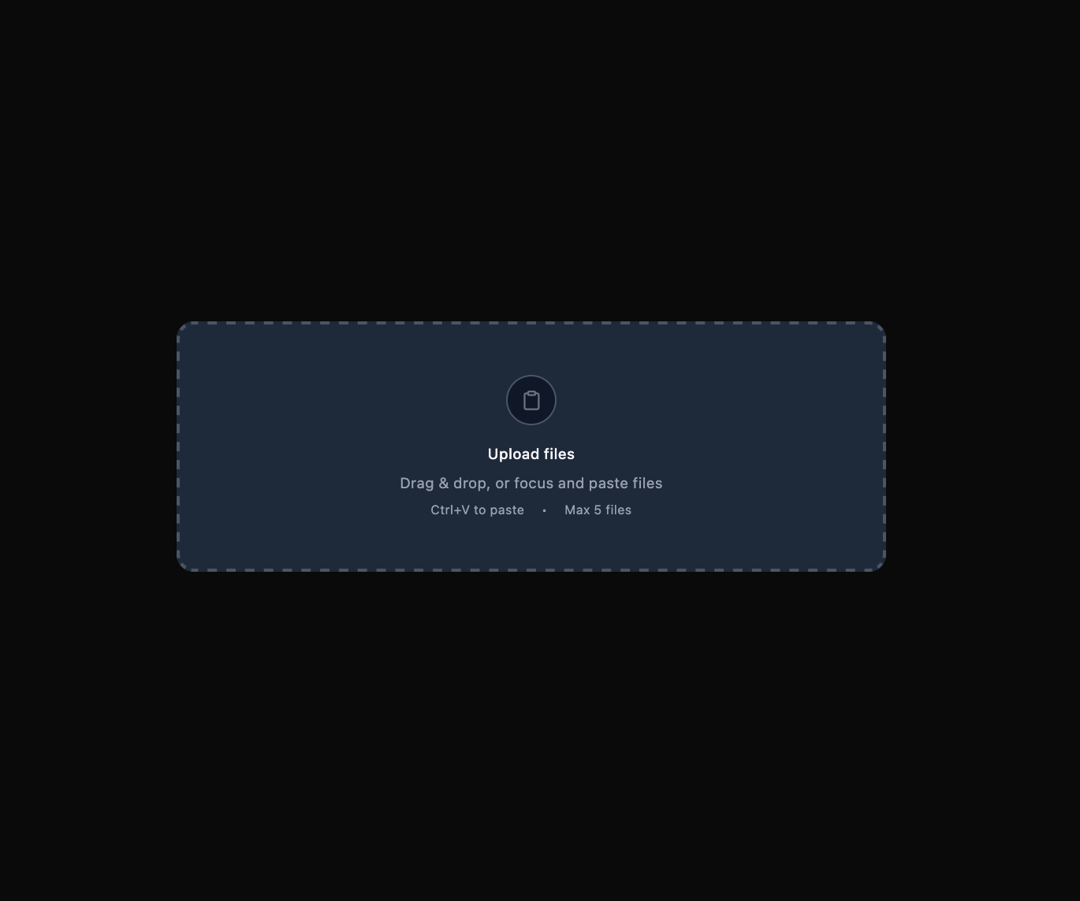
Here is File Upload component
Built with React and Tailwind. Copy the prompt and paste it into Claude Code, Cursor or Lovable: your agent adds File Upload to your project and fits it to your theme.
Code
How File Upload is used: the demo's code. The component's own source comes with a free account.
Usage.tsx
"use client";

import { FileUpload } from "@ark-ui/react/file-upload";
import { Clipboard, FileText, X } from "lucide-react";
import { useEffect, useState } from "react";

export default function WithPaste() {
  const [isPasted, setIsPasted] = useState(false);

  return (
    <FileUpload.Root maxFiles={5} className="w-full max-w-2xl">
      <FileUpload.Context>
        {({ acceptedFiles, setClipboardFiles }) => {
          // Handle paste events
          useEffect(() => {
            const handlePaste = (event: ClipboardEvent) => {
              const clipboardData = event.clipboardData;
              if (!clipboardData || !clipboardData.files.length) return;

              setClipboardFiles(clipboardData);
              setIsPasted(true);
              setTimeout(() => setIsPasted(false), 2000);
            };

            document.addEventListener("paste", handlePaste);
            return () => document.removeEventListener("paste", handlePaste);
          }, [setClipboardFiles]);

          return (
            <div className="space-y-4">
              {/* Dropzone */}
              <FileUpload.Dropzone
                className="relative w-full border-2 border-dashed border-gray-300 dark:border-gray-600 rounded-xl bg-gray-50 dark:bg-gray-800 flex flex-col items-center justify-center py-12 px-6 hover:bg-gray-100 dark:hover:bg-gray-700 focus:ring-2 focus:ring-gray-900 dark:focus:ring-gray-100 focus:ring-offset-2 focus:outline-hidden transition-colors"
                onClick={(e) => e.preventDefault()}
                tabIndex={0}
              >
                {/* Icon */}
                <div className="w-12 h-12 rounded-full border border-gray-300 dark:border-gray-600 bg-white dark:bg-gray-900 flex items-center justify-center mb-4">
                  <Clipboard className="w-5 h-5 text-gray-400 dark:text-gray-500" />
                </div>

                {/* Text */}
                <div className="text-center space-y-2">
                  <h3 className="text-sm font-medium text-gray-900 dark:text-gray-100">
                    Upload files
                  </h3>
                  <p className="text-sm text-gray-600 dark:text-gray-400">
                    Drag & drop, or focus and paste files
                  </p>
                  <div className="flex items-center justify-center gap-4 text-xs text-gray-500 dark:text-gray-400">
                    <span>Ctrl+V to paste</span>
                    <span>•</span>
                    <span>Max 5 files</span>
                  </div>
                </div>

                {/* Paste indicator */}
                {isPasted && (
                  <div className="absolute inset-0 bg-green-50 dark:bg-green-900/20 border-2 border-green-300 dark:border-green-600 rounded-xl flex items-center justify-center">
                    <div className="flex items-center gap-2 text-green-700 dark:text-green-300 text-sm font-medium">
                      <Clipboard className="w-4 h-4" />
                      Files pasted!
                    </div>
                  </div>
                )}
              </FileUpload.Dropzone>

              {/* Files List */}
              {acceptedFiles.length > 0 && (
                <div className="space-y-2">
                  <h4 className="text-sm font-medium text-gray-900 dark:text-gray-100">
                    Uploaded Files ({acceptedFiles.length})
                  </h4>
                  <FileUpload.ItemGroup>
                    <div className="space-y-2">
                      {acceptedFiles.map((file) => (
                        <FileUpload.Item key={file.name} file={file}>
                          <div className="flex items-center gap-3 p-3 border border-gray-200 dark:border-gray-700 rounded-lg bg-white dark:bg-gray-900">
                            {/* File Icon or Preview */}
                            <div className="w-10 h-10 rounded-lg border border-gray-200 dark:border-gray-700 bg-gray-50 dark:bg-gray-800 flex items-center justify-center shrink-0 overflow-hidden">
                              {file.type.startsWith("image/") ? (
                                <FileUpload.ItemPreview type="image/*">
                                  <FileUpload.ItemPreviewImage className="w-full h-full object-cover" />
                                </FileUpload.ItemPreview>
                              ) : (
                                <FileText className="w-4 h-4 text-gray-400 dark:text-gray-500" />
                              )}
                            </div>

                            {/* File Info */}
                            <div className="flex-1 min-w-0">
                              <FileUpload.ItemName className="text-sm font-medium text-gray-900 dark:text-gray-100 truncate" />
                              <FileUpload.ItemSizeText className="text-xs text-gray-500 dark:text-gray-400" />
                            </div>

                            {/* Delete Button */}
                            <FileUpload.ItemDeleteTrigger className="w-6 h-6 flex items-center justify-center text-gray-400 dark:text-gray-500 hover:text-gray-600 dark:hover:text-gray-300 shrink-0">
                              <X className="w-4 h-4" />
                            </FileUpload.ItemDeleteTrigger>
                          </div>
                        </FileUpload.Item>
                      ))}
                    </div>
                  </FileUpload.ItemGroup>

                  {/* Clear All Button */}
                  <FileUpload.ClearTrigger className="inline-flex items-center px-3 py-1.5 text-xs font-medium text-gray-700 dark:text-gray-300 bg-white dark:bg-gray-800 border border-gray-300 dark:border-gray-600 rounded-md hover:bg-gray-50 dark:hover:bg-gray-700 focus:outline-hidden focus:ring-2 focus:ring-gray-900 dark:focus:ring-gray-100 focus:ring-offset-2">
                    Clear all files
                  </FileUpload.ClearTrigger>
                </div>
              )}
            </div>
          );
        }}
      </FileUpload.Context>

      <FileUpload.HiddenInput />
    </FileUpload.Root>
  );
}
Dependencies
More by Abraham
View all

Signature Pad
107
Carousel
81
timeline-animation
65
Basic Toast
56
Calendar
54
QR Code
51
Menu
50
Steps
43