
About
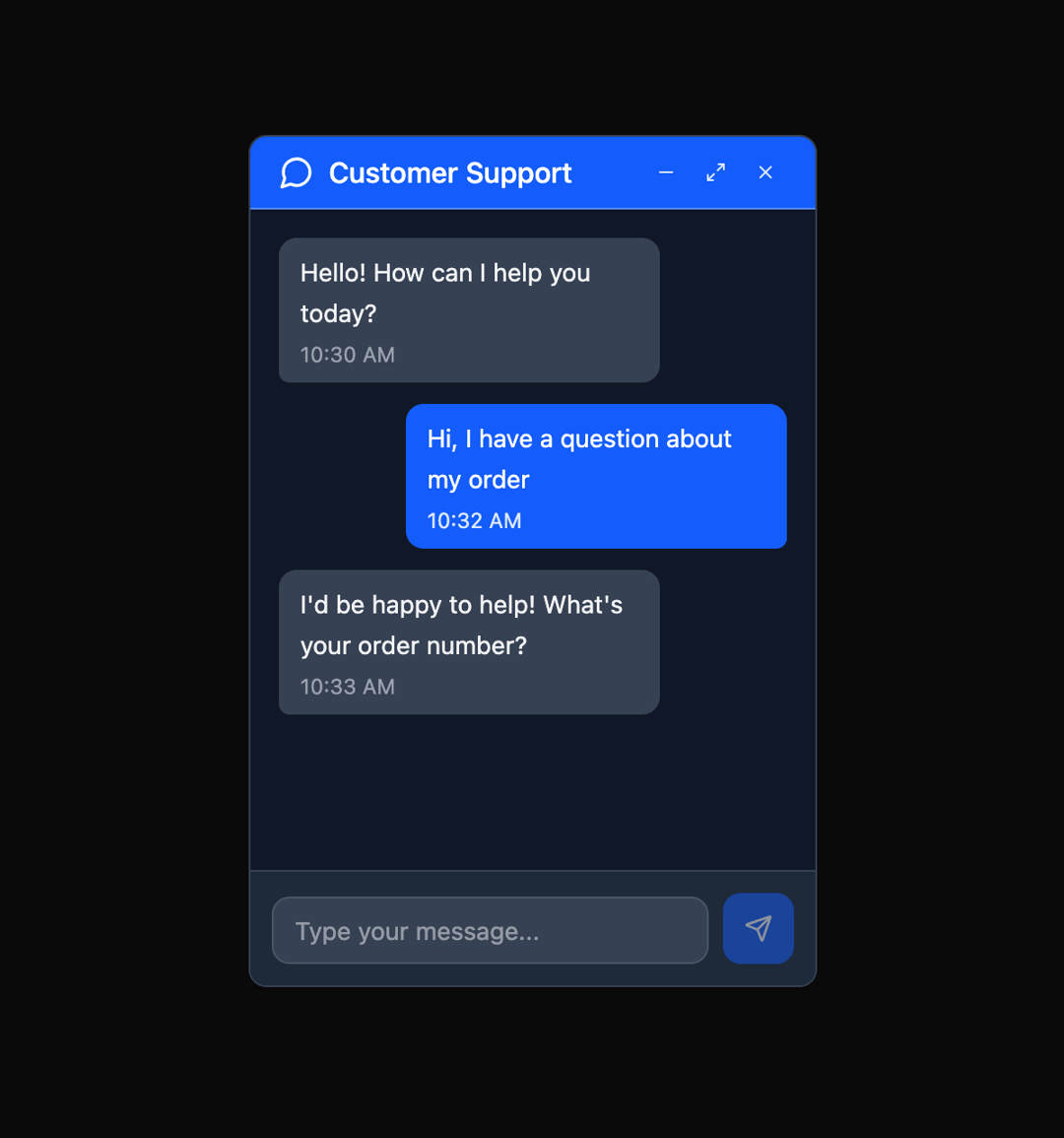
Here is Floating Panel component
Built with React and Tailwind. Copy the prompt and paste it into Claude Code, Cursor or Lovable: your agent adds Floating Panel to your project and fits it to your theme.
Code
How Floating Panel is used: the demo's code. The component's own source comes with a free account.
Usage.tsx
"use client";

import { FloatingPanel } from "@ark-ui/react/floating-panel";
import { Portal } from "@ark-ui/react/portal";
import {
  MessageCircle,
  X,
  Send,
  Minus,
  Maximize2,
  ArrowDownLeft,
} from "lucide-react";
import { useState } from "react";

export default function ChatWidget() {
  const [message, setMessage] = useState("");
  const [messages, setMessages] = useState([
    {
      id: 1,
      text: "Hello! How can I help you today?",
      sender: "support",
      time: "10:30 AM",
    },
    {
      id: 2,
      text: "Hi, I have a question about my order",
      sender: "user",
      time: "10:32 AM",
    },
    {
      id: 3,
      text: "I'd be happy to help! What's your order number?",
      sender: "support",
      time: "10:33 AM",
    },
  ]);

  const sendMessage = () => {
    if (message.trim()) {
      setMessages([
        ...messages,
        {
          id: messages.length + 1,
          text: message,
          sender: "user",
          time: new Date().toLocaleTimeString([], {
            hour: "2-digit",
            minute: "2-digit",
          }),
        },
      ]);
      setMessage("");
    }
  };

  return (
    <FloatingPanel.Root defaultSize={{ width: 320, height: 480 }}>
      <FloatingPanel.Trigger className="fixed bottom-6 right-6 w-14 h-14 bg-blue-600 text-white rounded-full shadow-lg hover:bg-blue-700 focus:outline-hidden focus:ring-2 focus:ring-blue-500 focus:ring-offset-2 flex items-center justify-center">
        <MessageCircle className="w-6 h-6" />
      </FloatingPanel.Trigger>

      <Portal>
        <FloatingPanel.Positioner className="z-50">
          <FloatingPanel.Content className="flex flex-col bg-white dark:bg-gray-900 rounded-lg data-maximized:rounded-none border border-gray-200 dark:border-gray-700 w-full shadow-md overflow-hidden">
            <FloatingPanel.DragTrigger>
              <FloatingPanel.Header className="border-b border-gray-50/30 py-2 px-4 bg-blue-600 text-white flex justify-between items-center cursor-move">
                <div className="flex items-center gap-2">
                  <MessageCircle className="w-5 h-5" />
                  <FloatingPanel.Title className="font-medium">
                    Customer Support
                  </FloatingPanel.Title>
                </div>
                <FloatingPanel.Control className="flex items-center gap-1">
                  <FloatingPanel.StageTrigger
                    stage="minimized"
                    className="w-6 h-6 flex items-center justify-center text-blue-100 hover:text-white hover:bg-blue-700/50 rounded transition-colors"
                  >
                    <Minus className="w-3 h-3" />
                  </FloatingPanel.StageTrigger>
                  <FloatingPanel.StageTrigger
                    stage="maximized"
                    className="w-6 h-6 flex items-center justify-center text-blue-100 hover:text-white hover:bg-blue-700/50 rounded transition-colors"
                  >
                    <Maximize2 className="w-3 h-3" />
                  </FloatingPanel.StageTrigger>
                  <FloatingPanel.StageTrigger
                    stage="default"
                    className="w-6 h-6 flex items-center justify-center text-blue-100 hover:text-white hover:bg-blue-700/50 rounded transition-colors"
                  >
                    <ArrowDownLeft className="w-3 h-3" />
                  </FloatingPanel.StageTrigger>
                  <FloatingPanel.CloseTrigger className="w-6 h-6 flex items-center justify-center text-blue-100 hover:text-white hover:bg-red-600/50 rounded transition-colors">
                    <X className="w-3 h-3" />
                  </FloatingPanel.CloseTrigger>
                </FloatingPanel.Control>
              </FloatingPanel.Header>
            </FloatingPanel.DragTrigger>

            <FloatingPanel.Body className="flex flex-1 flex-col min-h-0">
              {/* Chat Messages */}
              <div className="flex-1 p-4 space-y-3 overflow-y-auto">
                {messages.map((msg) => (
                  <div
                    key={msg.id}
                    className={`flex ${
                      msg.sender === "user" ? "justify-end" : "justify-start"
                    }`}
                  >
                    <div
                      className={`max-w-[75%] px-3 py-2 rounded-lg ${
                        msg.sender === "user"
                          ? "bg-blue-600 text-white rounded-br-sm"
                          : "bg-gray-100 dark:bg-gray-700 text-gray-900 dark:text-gray-100 rounded-bl-sm"
                      }`}
                    >
                      <p className="text-sm leading-relaxed">{msg.text}</p>
                      <p
                        className={`text-xs mt-1 ${
                          msg.sender === "user"
                            ? "text-blue-100"
                            : "text-gray-500 dark:text-gray-400"
                        }`}
                      >
                        {msg.time}
                      </p>
                    </div>
                  </div>
                ))}
              </div>

              {/* Message Input */}
              <div className="p-3 border-t border-gray-200 dark:border-gray-700 bg-gray-50 dark:bg-gray-800">
                <div className="flex gap-2 items-end">
                  <input
                    type="text"
                    value={message}
                    onChange={(e) => setMessage(e.target.value)}
                    onKeyPress={(e) => e.key === "Enter" && sendMessage()}
                    placeholder="Type your message..."
                    className="flex-1 px-3 py-2 border border-gray-300 dark:border-gray-600 rounded-lg text-sm focus:outline-hidden focus:ring-2 focus:ring-blue-500 focus:border-blue-500 bg-white dark:bg-gray-700 text-gray-900 dark:text-gray-100"
                  />
                  <button
                    onClick={sendMessage}
                    disabled={!message.trim()}
                    className="w-10 h-10 flex items-center justify-center bg-blue-600 text-white rounded-lg hover:bg-blue-700 focus:outline-hidden focus:ring-2 focus:ring-blue-500 disabled:opacity-50 disabled:cursor-not-allowed transition-colors"
                  >
                    <Send className="w-4 h-4" />
                  </button>
                </div>
              </div>
            </FloatingPanel.Body>

            {/* Resize handles */}
            <FloatingPanel.ResizeTrigger axis="n" />
            <FloatingPanel.ResizeTrigger axis="e" />
            <FloatingPanel.ResizeTrigger axis="w" />
            <FloatingPanel.ResizeTrigger axis="s" />
            <FloatingPanel.ResizeTrigger axis="se" />
            <FloatingPanel.ResizeTrigger axis="sw" />
          </FloatingPanel.Content>
        </FloatingPanel.Positioner>
      </Portal>
    </FloatingPanel.Root>
  );
}
Dependencies
More by Abraham
View all

Signature Pad
107
Carousel
81
timeline-animation
65
Basic Toast
56
Calendar
54
QR Code
51
Menu
50
Steps
43