
About
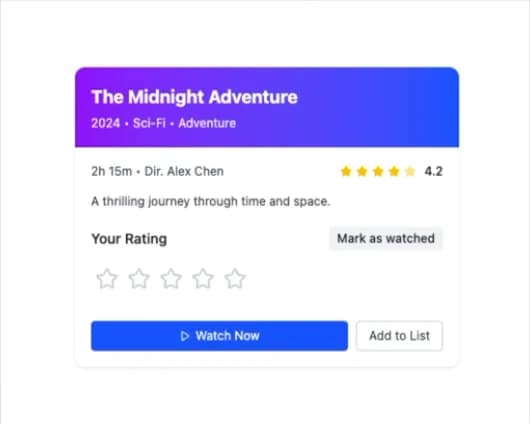
Here is Rating Group component
Built with React and Tailwind. Copy the prompt and paste it into Claude Code, Cursor or Lovable: your agent adds Rating Group to your project and fits it to your theme.
Code
How Rating Group is used: the demo's code. The component's own source comes with a free account.
Usage.tsx
"use client";

import { RatingGroup } from "@ark-ui/react/rating-group";
import { StarIcon, StarHalfIcon, PlayIcon } from "lucide-react";
import { useState } from "react";

export default function MovieRating() {
  const [userRating, setUserRating] = useState(0);
  const [isWatched, setIsWatched] = useState(false);

  const movieData = {
    title: "The Midnight Adventure",
    year: 2024,
    genre: "Sci-Fi • Adventure",
    duration: "2h 15m",
    director: "Alex Chen",
    averageRating: 4.2,
    totalRatings: 1247,
    description: "A thrilling journey through time and space.",
  };

  return (
    <div className="max-w-sm w-full bg-white dark:bg-gray-800 rounded-lg shadow overflow-hidden">
      <div className="bg-linear-to-r from-purple-600 to-blue-600 p-4 text-white">
        <h1 className="text-lg font-bold mb-1">{movieData.title}</h1>
        <p className="text-xs opacity-90">
          {movieData.year} • {movieData.genre}
        </p>
      </div>

      <div className="p-4">
        <div className="flex items-center justify-between mb-3">
          <div className="text-xs text-gray-600 dark:text-gray-400">
            {movieData.duration} • Dir. {movieData.director}
          </div>
          <div className="flex items-center space-x-1">
            {[1, 2, 3, 4, 5].map((star) => (
              <StarIcon
                key={star}
                className={`w-3 h-3 ${
                  star <= Math.floor(movieData.averageRating)
                    ? "text-yellow-400 fill-current"
                    : star === Math.ceil(movieData.averageRating) &&
                      movieData.averageRating % 1 > 0
                    ? "text-yellow-400 fill-current opacity-50"
                    : "text-gray-300 dark:text-gray-600"
                }`}
              />
            ))}
            <span className="text-xs font-medium text-gray-900 dark:text-white ml-1">
              {movieData.averageRating}
            </span>
          </div>
        </div>

        <p className="text-xs text-gray-700 dark:text-gray-300 mb-4 leading-relaxed">
          {movieData.description}
        </p>

        <div className="space-y-3">
          <div className="flex items-center justify-between">
            <h3 className="text-sm font-medium text-gray-900 dark:text-white">
              Your Rating
            </h3>
            <button
              onClick={() => setIsWatched(!isWatched)}
              className={`px-2 py-1 rounded text-xs font-medium transition-colors ${
                isWatched
                  ? "bg-green-100 text-green-800 dark:bg-green-900 dark:text-green-200"
                  : "bg-gray-100 text-gray-800 dark:bg-gray-700 dark:text-gray-200"
              }`}
            >
              {isWatched ? "✓ Watched" : "Mark as watched"}
            </button>
          </div>

          <RatingGroup.Root
            count={5}
            value={userRating}
            onValueChange={(details) => setUserRating(details.value)}
            allowHalf
          >
            <RatingGroup.Control className="inline-flex">
              <RatingGroup.Context>
                {({ items }) =>
                  items.map((item) => (
                    <RatingGroup.Item
                      key={item}
                      index={item}
                      className="w-8 h-8 p-1 focus:outline-none focus:ring-1 focus:ring-blue-500 rounded"
                    >
                      <RatingGroup.ItemContext>
                        {({ half, highlighted }) => {
                          if (half) {
                            return (
                              <div className="relative w-6 h-6">
                                <StarIcon className="w-6 h-6 text-gray-300 dark:text-gray-600" />
                                <div className="absolute inset-0 overflow-hidden w-1/2">
                                  <StarIcon className="w-6 h-6 text-yellow-400 fill-current" />
                                </div>
                              </div>
                            );
                          }
                          if (highlighted) {
                            return (
                              <StarIcon className="w-6 h-6 text-yellow-400 fill-current" />
                            );
                          }
                          return (
                            <StarIcon className="w-6 h-6 text-gray-300 dark:text-gray-600" />
                          );
                        }}
                      </RatingGroup.ItemContext>
                    </RatingGroup.Item>
                  ))
                }
              </RatingGroup.Context>
              <RatingGroup.HiddenInput />
            </RatingGroup.Control>
          </RatingGroup.Root>

          {userRating > 0 && (
            <p className="text-xs text-gray-600 dark:text-gray-400">
              You rated this {userRating} star{userRating !== 1 ? "s" : ""}
            </p>
          )}

          <div className="flex space-x-2 pt-2">
            <button className="flex-1 flex items-center justify-center space-x-1 px-3 py-1.5 bg-blue-600 text-white text-xs rounded hover:bg-blue-700 focus:outline-none focus:ring-1 focus:ring-blue-500">
              <PlayIcon className="w-3 h-3" />
              <span>Watch Now</span>
            </button>
            <button className="px-3 py-1.5 border border-gray-300 dark:border-gray-600 text-gray-700 dark:text-gray-300 text-xs rounded hover:bg-gray-50 dark:hover:bg-gray-700 focus:outline-none focus:ring-1 focus:ring-blue-500">
              Add to List
            </button>
          </div>
        </div>
      </div>
    </div>
  );
}
Dependencies
More by Abraham
View all

Signature Pad
107
Carousel
81
timeline-animation
65
Basic Toast
56
Calendar
54
QR Code
51
Menu
50
Steps
43
More in Buttons
View all
Button Save
46

Button
20

Eclipse Button
5

Button
6

Button
14

Button Group
37

Button
32
Split Button
32

