
About
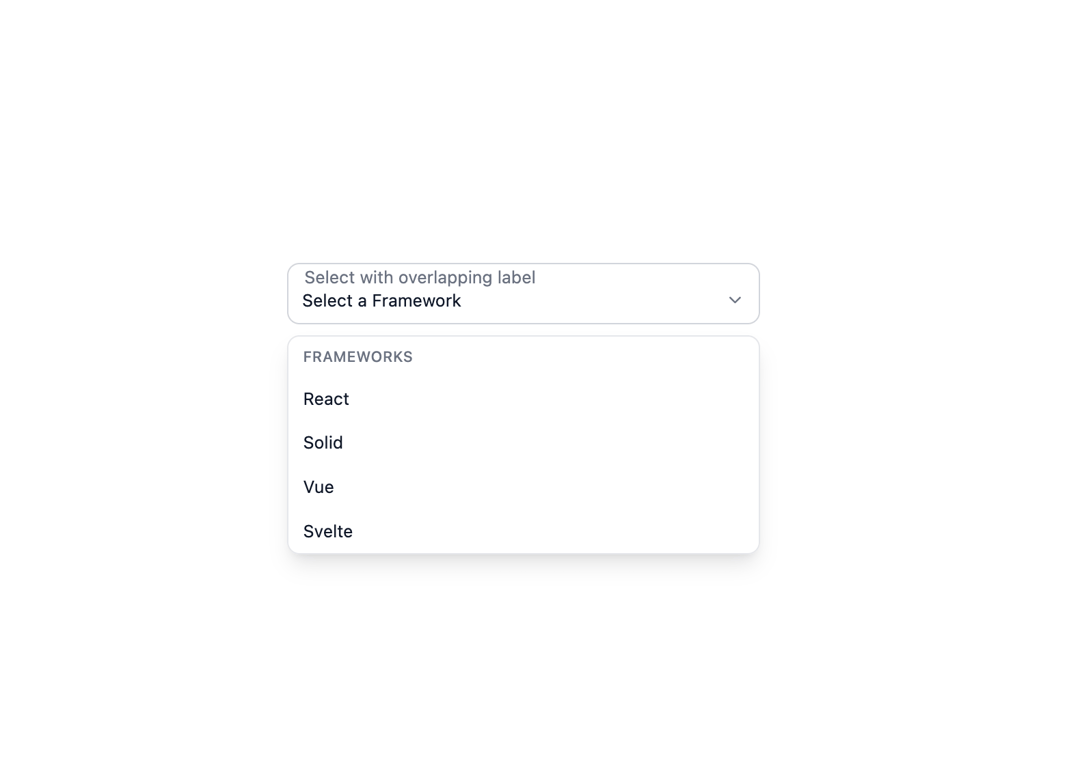
Here is Select component
Built with React and Tailwind. Copy the prompt and paste it into Claude Code, Cursor or Lovable: your agent adds Select to your project and fits it to your theme.
Code
How Select is used: the demo's code. The component's own source comes with a free account.
Usage.tsx
"use client";

import { Portal } from "@ark-ui/react/portal";
import { Select, createListCollection } from "@ark-ui/react/select";
import { Fieldset } from "@ark-ui/react/fieldset";
import { ChevronDownIcon } from "lucide-react";

export default function SelectWithOverlappingLabel() {
  const collection = createListCollection({
    items: ["React", "Solid", "Vue", "Svelte"],
  });

  return (
    <div className="bg-white dark:bg-gray-800 w-full px-4 py-12 rounded-xl flex items-center justify-center">
      <div className="relative max-w-sm w-full group">
        <Select.Root collection={collection}>
          <Select.Control>
            <Select.Trigger className="flex h-10 w-full items-center justify-between rounded-lg bg-white dark:bg-gray-800 px-3 py-2 text-sm text-gray-900 dark:text-gray-100 outline-none peer">
              <Select.ValueText placeholder="Select a Framework" />
              <Select.Indicator>
                <ChevronDownIcon className="h-4 w-4 text-gray-500 dark:text-gray-400" />
              </Select.Indicator>
            </Select.Trigger>
          </Select.Control>

          <div className="absolute left-[9px] top-px text-sm text-gray-500 dark:text-gray-400 group-focus-within:text-gray-900 dark:group-focus-within:text-gray-100 transition-all duration-300 px-1 transform -translate-y-1/2 pointer-events-none">
            Select with overlapping label
          </div>

          <Fieldset.Root className="inset-0 absolute border border-gray-300 dark:border-gray-600 rounded-lg pointer-events-none mt-[-9px] visible group-focus-within:border-gray-700 dark:group-focus-within:border-gray-100 group-focus-within:border-2">
            <Fieldset.Legend className="ml-2 text-sm invisible px-1 max-w-full whitespace-nowrap">
              Select with overlapping label
            </Fieldset.Legend>
          </Fieldset.Root>

          <Portal>
            <Select.Positioner>
              <Select.Content className="z-50 min-w-(--reference-width) rounded-lg border border-gray-200 dark:border-gray-700 bg-white dark:bg-gray-800 shadow-lg">
                <Select.ItemGroup>
                  <Select.ItemGroupLabel className="px-3 py-2 text-xs font-medium text-gray-500 dark:text-gray-400 uppercase tracking-wide">
                    Frameworks
                  </Select.ItemGroupLabel>
                  {collection.items.map((item) => (
                    <Select.Item
                      key={item}
                      item={item}
                      className="relative flex cursor-pointer select-none items-center px-3 py-2 text-sm text-gray-900 dark:text-gray-100 data-highlighted:bg-gray-100 dark:data-highlighted:bg-gray-700 data-[state=checked]:bg-gray-50 dark:data-[state=checked]:bg-gray-700"
                    >
                      <Select.ItemText>{item}</Select.ItemText>
                      <Select.ItemIndicator className="absolute right-3 text-blue-600 dark:text-blue-400">
                        ✓
                      </Select.ItemIndicator>
                    </Select.Item>
                  ))}
                </Select.ItemGroup>
              </Select.Content>
            </Select.Positioner>
          </Portal>
          <Select.HiddenSelect />
        </Select.Root>
      </div>
    </div>
  );
}
Dependencies
More by Abraham
View all

Signature Pad
106
Carousel
81
timeline-animation
65
Basic Toast
56
Calendar
54
QR Code
51
Menu
50
Steps
43
More in Forms
View all

Premium Auth
500

Login 2
7
Authentication Card
47

Login 1
52

Contact Card
1K
Login Form
6

Form
16

Book A Demo 3
83
