
About
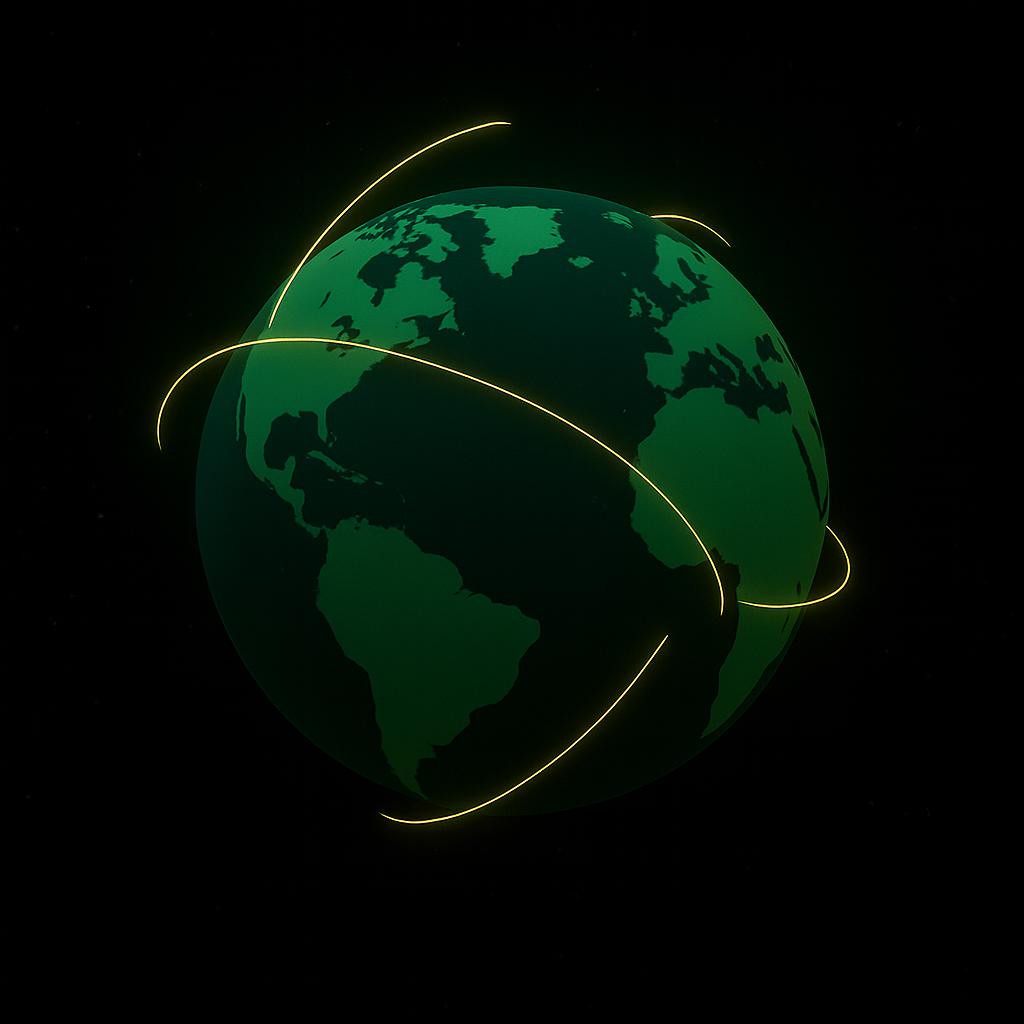
A 3D animated Shopify-style globe built with react-globe.gl, featuring teal-green continents, golden arcs representing connections, and interactive pin drops. Ideal for dashboards, landing pages, or data visualizations.
Built with React and Tailwind. Copy the prompt and paste it into Claude Code, Cursor or Lovable: your agent adds Shopify 3D Globe to your project and fits it to your theme.
Code
How Shopify 3D Globe is used: the demo's code. The component's own source comes with a free account.
Usage.tsx
"use client";

import * as React from "react";
import { useRef, useState, useEffect, Suspense } from "react";

// Dynamically import the 3D globe only on the client.
const Globe = React.lazy(() => import("react-globe.gl"));

export default function ShopifyStyleGlobe() {
  const globeRef = useRef<any>(null);
  const [mounted, setMounted] = useState(false);
  const [pins, setPins] = useState<any[]>([]);
  const [arcs, setArcs] = useState<any[]>([]);

  useEffect(() => setMounted(true), []);

  // Texture and background images
  const globeImageUrl = "https://cdn.21st.dev/assets/mirror/8b/8b8f3a4e258428b6e669a0799fb8b6f2db15c6240825d6a7c75963829b576994.jpg";
  const bumpImageUrl = "https://cdn.21st.dev/assets/mirror/83/839b12da2e4dd346b256cebae72e10c479a102c8980a22084c41275e4b9a0e12.png";
  const backgroundImageUrl = "https://cdn.21st.dev/assets/mirror/7e/7e1d5e780301e3a33bd79fd3ac414f7a742465f33ae4605abca743d43a3ab983.png";

  // Sample city coordinates
  const cities = [
    [45.5017, -73.5673],
    [48.8566, 2.3522],
    [6.5244, 3.3792],
    [35.6762, 139.6503],
    [-33.8688, 151.2093],
    [-23.5505, -46.6333],
  ];

  // Build animated arcs (simulating orders) on mount
  useEffect(() => {
    const newArcs = Array.from({ length: 20 }, () => {
      const from = cities[Math.floor(Math.random() * cities.length)];
      const to = cities[Math.floor(Math.random() * cities.length)];
      return {
        startLat: from[0],
        startLng: from[1],
        endLat: to[0],
        endLng: to[1],
        // white‑to‑gold gradient similar to Shopify’s trails
        color: ["#ffffff", "#ffd700"],
      };
    });
    setArcs(newArcs);
  }, []);

  // Click to drop a pin
  const handleGlobeClick = ({ lat, lng }: { lat: number; lng: number }) => {
    setPins((prev) => [
      ...prev,
      {
        lat,
        lng,
        size: 0.3,
        color: "#ffbf00",
        label: `📍 ${lat.toFixed(1)}, ${lng.toFixed(1)}`,
      },
    ]);
  };

  // Focus camera on a pin
  const handleLabelClick = (p: any) => {
    const g = globeRef.current;
    if (g) {
      g.pointOfView({ lat: p.lat, lng: p.lng, altitude: 1.5 }, 1500);
    }
  };

  return (
    <div className="w-full h-[600px] bg-black relative">
      {mounted && (
        <Suspense fallback={<div className="text-white/70 text-sm p-4">Loading Globe…</div>}>
          <Globe
            ref={globeRef}
            globeImageUrl={globeImageUrl}
            bumpImageUrl={bumpImageUrl}
            backgroundImageUrl={backgroundImageUrl}
            showAtmosphere
            atmosphereColor="#94650d"      // warm glow around Earth
            atmosphereAltitude={0.35}
            // Arc configuration inspired by Shopify’s curved order trails
            arcsData={arcs}
            arcColor={(d) => d.color}
            arcAltitude={0.2}              // raise arcs off the globe
            arcStroke={0.5}                // thicker, smoother trails
            arcDashLength={0.7}            // longer dashes for continuous feel
            arcDashGap={0.3}
            arcDashInitialGap={() => Math.random()} // staggered trails
            arcDashAnimateTime={3500}      // slower, more graceful animation
            arcAltitudeAutoScale={false}
            // Rotate the globe slowly for continuous motion
            autoRotate={true}
            autoRotateSpeed={0.5}
            // Initial camera view
            pointOfView={{ lat: 25, lng: -30, altitude: 2.2 }}
            // Pin (label) configuration
            labelsData={pins}
            labelText={(d) => d.label}
            labelSize={1.5}
            labelDotRadius={0.5}
            labelColor={(d) => d.color}
            onLabelClick={handleLabelClick}
            onGlobeClick={handleGlobeClick}
            enablePointerInteraction
          />
        </Suspense>
      )}
      <div className="absolute bottom-3 left-4 text-xs text-white/70 flex items-center gap-1">

      </div>
    </div>
  );
}
More by Masdouk Adelakoun
View all
Auth Switch
1.4K
Split-Flap Metrics Board
Animated Testimonial
Creative Left Nav
Why AppVibed