
About
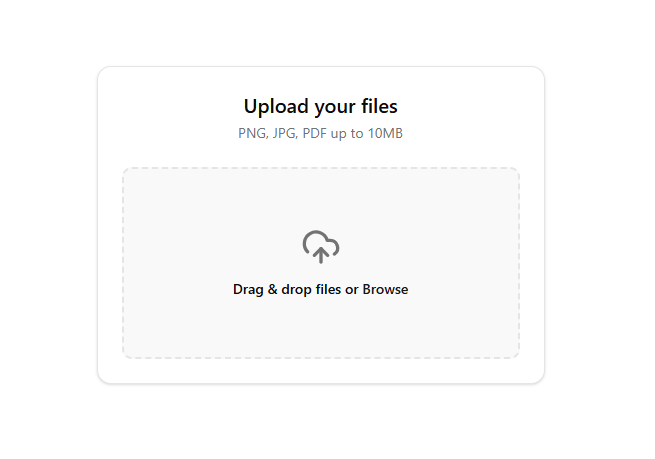
File Upload Design
Built with React and Tailwind. Copy the prompt and paste it into Claude Code, Cursor or Lovable: your agent adds FileUpload to your project and fits it to your theme.
Code
How FileUpload is used: the demo's code. The component's own source comes with a free account.
Usage.tsx
import React, { useState, useRef } from 'react';
import { UploadCloud, File, X } from 'lucide-react';

const FileUpload = () => {
  const [dragActive, setDragActive] = useState(false);
  const [files, setFiles] = useState([]);
  const inputRef = useRef(null);


  const handleDrag = (e) => {
    e.preventDefault();
    e.stopPropagation();
    if (e.type === "dragenter" || e.type === "dragover") {
      setDragActive(true);
    } else if (e.type === "dragleave") {
      setDragActive(false);
    }
  };


  const handleDrop = (e) => {
    e.preventDefault();
    e.stopPropagation();
    setDragActive(false);

    if (e.dataTransfer.files && e.dataTransfer.files[0]) {
      const newFiles = Array.from(e.dataTransfer.files);
      setFiles((prev) => [...prev, ...newFiles]);
    }
  };


  const handleChange = (e) => {
    e.preventDefault();
    if (e.target.files && e.target.files[0]) {
      const newFiles = Array.from(e.target.files);
      setFiles((prev) => [...prev, ...newFiles]);
    }
  };

  const onButtonClick = () => {
    inputRef.current.click();
  };

  const removeFile = (indexToRemove) => {
    setFiles(files.filter((_, index) => index !== indexToRemove));
  };

  const formatSize = (bytes) => {
    if (bytes === 0) return '0 Bytes';
    const k = 1024;
    const sizes = ['Bytes', 'KB', 'MB', 'GB'];
    const i = Math.floor(Math.log(bytes) / Math.log(k));
    return parseFloat((bytes / Math.pow(k, i)).toFixed(2)) + ' ' + sizes[i];
  };

  return (
    <div className="w-full max-w-md p-6 mx-auto bg-card dark:bg-card text-card-foreground rounded-xl shadow-sm border border-border font-sans transition-colors duration-200">
      <div className="text-center mb-6">
        <h2 className="text-xl font-semibold text-foreground">Upload your files</h2>
        <p className="text-sm text-muted-foreground mt-1">PNG, JPG, PDF up to 10MB</p>
      </div>

      <form
        onDragEnter={handleDrag}
        onSubmit={(e) => e.preventDefault()}
        className="relative"
      >
        <input
          ref={inputRef}
          type="file"
          multiple={true}
          onChange={handleChange}
          className="hidden"
        />

        <div
          className={`flex flex-col items-center justify-center w-full h-48 rounded-lg border-2 border-dashed transition-colors duration-200 ease-in-out cursor-pointer
            ${dragActive
              ? 'border-primary bg-primary/10 dark:bg-primary/5'
              : 'border-border bg-muted/50 hover:bg-muted dark:bg-muted/10 dark:hover:bg-muted/20'
            }`}
          onClick={onButtonClick}
          onDragEnter={handleDrag}
          onDragLeave={handleDrag}
          onDragOver={handleDrag}
          onDrop={handleDrop}
        >
          <UploadCloud
            className={`w-10 h-10 mb-3 ${dragActive ? 'text-primary' : 'text-muted-foreground'}`}
          />
          <p className="text-sm text-foreground font-medium">
            Drag & drop files or <span className="text-primary hover:text-primary/80 transition-colors">Browse</span>
          </p>
        </div>
      </form>

      {files.length > 0 && (
        <div className="mt-6 space-y-3">
          <h3 className="text-sm font-medium text-foreground">Selected Files</h3>
          <div className="max-h-48 overflow-y-auto space-y-2 pr-1">
            {files.map((file, index) => (
              <div
                key={`${file.name}-${index}`}
                className="flex items-center justify-between p-3 bg-muted/30 dark:bg-muted/10 border border-border rounded-lg group hover:border-primary/50 transition-colors"
              >
                <div className="flex items-center space-x-3 overflow-hidden">
                  <div className="p-2 bg-background dark:bg-muted/20 rounded shadow-sm text-primary shrink-0 border border-border/50">
                    <File className="w-5 h-5" />
                  </div>
                  <div className="flex flex-col overflow-hidden">
                    <span className="text-sm font-medium text-foreground truncate">
                      {file.name}
                    </span>
                    <span className="text-xs text-muted-foreground">
                      {formatSize(file.size)}
                    </span>
                  </div>
                </div>
                <button
                  onClick={() => removeFile(index)}
                  className="p-1.5 text-muted-foreground hover:text-destructive hover:bg-destructive/10 rounded-md transition-colors shrink-0"
                  aria-label="Remove file"
                >
                  <X className="w-4 h-4" />
                </button>
              </div>
            ))}
          </div>
        </div>
      )}
    </div>
  );
};

export default FileUpload;
Dependencies
More by Arun Dass
View all

Dashboard Sidebar
1.7K
AI Planning
453
AI Agent Processing States
182
Kanban Board
160
Neomorphism Metric Card
88
Focus Hero
38
AI Prompt Input Box
2
Fuji
1
More in Forms
View all

Premium Auth
500

Login 2
7
Authentication Card
47

Login 1
52

Contact Card
1K
Login Form
6

Form
16

Book A Demo 3
83
