
About
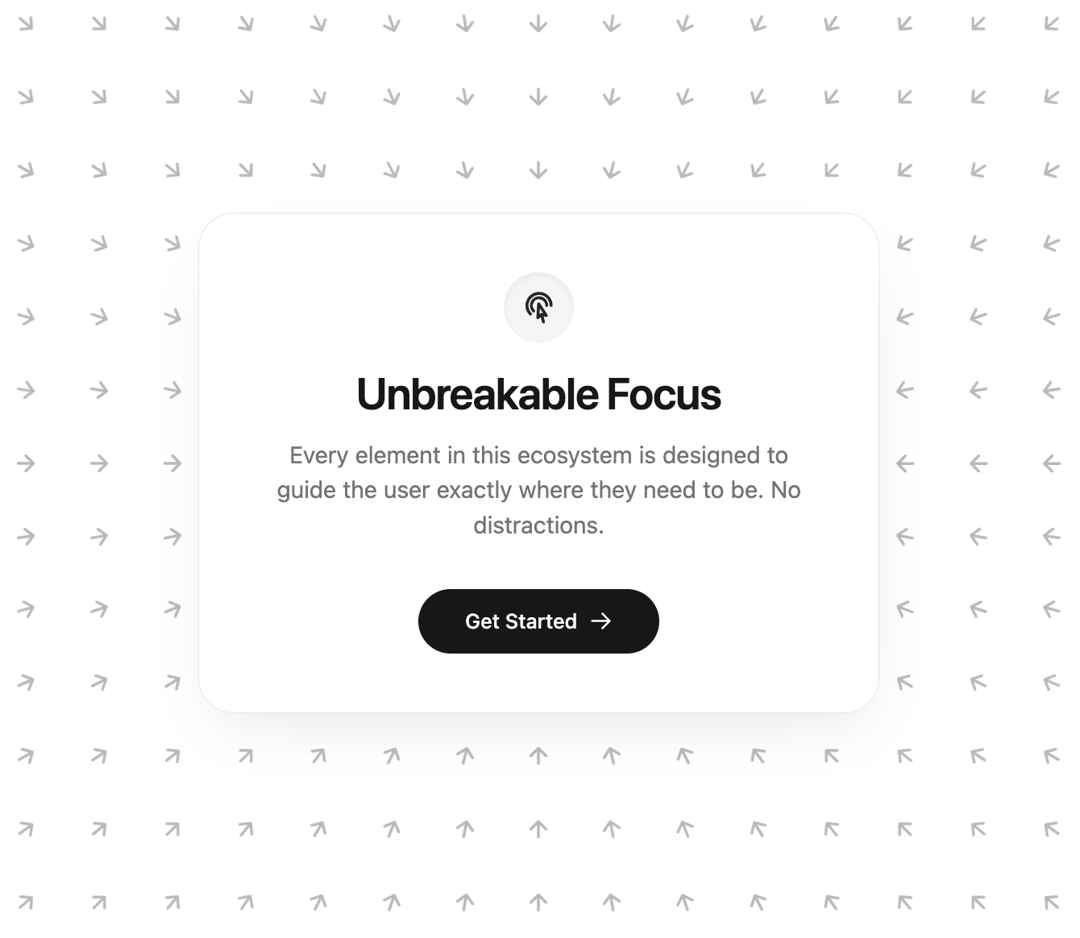
A hyper-responsive, physics-based vector field that guides user attention to a central glassmorphic card.
Built with React and Tailwind. Copy the prompt and paste it into Claude Code, Cursor or Lovable: your agent adds Focus Hero to your project and fits it to your theme.
Code
How Focus Hero is used: the demo's code. The component's own source comes with a free account.
Usage.tsx
import React, { useEffect, useState } from "react";
import { motion, useMotionValue, useSpring, useMotionValueEvent } from "framer-motion";


interface ArrowData {
  id: string;
  x: number;
  y: number;
  initialAngle: number;
}


const DynamicArrow = ({ x, y, mouseX, mouseY, initialAngle }: ArrowData & { mouseX: any, mouseY: any }) => {
  const rotate = useMotionValue(initialAngle);


  const smoothRotate = useSpring(rotate, { stiffness: 400, damping: 25, mass: 0.1 });

  useMotionValueEvent(mouseX, "change", (latestX) => {
    const latestY = mouseY.get();

    const targetAngle = Math.atan2(latestY - y, latestX - x) * (180 / Math.PI);

    const currentAngle = rotate.get();
    let angleDifference = targetAngle - currentAngle;
    while (angleDifference < -180) angleDifference += 360;
    while (angleDifference > 180) angleDifference -= 360;

    rotate.set(currentAngle + angleDifference);
  });

  return (
    <motion.div
      className="absolute text-neutral-900/30 dark:text-white/30"
      style={{
        left: x,
        top: y,
        x: "-50%",
        y: "-50%",
        rotate: smoothRotate,
      }}
    >
      <svg
        width="18"
        height="18"
        viewBox="0 0 24 24"
        fill="none"
        stroke="currentColor"
        strokeWidth="2.5"
        strokeLinecap="round"
        strokeLinejoin="round"
      >
        <path d="M5 12h14M12 5l7 7-7 7" />
      </svg>
    </motion.div>
  );
};


export default function FocusHero() {
  const [arrows, setArrows] = useState<ArrowData[]>([]);
  const [dimensions, setDimensions] = useState({ width: 0, height: 0 });

  const mouseX = useMotionValue(typeof window !== "undefined" ? window.innerWidth / 2 : 0);
  const mouseY = useMotionValue(typeof window !== "undefined" ? window.innerHeight / 2 : 0);

  useEffect(() => {
    const generateArrows = () => {
      const width = window.innerWidth;
      const height = window.innerHeight;
      setDimensions({ width, height });

      mouseX.set(width / 2);
      mouseY.set(height / 2);

      const centerX = width / 2;
      const centerY = height / 2;
      const spacing = 50;


      const cols = Math.ceil((width / 2) / spacing) + 1;
      const rows = Math.ceil((height / 2) / spacing) + 1;

      const newArrows: ArrowData[] = [];

      for (let i = -cols; i <= cols; i++) {
        for (let j = -rows; j <= rows; j++) {
          const x = centerX + i * spacing;
          const y = centerY + j * spacing;

          const dx = centerX - x;
          const dy = centerY - y;

          const initialAngle = (dx === 0 && dy === 0) ? 0 : Math.atan2(dy, dx) * (180 / Math.PI);

          newArrows.push({ id: `${i}-${j}`, x, y, initialAngle });
        }
      }
      setArrows(newArrows);
    };

    generateArrows();
    window.addEventListener("resize", generateArrows);
    return () => window.removeEventListener("resize", generateArrows);
  }, []);

  const handleMouseMove = (e: React.MouseEvent) => {
    mouseX.set(e.clientX);
    mouseY.set(e.clientY);
  };

  return (
    <div
      onMouseMove={handleMouseMove}
      className="relative flex min-h-screen w-full items-center justify-center overflow-hidden bg-white dark:bg-neutral-950 selection:bg-neutral-900 selection:text-white dark:selection:bg-white dark:selection:text-neutral-900 transition-colors duration-500"
    >

      <div className="pointer-events-none absolute inset-0 z-0 overflow-hidden">
        {arrows.map((arrow) => (
          <DynamicArrow
            key={arrow.id}
            {...arrow}
            mouseX={mouseX}
            mouseY={mouseY}
          />
        ))}
      </div>


      <div className="relative z-20 flex flex-col items-center justify-center rounded-3xl border border-neutral-200 dark:border-neutral-800 bg-white/95 dark:bg-neutral-900/95 p-10 text-center shadow-[0_20px_40px_-15px_rgba(0,0,0,0.1)] dark:shadow-[0_20px_40px_-15px_rgba(0,0,0,0.5)] backdrop-blur-md transition-colors duration-500">

        <div className="mb-4 rounded-full bg-neutral-100 dark:bg-neutral-800 p-3 shadow-inner transition-colors duration-500">
          <svg
            xmlns="http://www.w3.org/2000/svg"
            fill="none"
            viewBox="0 0 24 24"
            strokeWidth={2}
            stroke="currentColor"
            className="h-6 w-6 text-neutral-800 dark:text-neutral-200"
          >
            <path
              strokeLinecap="round"
              strokeLinejoin="round"
              d="M15.042 21.672L13.684 16.6m0 0l-2.51 2.225.569-9.47 5.227 7.917-3.286-.672zm-7.518-.267A8.25 8.25 0 1120.25 10.5M8.288 14.212A5.25 5.25 0 1117.25 10.5"
            />
          </svg>
        </div>

        <h1 className="mb-3 text-3xl font-semibold tracking-tight text-neutral-900 dark:text-white transition-colors duration-500">
          Unbreakable Focus
        </h1>

        <p className="mb-8 max-w-sm text-neutral-500 dark:text-neutral-400 transition-colors duration-500">
          Every element in this ecosystem is designed to guide the user exactly
          where they need to be. No distractions.
        </p>

        <motion.button
          whileHover={{ scale: 1.05 }}
          whileTap={{ scale: 0.95 }}
          className="group relative inline-flex items-center justify-center gap-2 overflow-hidden rounded-full bg-neutral-900 dark:bg-white px-8 py-3 text-sm font-medium text-white dark:text-neutral-900 transition-colors hover:bg-neutral-800 dark:hover:bg-neutral-200"
        >
          <span>Get Started</span>
          <svg
            xmlns="http://www.w3.org/2000/svg"
            fill="none"
            viewBox="0 0 24 24"
            strokeWidth={2}
            stroke="currentColor"
            className="h-4 w-4 transition-transform duration-300 group-hover:translate-x-1"
          >
            <path
              strokeLinecap="round"
              strokeLinejoin="round"
              d="M13.5 4.5L21 12m0 0l-7.5 7.5M21 12H3"
            />
          </svg>
        </motion.button>
      </div>
    </div>
  );
}
Dependencies
More by Arun Dass
View all

Dashboard Sidebar
1.7K
AI Planning
453
AI Agent Processing States
182
Kanban Board
160
FileUpload
155
Neomorphism Metric Card
88
AI Prompt Input Box
2
Fuji
1
More in Heroes
View all

SaaS Template
2.4K

Responsive Hero Banner
2K

Hero
1.2K
Centered Hero with Image Fan
931
Editorial Collage Hero
430
Glass Fold
212

Minimalist Hero Fashion
285

HeroSectionWithGradient
336
