About
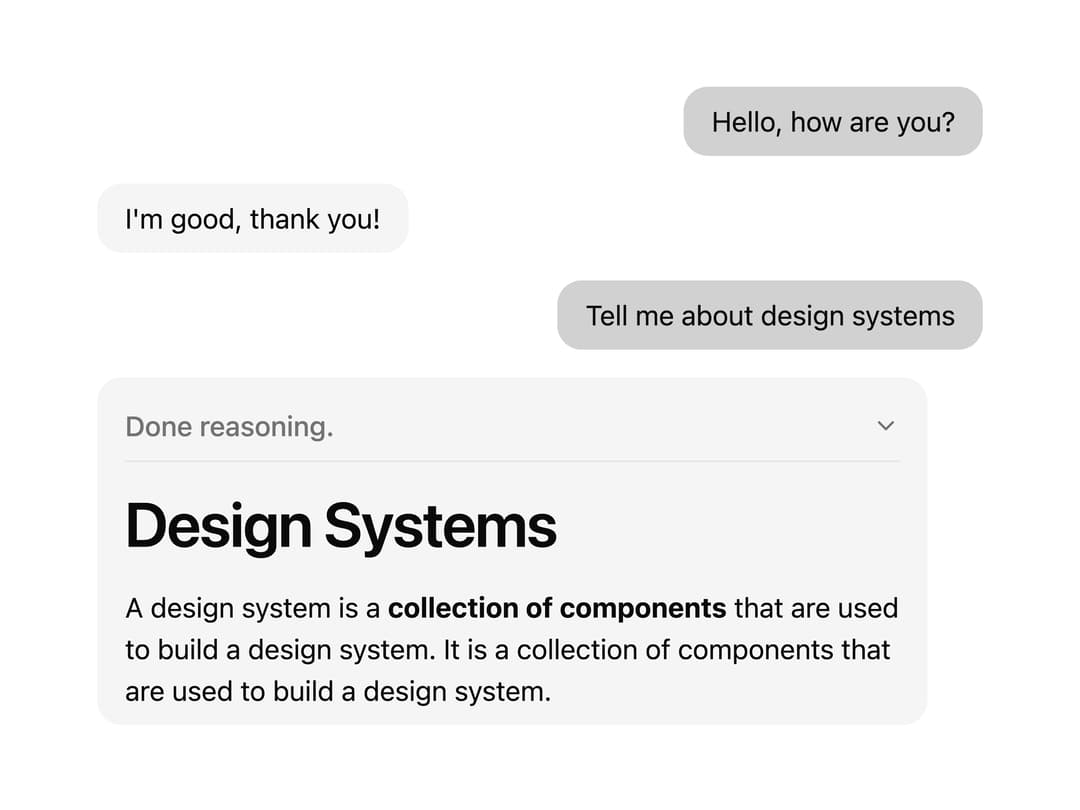
A chat bubble that renders a single AI SDK message, formatting markdown text, reasoning steps, and tool call results differently for user vs assistant roles.
Built with React and Tailwind. Copy the prompt and paste it into Claude Code, Cursor or Lovable: your agent adds Chat Message to your project and fits it to your theme.
Code
How Chat Message is used: the demo's code. The component's own source comes with a free account.
Usage.tsx
"use client";

import ChatMessage from "@/components/ui/chat-message";
import { UIMessage } from "ai";

const messages: UIMessage[] = [
  {
    id: "1",
    role: "user",
    parts: [
      {
        type: "text",
        text: "Hello, how are you?",
      },
    ],
  },
  {
    id: "2",
    role: "assistant",
    parts: [
      {
        type: "text",
        text: "I'm good, thank you!",
      },
    ],
  },
  {
    id: "3",
    role: "user",
    parts: [
      {
        type: "text",
        text: "Tell me about design systems",
      },
    ],
  },
  {
    id: "4",
    role: "assistant",
    parts: [
      {
        type: "reasoning",
        text: "I'm thinking about design systems and I'm going to use the web_search tool to help me.",
      },
      {
        type: "dynamic-tool",
        toolName: "web_search",
        toolCallId: "1",
        input: {
          query: "what is a design system?",
        },
        output: {
          results: [
            "A design system is a **collection of components** that are used to build a design system. It is a collection of components that are used to build a design system. ",
          ],
        },
        state: "output-available",
      },
      {
        type: "reasoning",
        text: "Now I'm going to return the results of the web_search tool to the user.",
      },
      {
        type: "text",
        text: "# Design Systems\n\nA design system is a **collection of components** that are used to build a design system. It is a collection of components that are used to build a design system. ",
      },
    ],
  },
];

export default function ChatMessageDemo() {
  return (
    <div className="flex flex-col gap-4 w-full max-w-lg mx-auto">
      {messages.map((message) => (
        <ChatMessage key={message.id} message={message} />
      ))}
    </div>
  );
}
Dependencies
More by asanshay
View all
Chat Reasoning
131
Shader Loader
67
Motion Blur Text
36
Reveal
14
Chat Tool
10
Page Header
More in AI chats
View all

AI Actions
319
Agent Chat
17

System Message
54
Message Thread
35
Color Picker
81

AI Task List
160

Modal Card
101
Quota Banner
21


