
About
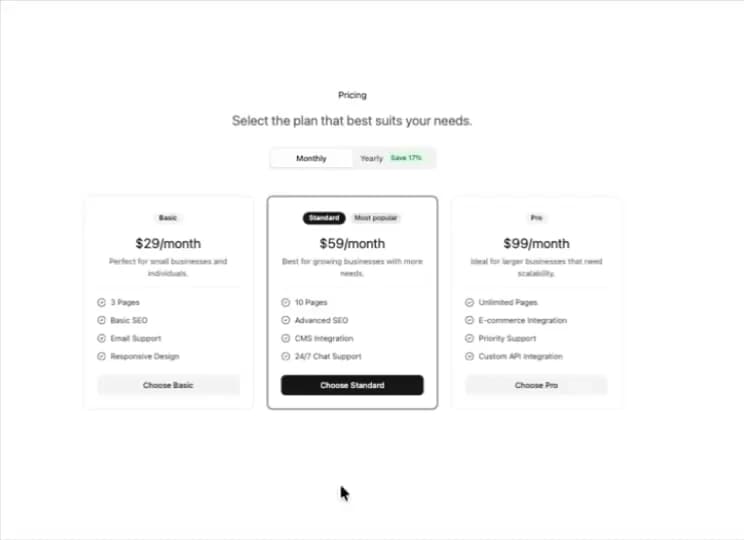
Here is Pricing Section component
Built with React and Tailwind. Copy the prompt and paste it into Claude Code, Cursor or Lovable: your agent adds Pricing Section to your project and fits it to your theme.
Code
How Pricing Section is used: the demo's code. The component's own source comes with a free account.
Usage.tsx
// app/components/Pricing.tsx
"use client";

import { useState } from "react";
import Balancer from "react-wrap-balancer";
import Link from "next/link";
import { CircleCheck } from "lucide-react";

// shadcn/ui
import { Button } from "@/components/ui/button";
import { Badge } from "@/components/ui/badge";
import { Tabs, TabsList, TabsTrigger } from "@/components/ui/tabs";

// ---- minimal craft-ds inline (single-file helper) ----------------
import clsx, { type ClassValue } from "clsx";
import { twMerge } from "tailwind-merge";
const cn = (...inputs: ClassValue[]) => twMerge(clsx(inputs));

type SectionProps = { children: React.ReactNode; className?: string; id?: string };
type ContainerProps = { children: React.ReactNode; className?: string; id?: string };

const Section = ({ children, className, id }: SectionProps) => (
  <section className={cn("py-8 md:py-12", className)} id={id}>
    {children}
  </section>
);

const Container = ({ children, className, id }: ContainerProps) => (
  <div className={cn("mx-auto max-w-5xl p-6 sm:p-8", className)} id={id}>
    {children}
  </div>
);
// ------------------------------------------------------------------

interface PricingCardProps {
  title: "Basic" | "Standard" | "Pro";
  monthlyPrice: string;
  yearlyPrice: string;
  description?: string;
  features: string[];
  cta: string;
  href: string;
  featured?: boolean;
}

// Dummy pricing data
const pricingData: PricingCardProps[] = [
  {
    title: "Basic",
    monthlyPrice: "$29",
    yearlyPrice: "$290",
    description: "Perfect for small businesses and individuals.",
    features: ["3 Pages", "Basic SEO", "Email Support", "Responsive Design"],
    cta: "Choose Basic",
    href: "https://stripe.com/",
  },
  {
    title: "Standard",
    monthlyPrice: "$59",
    yearlyPrice: "$590",
    description: "Best for growing businesses with more needs.",
    features: ["10 Pages", "Advanced SEO", "CMS Integration", "24/7 Chat Support"],
    cta: "Choose Standard",
    href: "https://stripe.com/",
    featured: true,
  },
  {
    title: "Pro",
    monthlyPrice: "$99",
    yearlyPrice: "$990",
    description: "Ideal for larger businesses that need scalability.",
    features: ["Unlimited Pages", "E-commerce Integration", "Priority Support", "Custom API Integration"],
    cta: "Choose Pro",
    href: "https://stripe.com/",
  },
];

export default function Pricing() {
  const [billingPeriod, setBillingPeriod] = useState<"monthly" | "yearly">("monthly");

  return (
    <Section>
      <Container className="flex flex-col items-center gap-4 text-center">
        <h2 className="!my-0">Pricing</h2>
        <p className="text-lg opacity-70 md:text-2xl">
          <Balancer>Select the plan that best suits your needs.</Balancer>
        </p>

        <div className="mt-4 w-full not-prose flex justify-center">
          <Tabs
            defaultValue="monthly"
            onValueChange={(v) => setBillingPeriod(v as "monthly" | "yearly")}
            className="w-[300px]"
          >
            <TabsList className="grid w-full grid-cols-2">
              <TabsTrigger value="monthly">Monthly</TabsTrigger>
              <TabsTrigger value="yearly">
                Yearly
                <span className="ml-1.5 rounded-full bg-green-100 px-2 py-0.5 text-xs text-green-800 dark:bg-green-900 dark:text-green-100">
                  Save 17%
                </span>
              </TabsTrigger>
            </TabsList>
          </Tabs>
        </div>

        <div className="not-prose mt-8 grid grid-cols-1 gap-6 min-[900px]:grid-cols-3">
          {pricingData.map((plan) => (
            <PricingCard key={plan.title} plan={plan} billingPeriod={billingPeriod} />
          ))}
        </div>
      </Container>
    </Section>
  );
}

function PricingCard({
  plan,
  billingPeriod,
}: {
  plan: PricingCardProps;
  billingPeriod: "monthly" | "yearly";
}) {
  const price =
    billingPeriod === "monthly" ? `${plan.monthlyPrice}/month` : `${plan.yearlyPrice}/year`;

  return (
    <div
      className={cn(
        "flex flex-col rounded-lg border p-6 text-left",
        plan.featured && "border-primary shadow-sm ring-1 ring-primary/10"
      )}
      aria-label={`${plan.title} plan`}
    >
      <div className="text-center">
        <div className="inline-flex items-center gap-2">
          <Badge variant={plan.featured ? "default" : "secondary"}>{plan.title}</Badge>
          {plan.featured && (
            <span className="rounded-full bg-primary/10 px-2 py-0.5 text-xs font-medium text-primary">
              Most popular
            </span>
          )}
        </div>
        <h4 className="mb-2 mt-4 text-2xl text-primary">{price}</h4>
        {plan.description && <p className="text-sm opacity-70">{plan.description}</p>}
      </div>

      <div className="my-4 border-t" />

      <ul className="space-y-3">
        {plan.features.map((feature) => (
          <li key={feature} className="flex items-center text-sm opacity-80">
            <CircleCheck className="mr-2 h-4 w-4" aria-hidden />
            <span>{feature}</span>
          </li>
        ))}
      </ul>

      <div className="mt-auto pt-6">
        <Link href={plan.href} target="_blank" rel="noreferrer noopener">
          <Button size="sm" className="w-full" variant={plan.featured ? "default" : "secondary"}>
            {plan.cta}
          </Button>
        </Link>
      </div>
    </div>
  );
}
Dependencies
More by brijr
View all
Hero Modern
76
Feature Modern
20
Accordion
17
Call to Action
12
More in Pricing
View all
Pricing Section
582

Pricing Section
173

Pricing Card
365
pricing section
158

Pricing Cards
86
Colorful-Pricing
85
Glowing Pricing Tiers
45

RuixenPricing05
102


