
About
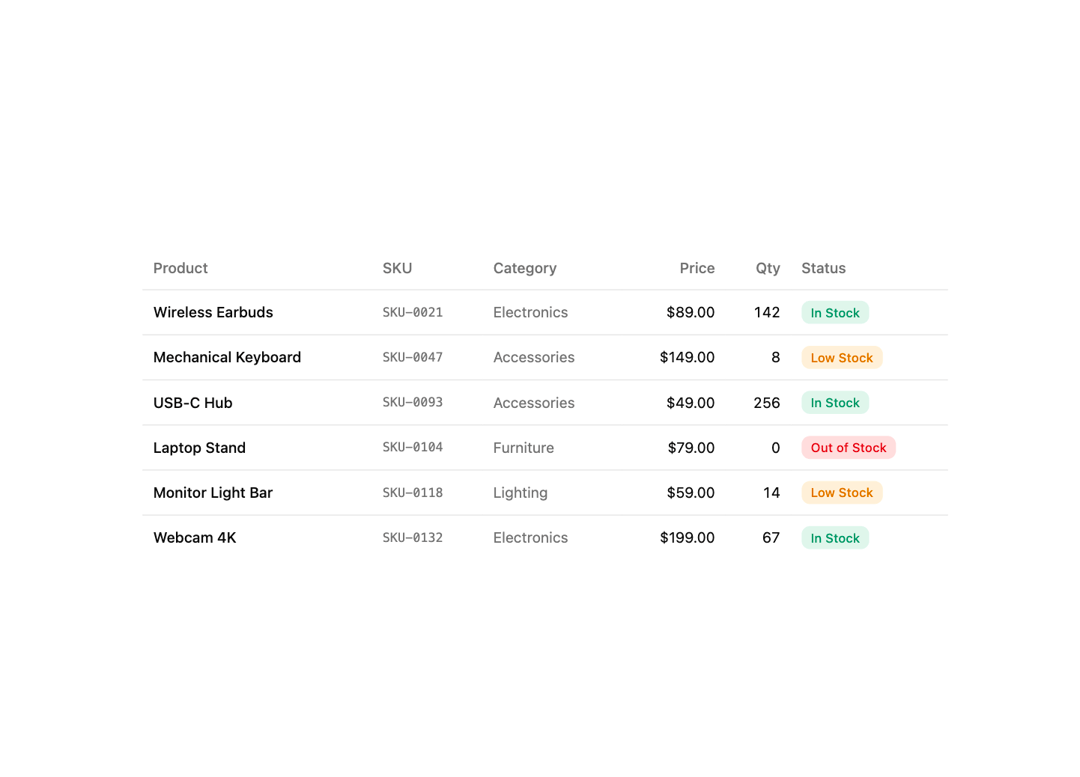
A styled, responsive table primitive with default and card variants. Ships Table, TableHeader, TableBody, TableFooter, TableRow, TableHead, TableCell and TableCaption — semantic <table> elements with hover and selected row states, a horizontal-scroll container, and a rounded 'card' layout. Dependency-free (just cn). Compose it for project lists, invoices, inventory, API metrics, server usage, subscriptions or pricing comparisons.
Built with React and Tailwind. Copy the prompt and paste it into Claude Code, Cursor or Lovable: your agent adds Table to your project and fits it to your theme.
Code
How Table is used: the demo's code. The component's own source comes with a free account.
Usage.tsx
import {
  Table,
  TableBody,
  TableCell,
  TableHead,
  TableHeader,
  TableRow,
} from "@/components/ui/cnippet-table";

import type React from "react";

const badgeStyles: Record<string, string> = {
  outline: "text-foreground",
  default: "border-transparent bg-primary text-primary-foreground",
  success:
    "border-transparent bg-emerald-500/15 text-emerald-600 dark:text-emerald-400",
  warning:
    "border-transparent bg-amber-500/15 text-amber-600 dark:text-amber-400",
  destructive: "border-transparent bg-destructive/15 text-destructive",
  info: "border-transparent bg-blue-500/15 text-blue-600 dark:text-blue-400",
};

function Badge({
  variant = "outline",
  className = "",
  children,
}: {
  variant?: string;
  className?: string;
  children?: React.ReactNode;
}): React.ReactElement {
  return (
    <span
      className={`inline-flex items-center gap-1.5 whitespace-nowrap rounded-md border px-2 py-0.5 font-medium text-xs [&_svg]:size-3 ${badgeStyles[variant] ?? ""} ${className}`}
    >
      {children}
    </span>
  );
}

type StockStatus = "in-stock" | "low-stock" | "out-of-stock";

const stockVariant: Record<StockStatus, "success" | "warning" | "destructive"> =
  {
    "in-stock": "success",
    "low-stock": "warning",
    "out-of-stock": "destructive",
  };

const stockLabel: Record<StockStatus, string> = {
  "in-stock": "In Stock",
  "low-stock": "Low Stock",
  "out-of-stock": "Out of Stock",
};

const products = [
  {
    category: "Electronics",
    name: "Wireless Earbuds",
    price: "$89.00",
    qty: 142,
    sku: "SKU-0021",
    stock: "in-stock" as StockStatus,
  },
  {
    category: "Accessories",
    name: "Mechanical Keyboard",
    price: "$149.00",
    qty: 8,
    sku: "SKU-0047",
    stock: "low-stock" as StockStatus,
  },
  {
    category: "Accessories",
    name: "USB-C Hub",
    price: "$49.00",
    qty: 256,
    sku: "SKU-0093",
    stock: "in-stock" as StockStatus,
  },
  {
    category: "Furniture",
    name: "Laptop Stand",
    price: "$79.00",
    qty: 0,
    sku: "SKU-0104",
    stock: "out-of-stock" as StockStatus,
  },
  {
    category: "Lighting",
    name: "Monitor Light Bar",
    price: "$59.00",
    qty: 14,
    sku: "SKU-0118",
    stock: "low-stock" as StockStatus,
  },
  {
    category: "Electronics",
    name: "Webcam 4K",
    price: "$199.00",
    qty: 67,
    sku: "SKU-0132",
    stock: "in-stock" as StockStatus,
  },
];

export default function TableInventory() {
  return (
    <div className="mx-auto w-full max-w-3xl">
      <Table>
        <TableHeader>
          <TableRow>
            <TableHead>Product</TableHead>
            <TableHead>SKU</TableHead>
            <TableHead>Category</TableHead>
            <TableHead className="text-right">Price</TableHead>
            <TableHead className="text-right">Qty</TableHead>
            <TableHead>Status</TableHead>
          </TableRow>
        </TableHeader>
        <TableBody>
          {products.map((p) => (
            <TableRow key={p.sku}>
              <TableCell className="font-medium text-sm">{p.name}</TableCell>
              <TableCell className="font-mono text-muted-foreground text-xs">
                {p.sku}
              </TableCell>
              <TableCell className="text-muted-foreground text-sm">
                {p.category}
              </TableCell>
              <TableCell className="text-right text-sm">{p.price}</TableCell>
              <TableCell className="text-right text-sm tabular-nums">
                {p.qty}
              </TableCell>
              <TableCell>
                <Badge size="sm" variant={stockVariant[p.stock]}>
                  {stockLabel[p.stock]}
                </Badge>
              </TableCell>
            </TableRow>
          ))}
        </TableBody>
      </Table>
    </div>
  );
}
More by Cnippet
View all

Team
1.3K
Davincho Hero-1
683
Aero Hero-3
559
Features
510
Random Letter Swap Navigation
487
Services with Animated Hover Modal
465
Blogs
396
Aero Hero-1
356