
About
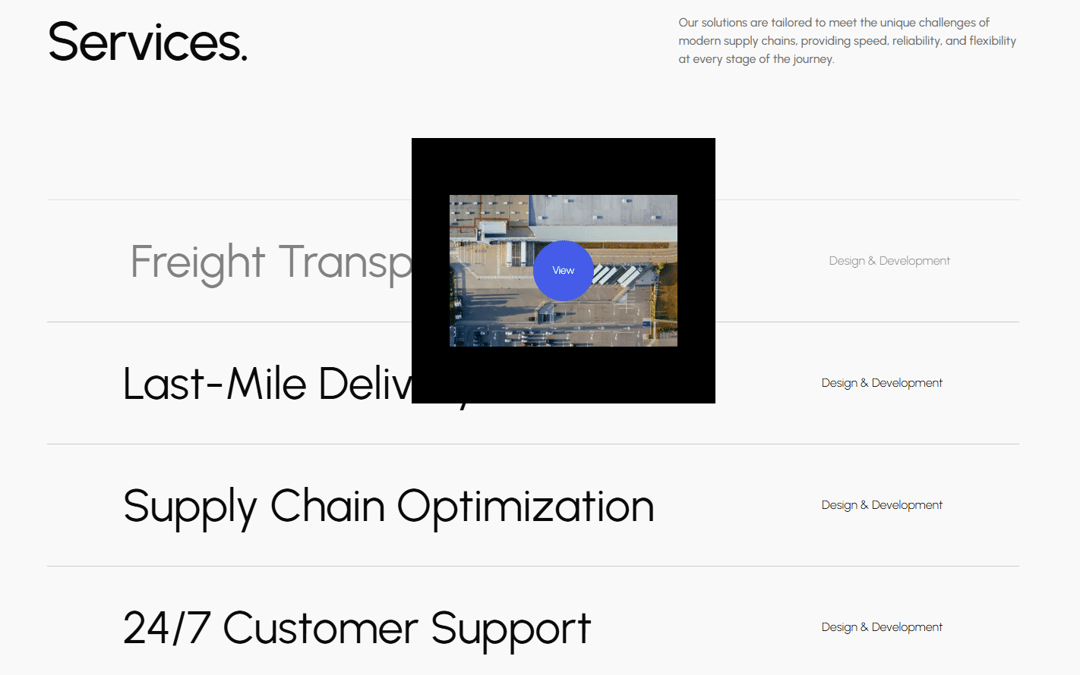
A responsive services component that displays a list of offerings. On hover, a modal follows the cursor, revealing project images with smooth scaling and transition effects. Built with GSAP for cursor‑following animations and Framer Motion for scale transitions.
Built with React and Tailwind. Copy the prompt and paste it into Claude Code, Cursor or Lovable: your agent adds Services with Animated Hover Modal to your project and fits it to your theme.
Code
How Services with Animated Hover Modal is used: the demo's code. The component's own source comes with a free account.
Usage.tsx
"use client";
import gsap from "gsap";
import { motion } from "motion/react";
import Image from "next/image";
import { useEffect, useRef, useState } from "react";

const projects = [
  {
    color: "#000000",
    src: "c2montreal.png",
    title: "Freight Transportation",
  },
  {
    color: "#8C8C8C",
    src: "officestudio.png",
    title: "Last-Mile Delivery",
  },
  {
    color: "#EFE8D3",
    src: "locomotive.png",
    title: "Supply Chain Optimization",
  },
  {
    color: "#706D63",
    src: "silencio.png",
    title: "24/7 Customer Support",
  },
];

const scaleAnimation = {
  closed: {
    scale: 0,
    transition: { duration: 0.4, ease: [0.32, 0, 0.67, 0] },
    x: "-50%",
    y: "-50%",
  },
  enter: {
    scale: 1,
    transition: { duration: 0.4, ease: [0.76, 0, 0.24, 1] },
    x: "-50%",
    y: "-50%",
  },
  initial: { scale: 0, x: "-50%", y: "-50%" },
};

export default function Services() {
  const [modal, setModal] = useState({ active: false, index: 0 });

  return (
    <div className="py-16 overflow-hidden bg-[#f9f9f9]dark:text-black">
      <div className="mx-auto max-w-7xl px-5 md:px-0">
        <div className="flex justify-between">
          <h2 className="font-formal text-7xl tracking-tight">Services.</h2>
          <p className="max-w-md font-medium text-neutral-500">
            Our solutions are tailored to meet the unique challenges of modern
            supply chains, providing speed, reliability, and flexibility at
            every stage of the journey.
          </p>
        </div>
        <div className="flex h-screen items-center justify-center">
          <div className="flex w-full flex-col items-center justify-center">
            {projects.map((project, index) => (
              <Project
                index={index}
                key={project.title}
                setModal={setModal}
                title={project.title}
              />
            ))}
          </div>
          <Modal modal={modal} projects={projects} />
        </div>
      </div>
    </div>
  );
}

function Project({ index, title, setModal }) {
  return (
    <div
      className="group flex w-full cursor-pointer items-center justify-between border-[rgb(201,201,201)] border-t px-25 py-12.5 transition-all duration-200 last:border-b hover:opacity-50"
      onMouseEnter={() => setModal({ active: true, index })}
      onMouseLeave={() => setModal({ active: false, index })}
    >
      <h2 className="m-0 font-normal text-6xl transition-all duration-300 group-hover:translate-x-2.5">
        {title}
      </h2>
      <p className="font-light transition-all duration-300 group-hover:translate-x-2.5">
        Design & Development
      </p>
    </div>
  );
}

function Modal({ modal, projects }) {
  const { active, index } = modal;
  const modalContainer = useRef(null);
  const cursor = useRef(null);
  const cursorLabel = useRef(null);

  useEffect(() => {
    // Move Container
    const xMoveContainer = gsap.quickTo(modalContainer.current, "left", {
      duration: 0.8,
      ease: "power3",
    });
    const yMoveContainer = gsap.quickTo(modalContainer.current, "top", {
      duration: 0.8,
      ease: "power3",
    });
    // Move cursor
    const xMoveCursor = gsap.quickTo(cursor.current, "left", {
      duration: 0.5,
      ease: "power3",
    });
    const yMoveCursor = gsap.quickTo(cursor.current, "top", {
      duration: 0.5,
      ease: "power3",
    });
    // Move cursor label
    const xMoveCursorLabel = gsap.quickTo(cursorLabel.current, "left", {
      duration: 0.45,
      ease: "power3",
    });
    const yMoveCursorLabel = gsap.quickTo(cursorLabel.current, "top", {
      duration: 0.45,
      ease: "power3",
    });

    const handleMouseMove = (e) => {
      const { pageX, pageY } = e;
      xMoveContainer(pageX);
      yMoveContainer(pageY);
      xMoveCursor(pageX);
      yMoveCursor(pageY);
      xMoveCursorLabel(pageX);
      yMoveCursorLabel(pageY);
    };
    window.addEventListener("mousemove", handleMouseMove);
    return () => window.removeEventListener("mousemove", handleMouseMove);
  }, []);

  return (
    <>
      <motion.div
        animate={active ? "enter" : "closed"}
        className="pointer-events-none absolute flex h-87.5 w-100 items-center justify-center overflow-hidden bg-white"
        initial="initial"
        ref={modalContainer}
        variants={scaleAnimation}
      >
        <div
          className="absolute h-full w-full transition-[top] duration-500 ease-[cubic-bezier(0.76,0,0.24,1)]"
          style={{ top: `${index * -100}%` }}
        >
          {projects.map((project, idx) => (
            <div
              className="flex h-full w-full items-center justify-center"
              key={project.title}
              style={{ backgroundColor: project.color }}
            >
              <Image
                alt="image"
                className="h-auto"
                height={0}
                src={`https://images.cnippet.dev/image/upload/v1770400411/img_1700${idx + 1}.jpg`}
                width={300}
              />
            </div>
          ))}
        </div>
      </motion.div>
      <motion.div
        animate={active ? "enter" : "closed"}
        className="pointer-events-none absolute z-2 flex h-20 w-20 items-center justify-center rounded-full bg-[#455CE9] font-light text-sm text-white"
        initial="initial"
        ref={cursor}
        variants={scaleAnimation}
      />
      <motion.div
        animate={active ? "enter" : "closed"}
        className="pointer-events-none absolute z-2 flex h-20 w-20 items-center justify-center rounded-full bg-transparent font-light text-sm text-white"
        initial="initial"
        ref={cursorLabel}
        variants={scaleAnimation}
      >
        View
      </motion.div>
    </>
  );
}
More by Cnippet
View all

Team
1.3K
Davincho Hero-1
683
Aero Hero-3
558
Features
510
Random Letter Swap Navigation
487
Blogs
396
Aero Hero-1
356
Button
323
More in Cards
View all

Statistics Card 2
264

Course Design Cards
1.1K
Card
70
Stats cards with links
39
The Item one
3

Card Studio
7
Statistics Card 7
292

Item
10
