
About
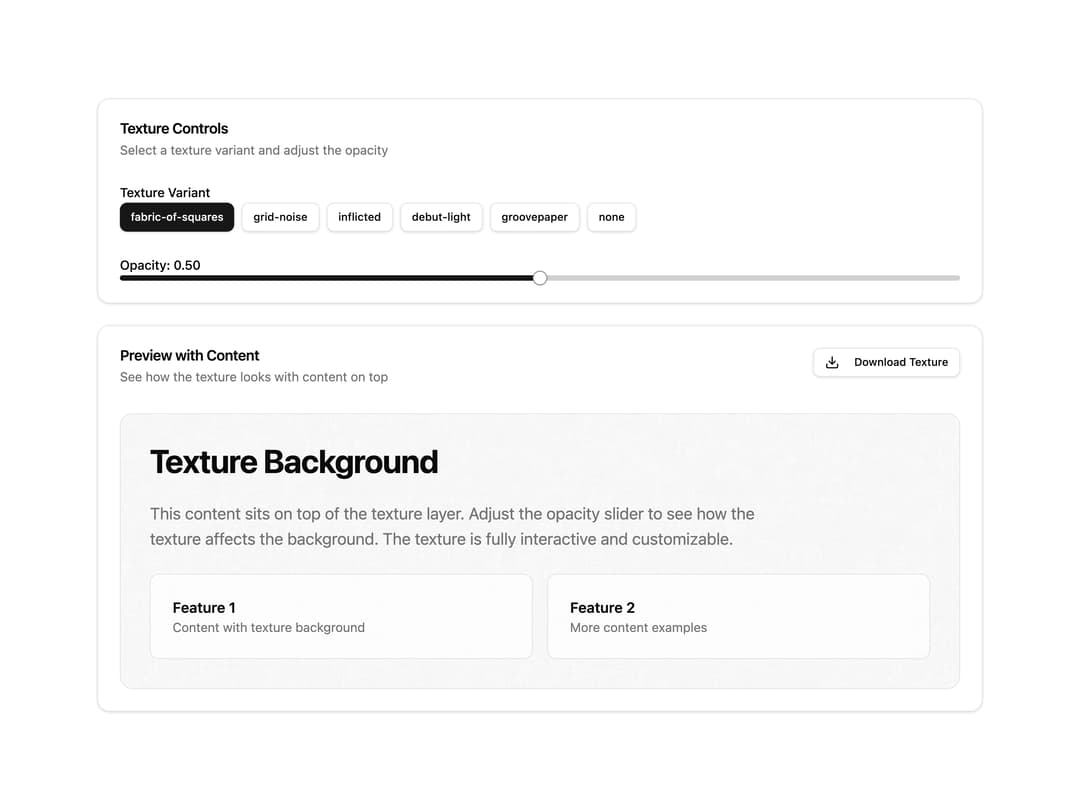
Background wrapper that overlays a repeating image texture (fabric, grid noise, paper and more) behind its content with adjustable opacity.
Built with React and Tailwind. Copy the prompt and paste it into Claude Code, Cursor or Lovable: your agent adds Background Image Texture to your project and fits it to your theme.
Code
How Background Image Texture is used: the demo's code. The component's own source comes with a free account.
Usage.tsx
"use client";

import { useState } from "react";
import { Download } from "lucide-react";

import { Button } from "@/components/ui/button";
import {
  Card,
  CardContent,
  CardDescription,
  CardHeader,
  CardTitle,
} from "@/components/ui/card";
import { Label } from "@/components/ui/label";
import { Slider } from "@/components/ui/slider";
import { BackgroundImageTexture } from "@/components/ui/bg-image-texture";
import type { TextureVariant } from "@/components/ui/bg-image-texture";

const textureVariants: TextureVariant[] = [
  "fabric-of-squares",
  "grid-noise",
  "inflicted",
  "debut-light",
  "groovepaper",
  "none",
];

export default function BackgroundImageTextureDemo() {
  const [variant, setVariant] = useState<TextureVariant>("fabric-of-squares");
  const [opacity, setOpacity] = useState(0.5);

  return (
    <div className="w-full max-w-5xl mx-auto space-y-6 p-6">
      <Card>
        <CardHeader>
          <CardTitle>Texture Controls</CardTitle>
          <CardDescription>
            Select a texture variant and adjust the opacity
          </CardDescription>
        </CardHeader>
        <CardContent className="space-y-6">
          <div className="space-y-3">
            <Label>Texture Variant</Label>
            <div className="flex flex-wrap gap-2">
              {textureVariants.map((v) => (
                <Button
                  key={v}
                  variant={variant === v ? "default" : "outline"}
                  size="sm"
                  onClick={() => setVariant(v)}
                >
                  {v}
                </Button>
              ))}
            </div>
          </div>
          <div className="space-y-3">
            <Label>Opacity: {opacity.toFixed(2)}</Label>
            <Slider
              value={[opacity]}
              onValueChange={(value) => setOpacity(value[0])}
              min={0}
              max={1}
              step={0.01}
            />
          </div>
        </CardContent>
      </Card>

      <Card>
        <CardHeader className="flex flex-row items-start justify-between gap-4">
          <div className="space-y-1.5">
            <CardTitle>Preview with Content</CardTitle>
            <CardDescription>
              See how the texture looks with content on top
            </CardDescription>
          </div>
          <Button variant="outline" size="sm" className="shrink-0">
            <Download className="mr-2 h-4 w-4" />
            Download Texture
          </Button>
        </CardHeader>
        <CardContent>
          <BackgroundImageTexture
            variant={variant}
            opacity={opacity}
            className="overflow-hidden rounded-xl border bg-muted/40"
          >
            <div className="space-y-6 p-8">
              <h2 className="text-4xl font-bold tracking-tight text-foreground">
                Texture Background
              </h2>
              <p className="max-w-2xl text-lg text-muted-foreground">
                This content sits on top of the texture layer. Adjust the
                opacity slider to see how the texture affects the background.
                The texture is fully interactive and customizable.
              </p>
              <div className="grid gap-4 sm:grid-cols-2">
                <div className="rounded-lg border bg-background/70 p-6">
                  <h3 className="font-semibold text-foreground">Feature 1</h3>
                  <p className="text-sm text-muted-foreground">
                    Content with texture background
                  </p>
                </div>
                <div className="rounded-lg border bg-background/70 p-6">
                  <h3 className="font-semibold text-foreground">Feature 2</h3>
                  <p className="text-sm text-muted-foreground">
                    More content examples
                  </p>
                </div>
              </div>
            </div>
          </BackgroundImageTexture>
        </CardContent>
      </Card>
    </div>
  );
}
Dependencies
More by cult/ui
View all
3D Carousel
2.5K
Logo Carousel
1.1K
Feature Carousel
504
Popover Form
419
Floating Panel
245
Expandable
126
Dock
119
Hero Liquid Metal
101
More in Backgrounds
View all
Elegant Dark Pattern
811

Gradient Backgrounds
25
Jade Sky
85

Light theme Tailwind CSS Background Snippet
221
Gradient Blur Bg
34
Background snippets
16
Background Components
233

LivingOrigami bg
134

