
About
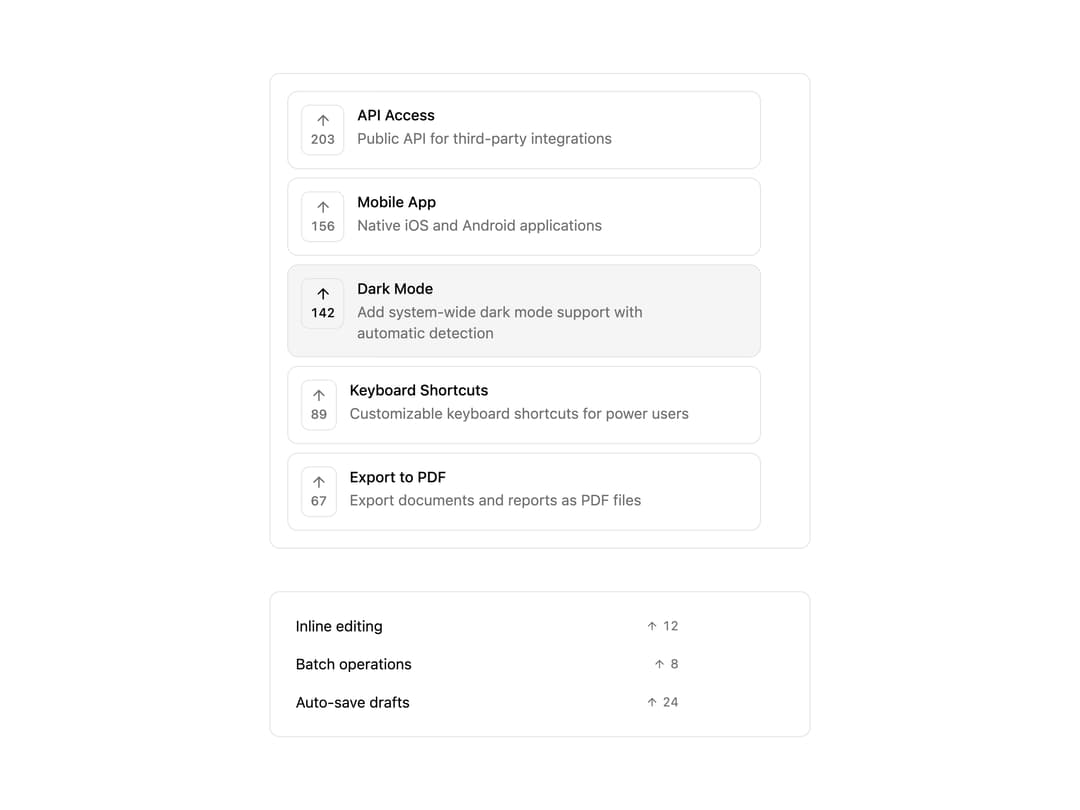
A headless, compound React component for a list of items with up-vote buttons, vote counts, optional sort-by-votes, and controlled or uncontrolled state.
Built with React and Tailwind. Copy the prompt and paste it into Claude Code, Cursor or Lovable: your agent adds Vote Tally to your project and fits it to your theme.
Code
How Vote Tally is used: the demo's code. The component's own source comes with a free account.
Usage.tsx
"use client";

import { VoteTally, type VoteTallyValue } from "@/components/ui/vote-tally";
import { useState } from "react";
import { ArrowUp } from "lucide-react";

import { cn } from "@/lib/utils";

/* -----------------------------------------------------------------------------
 * Example: Styled Vote Tally Widget
 * Demonstrates usage of the headless VoteTally primitive
 * -------------------------------------------------------------------------- */

const FEATURES = [
  {
    id: "dark-mode",
    title: "Dark Mode",
    description: "Add system-wide dark mode support with automatic detection",
  },
  {
    id: "keyboard-shortcuts",
    title: "Keyboard Shortcuts",
    description: "Customizable keyboard shortcuts for power users",
  },
  {
    id: "export-pdf",
    title: "Export to PDF",
    description: "Export documents and reports as PDF files",
  },
  {
    id: "api-access",
    title: "API Access",
    description: "Public API for third-party integrations",
  },
  {
    id: "mobile-app",
    title: "Mobile App",
    description: "Native iOS and Android applications",
  },
] as const;

export function VoteTallyExample() {
  const [votes, setVotes] = useState<VoteTallyValue>({
    "dark-mode": 142,
    "keyboard-shortcuts": 89,
    "export-pdf": 67,
    "api-access": 203,
    "mobile-app": 156,
  });

  const [votedItems, setVotedItems] = useState<Set<string>>(
    new Set(["dark-mode"]),
  );

  return (
    <div className="w-full max-w-md">
      <VoteTally.Root
        className="flex flex-col gap-2"
        onValueChange={setVotes}
        onVotedItemsChange={setVotedItems}
        value={votes}
        votedItems={votedItems}
      >
        <VoteTally.Group className="flex flex-col gap-2" sortBy="votes-desc">
          {FEATURES.map((feature) => (
            <VoteTally.Item
              className={cn(
                "flex items-start gap-3 rounded-lg border border-border bg-background p-3",
                "data-voted:bg-muted",
                "data-disabled:cursor-not-allowed data-disabled:opacity-50",
              )}
              key={feature.id}
              value={feature.id}
            >
              <VoteTally.Trigger
                className={cn(
                  "flex shrink-0 flex-col items-center gap-0.5 rounded-md border px-2 py-1.5",
                  "border-border bg-background text-muted-foreground",
                  "hover:bg-muted hover:text-foreground",
                  "focus-visible:outline-none focus-visible:ring-2 focus-visible:ring-ring focus-visible:ring-offset-2",
                  "data-[state=voted]:bg-muted data-[state=voted]:text-foreground",
                  "disabled:pointer-events-none disabled:opacity-50",
                )}
              >
                <ArrowUp aria-hidden className="size-4" />
                <VoteTally.Count className="font-medium text-xs tabular-nums" />
              </VoteTally.Trigger>

              <div className="flex min-w-0 flex-col gap-0.5">
                <VoteTally.Title className="text-balance font-medium text-foreground text-sm">
                  {feature.title}
                </VoteTally.Title>
                <VoteTally.Description className="text-pretty text-muted-foreground text-sm">
                  {feature.description}
                </VoteTally.Description>
              </div>
            </VoteTally.Item>
          ))}
        </VoteTally.Group>
      </VoteTally.Root>
    </div>
  );
}

/* -----------------------------------------------------------------------------
 * Example: Minimal/Compact variant
 * -------------------------------------------------------------------------- */

export function VoteTallyCompact() {
  return (
    <div className="w-full max-w-sm">
      <VoteTally.Root
        className="flex flex-col gap-1"
        defaultValue={{
          "feature-a": 12,
          "feature-b": 8,
          "feature-c": 24,
        }}
      >
        {[
          { id: "feature-a", title: "Inline editing" },
          { id: "feature-b", title: "Batch operations" },
          { id: "feature-c", title: "Auto-save drafts" },
        ].map((feature) => (
          <VoteTally.Item
            className={cn(
              "flex items-center justify-between gap-2 rounded px-2 py-1.5",
              "hover:bg-muted",
              "data-voted:bg-muted",
            )}
            key={feature.id}
            value={feature.id}
          >
            <VoteTally.Title className="text-foreground text-sm">
              {feature.title}
            </VoteTally.Title>

            <VoteTally.Trigger
              className={cn(
                "flex items-center gap-1 rounded px-1.5 py-0.5 text-xs",
                "text-muted-foreground hover:text-foreground",
                "data-[state=voted]:font-medium data-[state=voted]:text-foreground",
              )}
            >
              <ArrowUp aria-hidden className="size-3" />
              <VoteTally.Count className="tabular-nums" />
            </VoteTally.Trigger>
          </VoteTally.Item>
        ))}
      </VoteTally.Root>
    </div>
  );
}

export default function VoteTallyDemo() {
  return (
    <div className="flex w-full max-w-lg flex-col gap-10 py-6">
      <div className="rounded-lg border border-border bg-card p-4">
        <VoteTallyExample />
      </div>
      <div className="rounded-lg border border-border bg-card p-4">
        <VoteTallyCompact />
      </div>
    </div>
  );
}
Dependencies
More by cult/ui
View all
3D Carousel
2.5K
Logo Carousel
1.1K
Feature Carousel
504
Popover Form
419
Floating Panel
245
Expandable
126
Dock
119
Hero Liquid Metal
101