
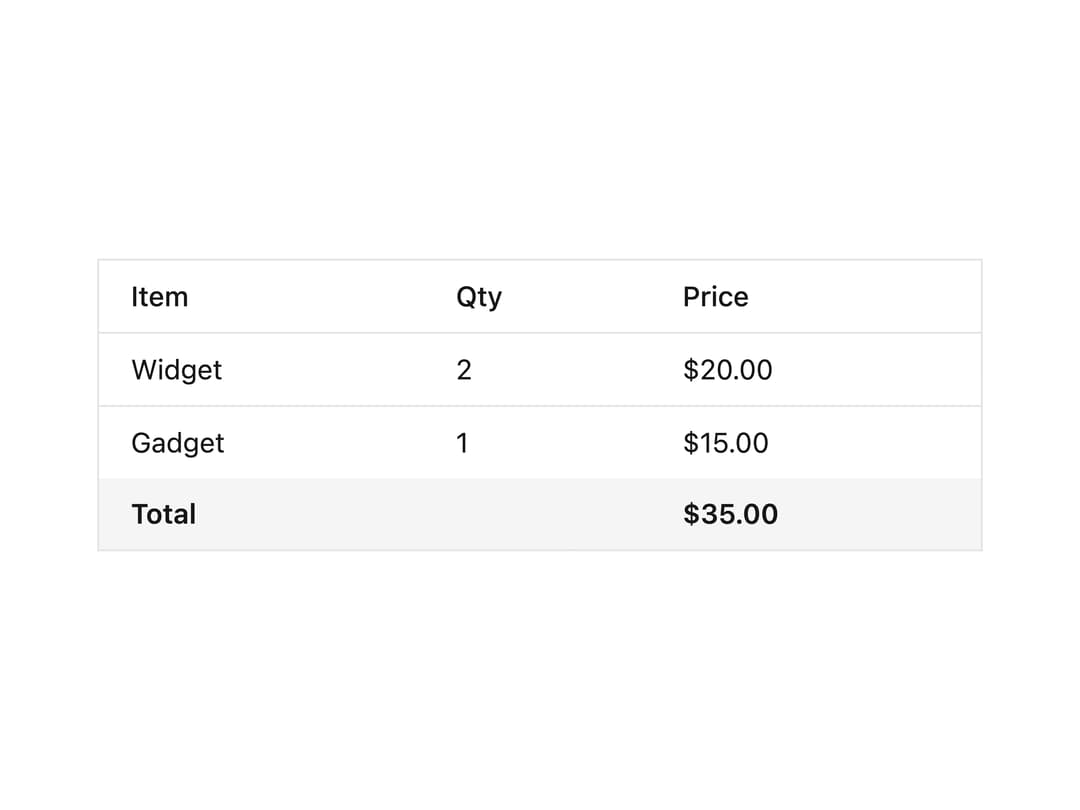
About
A styled tfoot element for HTML tables, used to visually set off summary or total rows at the bottom of a data table.
Built with React and Tailwind. Copy the prompt and paste it into Claude Code, Cursor or Lovable: your agent adds Table Footer to your project and fits it to your theme.
Code
How Table Footer is used: the demo's code. The component's own source comes with a free account.
Usage.tsx
import TableFooter from "@/components/ui/table-footer";

export default function TableFooterDemo() {
  return (
    <div className="w-full max-w-md text-neutral-900 dark:text-neutral-100">
      <table className="w-full text-sm text-left border border-neutral-200 dark:border-neutral-800">
        <thead className="bg-white dark:bg-neutral-950">
          <tr>
            <th className="px-4 py-2 font-medium">Item</th>
            <th className="px-4 py-2 font-medium">Qty</th>
            <th className="px-4 py-2 font-medium">Price</th>
          </tr>
        </thead>
        <tbody>
          <tr className="border-t border-neutral-200 dark:border-neutral-800">
            <td className="px-4 py-2">Widget</td>
            <td className="px-4 py-2">2</td>
            <td className="px-4 py-2">$20.00</td>
          </tr>
          <tr className="border-t border-neutral-200 dark:border-neutral-800">
            <td className="px-4 py-2">Gadget</td>
            <td className="px-4 py-2">1</td>
            <td className="px-4 py-2">$15.00</td>
          </tr>
        </tbody>
        <TableFooter>
          <tr>
            <td className="px-4 py-2 font-semibold" colSpan={2}>
              Total
            </td>
            <td className="px-4 py-2 font-semibold">$35.00</td>
          </tr>
        </TableFooter>
      </table>
    </div>
  );
}
Dependencies
More by darshan-rajadhyaksha
View all
Backdrop
1
Card Content
Breadcrumbs

Checkbox
Textarea
Card Title
Table
Accordion