
About
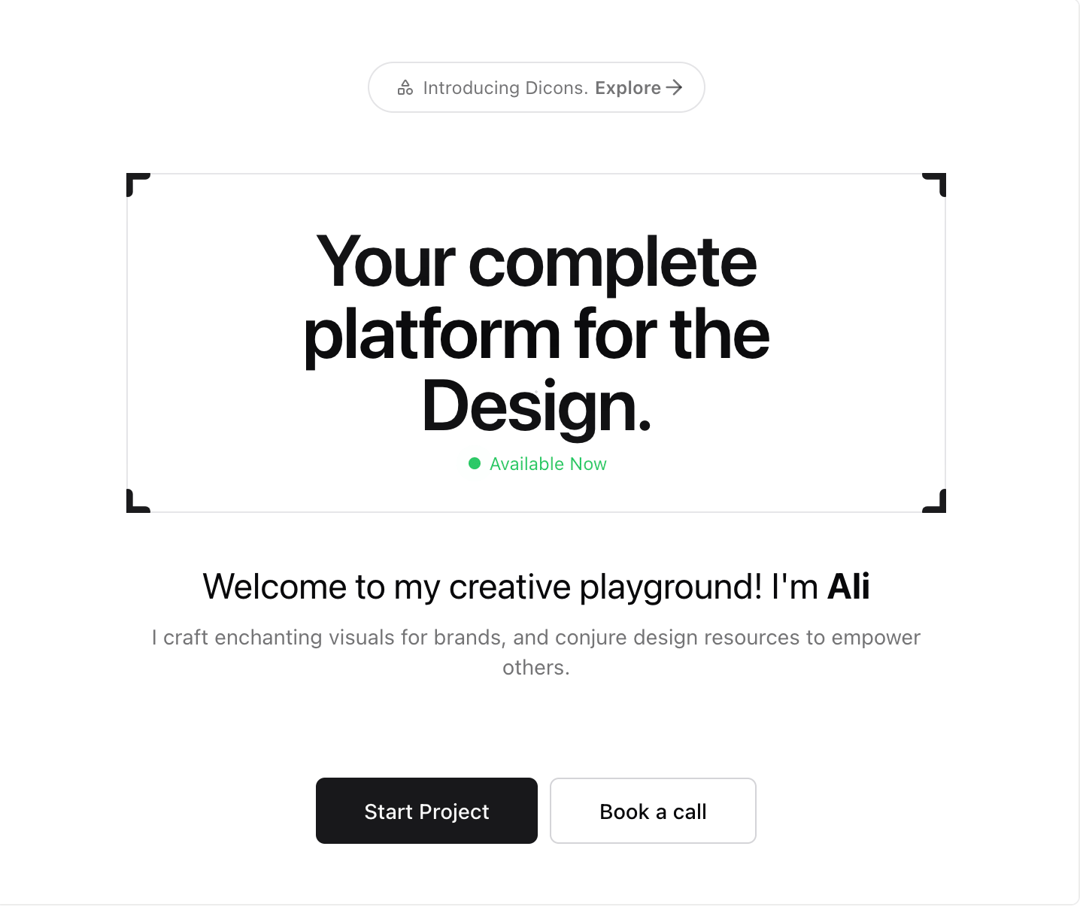
Canvas effect
Built with React and Tailwind. Copy the prompt and paste it into Claude Code, Cursor or Lovable: your agent adds Canvas to your project and fits it to your theme.
Code
How Canvas is used: the demo's code. The component's own source comes with a free account.
Usage.tsx
"use client";
// this is a client component
import { useEffect } from "react";
import Link from "next/link";
import { renderCanvas } from "@/components/ui/canvas"
import { DIcons } from "dicons";
import { Button } from "@/components/ui/button";
export function Hero() {
useEffect(() => {
renderCanvas();
}, []);
return (
<section id="home">
<div className="animation-delay-8 animate-fadeIn mt-20 flex flex-col items-center justify-center px-4 text-center md:mt-20">
<div className="z-10 mb-6 mt-10 sm:justify-center md:mb-4 md:mt-20">
<div className="relative flex items-center whitespace-nowrap rounded-full border bg-popover px-3 py-1 text-xs leading-6 text-primary/60 ">
<DIcons.Shapes className="h-5 p-1" /> Introducing Dicons.
<a
href="/products/dicons"
rel="noreferrer"
className="hover:text-ali ml-1 flex items-center font-semibold"
>
<div className="absolute inset-0 flex" aria-hidden="true" />
Explore{" "}
<span aria-hidden="true">
<DIcons.ArrowRight className="h-4 w-4" />
</span>
</a>
</div>
</div>
<div className="mb-10 mt-4 md:mt-6">
<div className="px-2">
<div className="border-ali relative mx-auto h-full max-w-7xl border p-6 [mask-image:radial-gradient(800rem_96rem_at_center,white,transparent)] md:px-12 md:py-20">
<h1 className="flex select-none flex-col px-3 py-2 text-center text-5xl font-semibold leading-none tracking-tight md:flex-col md:text-8xl lg:flex-row lg:text-8xl">
<DIcons.Plus
strokeWidth={4}
className="text-ali absolute -left-5 -top-5 h-10 w-10"
/>
<DIcons.Plus
strokeWidth={4}
className="text-ali absolute -bottom-5 -left-5 h-10 w-10"
/>
<DIcons.Plus
strokeWidth={4}
className="text-ali absolute -right-5 -top-5 h-10 w-10"
/>
<DIcons.Plus
strokeWidth={4}
className="text-ali absolute -bottom-5 -right-5 h-10 w-10"
/>
Your complete platform for the Design.
</h1>
<div className="flex items-center justify-center gap-1">
<span className="relative flex h-3 w-3 items-center justify-center">
<span className="absolute inline-flex h-full w-full animate-ping rounded-full bg-green-500 opacity-75"></span>
<span className="relative inline-flex h-2 w-2 rounded-full bg-green-500"></span>
</span>
<p className="text-xs text-green-500">Available Now</p>
</div>
</div>
</div>
<h1 className="mt-8 text-2xl md:text-2xl">
Welcome to my creative playground! I'm{" "}
<span className="text-ali font-bold">Ali </span>
</h1>
<p className="md:text-md mx-auto mb-16 mt-2 max-w-2xl px-6 text-sm text-primary/60 sm:px-6 md:max-w-4xl md:px-20 lg:text-lg">
I craft enchanting visuals for brands, and conjure design resources
to empower others.
</p>
<div className="flex justify-center gap-2">
<Link href={"/dashboard"}>
<Button variant="default" size="lg">
Start Project
</Button>
</Link>
<Link href={"https://cal.com/aliimam/designali"} target="_blank">
<Button variant="outline" size="lg">
Book a call
</Button>
</Link>
</div>
</div>
</div>
<canvas
className="bg-skin-base pointer-events-none absolute inset-0 mx-auto"
id="canvas"
></canvas>
</section>
);
};
Dependencies
More by Ali Imam
View all

Liquid Glass Button
6.6K
Shader Animation
3.7K
WebGL Shader
2.6K
Shader Lines
2.3K
Shiny Button
2.2K
GLSL Hills
2.1K
Glowing Shadow
1.5K
Gallery
1.4K
More in Heroes
View all

SaaS Template
2.4K

Responsive Hero Banner
2K

Hero
1.2K
Centered Hero with Image Fan
919

HeroSectionWithGradient
334
Editorial Collage Hero
425
Hero 03
313
Glass Fold
194
