
About
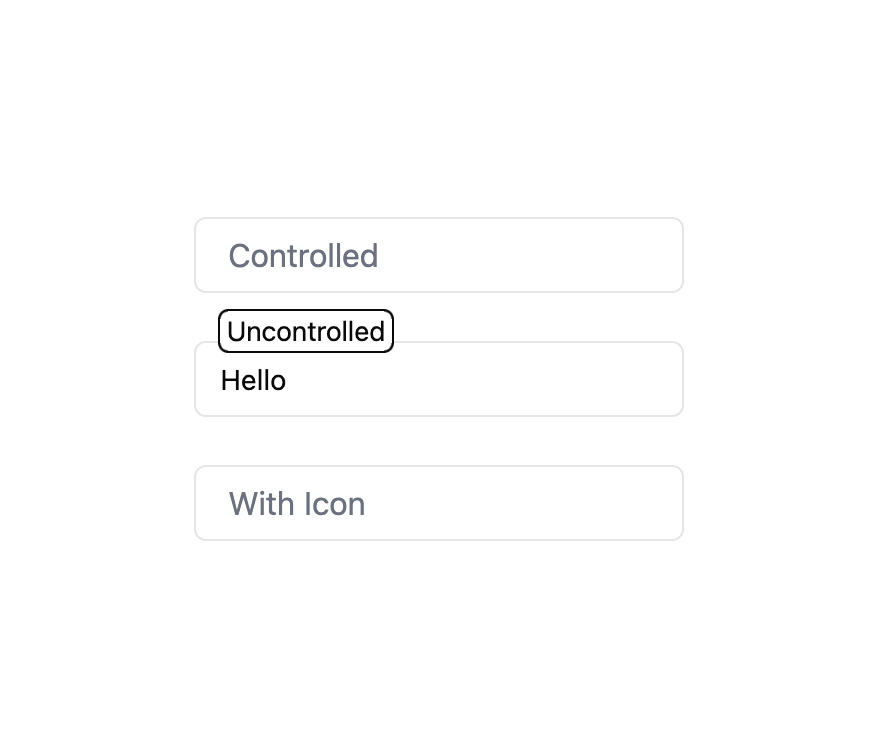
Here is Animated Input component
Built with React and Tailwind. Copy the prompt and paste it into Claude Code, Cursor or Lovable: your agent adds Animated Input to your project and fits it to your theme.
Code
How Animated Input is used: the demo's code. The component's own source comes with a free account.
Usage.tsx
"use client"

import { useState } from "react"
import { User } from "lucide-react"

import AnimatedInput from "@/components/ui/animated-input"

export default function AnimatedInputDemo() {
  const [value, setValue] = useState("")
  return (
    <div className="max-w-xs space-y-6">
      <AnimatedInput
        label="Controlled"
        value={value}
        onChange={setValue}
        placeholder="Type here..."
      />
      <AnimatedInput label="Uncontrolled" defaultValue="Hello" />
      <AnimatedInput
        label="With Icon"
        icon={<User size={20} strokeWidth={1.5} />}
        placeholder="Username"
      />
    </div>
  )
}
Dependencies
More by Edu Calvo
View all

Scrollable Card Stack
235
AI Task List
160
Siri Orb
160
Cursor Follow
154
Pixel Flow Field
142
Agent Avatar
130
Gravity Stars
112
Coverflow Carousel
95
More in Forms
View all

Premium Auth
500

Login 2
7
Authentication Card
47

Login 1
52

Contact Card
1K
Login Form
6

Form
16

Book A Demo 3
83
