
About
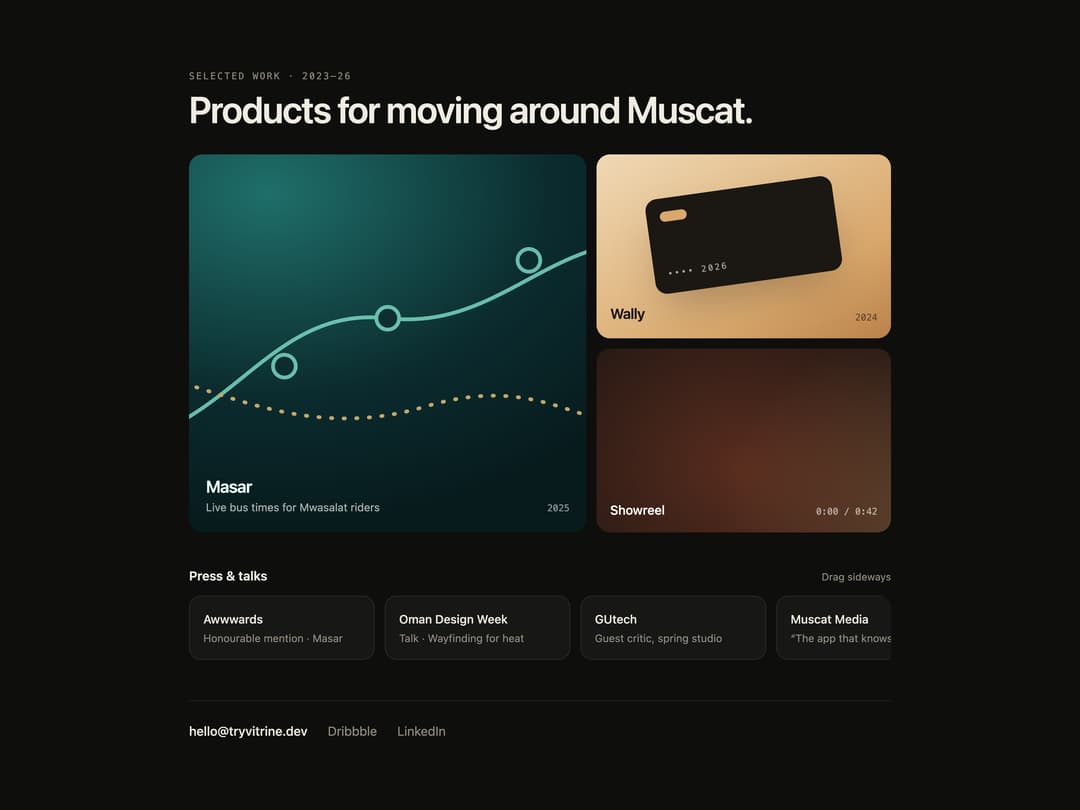
A custom cursor that morphs from a dot into a labeled pill describing what a click will do when hovering elements marked with data-intent, with spring animation, drag feedback, playback progress, and keyboard focus support.
Built with React and Tailwind. Copy the prompt and paste it into Claude Code, Cursor or Lovable: your agent adds Intent Label to your project and fits it to your theme.
Code
How Intent Label is used: the demo's code. The component's own source comes with a free account.
Usage.tsx
"use client";
import { IntentLabel } from "@/components/ui/intent-label";
import { useEffect, useRef, useState } from "react";
const PRESS = [
{ t: "Awwwards", s: "Honourable mention · Masar" },
{ t: "Oman Design Week", s: "Talk · Wayfinding for heat" },
{ t: "GUtech", s: "Guest critic, spring studio" },
{ t: "Muscat Media", s: "“The app that knows the bus”" },
{ t: "Figma Config", s: "Community spotlight" },
{ t: "Ithraa", s: "Startup showcase, 2025" },
];
const REEL = 42;
export default function Demo({ variant = "night" }: { variant?: string }) {
const paper = variant === "paper";
const [status, setStatus] = useState("");
const [copied, setCopied] = useState(false);
const [playing, setPlaying] = useState(false);
const [t, setT] = useState(0);
const strip = useRef<HTMLDivElement>(null);
const drag = useRef<{ x: number; left: number } | null>(null);
useEffect(() => {
if (!playing) return;
const id = window.setInterval(
() => setT((v) => Math.min(REEL, v + 0.1)),
100,
);
return () => window.clearInterval(id);
}, [playing]);
useEffect(() => {
if (t < REEL) return;
setPlaying(false);
setT(0);
}, [t]);
useEffect(() => {
if (!copied) return;
const id = window.setTimeout(() => setCopied(false), 1600);
return () => window.clearTimeout(id);
}, [copied]);
const c = paper
? {
page: "bg-[#f3efe7] text-[#17160f]",
muted: "text-[#77705f]",
line: "border-black/[0.09]",
chip: "bg-white",
ring: "focus-visible:outline-[#17160f]",
}
: {
page: "bg-[#0e0e0c] text-[#f1ece2]",
muted: "text-[#8f897c]",
line: "border-white/[0.08]",
chip: "bg-white/[0.04]",
ring: "focus-visible:outline-[#f4efe6]",
};
const focus = `focus-visible:outline-2 focus-visible:outline-offset-[3px] ${c.ring}`;
const fmt = (s: number) =>
`${Math.floor(s / 60)}:${String(Math.floor(s % 60)).padStart(2, "0")}`;
const copy = async () => {
try {
await navigator.clipboard.writeText("hello@tryvitrine.dev");
} catch {}
setCopied(true);
setStatus("Email copied to the clipboard");
};
return (
<IntentLabel
theme={paper ? "paper" : "night"}
className={`min-h-full w-full ${c.page}`}
style={{ fontFamily: "Geist, ui-sans-serif, system-ui" }}
>
<div className="mx-auto w-full max-w-4xl px-4 py-10 sm:px-8">
<div className="flex items-end justify-between gap-4">
<div>
<p
className={`font-mono text-[11px] uppercase tracking-[0.16em] ${c.muted}`}
>
Selected work · 2023–26
</p>
<h2 className="mt-2 text-[clamp(1.75rem,4.5vw,2.75rem)] font-semibold leading-none tracking-[-0.03em]">
Products for moving around Muscat.
</h2>
</div>
</div>
<div className="mt-8 grid gap-3 sm:grid-cols-[1.35fr_1fr]">
<a
href="#"
onClick={(e) => {
e.preventDefault();
setStatus("Opening Masar case study");
}}
data-intent="View case study"
data-intent-icon="view"
className={`group relative block aspect-[4/3] overflow-hidden rounded-2xl sm:row-span-2 sm:aspect-auto ${focus}`}
style={{
background:
"radial-gradient(120% 90% at 20% 10%, #1f6f6a, #0b2b2e 60%, #071a1c)",
}}
>
<svg
viewBox="0 0 400 300"
className="absolute inset-0 size-full opacity-80 transition-transform duration-700 group-hover:scale-[1.03]"
aria-hidden="true"
preserveAspectRatio="xMidYMid slice"
>
<path
d="M-10 230 C80 210 110 120 200 130 S330 60 420 70"
fill="none"
stroke="#7fe0c9"
strokeWidth="3"
strokeLinecap="round"
/>
<path
d="M-10 170 C60 180 130 230 230 200 S360 230 420 210"
fill="none"
stroke="#f3c77b"
strokeWidth="3"
strokeLinecap="round"
strokeDasharray="1 9"
/>
{[
[200, 130],
[118, 168],
[312, 84],
].map(([x, y]) => (
<g key={x}>
<circle
cx={x}
cy={y}
r="9"
fill="#0b2b2e"
stroke="#7fe0c9"
strokeWidth="3"
/>
</g>
))}
</svg>
<span className="absolute inset-x-0 bottom-0 flex items-end justify-between p-5 text-[#eafff8]">
<span>
<span className="block text-[20px] font-semibold tracking-tight">
Masar
</span>
<span className="block text-[13px] text-white/65">
Live bus times for Mwasalat riders
</span>
</span>
<span className="font-mono text-[11px] text-white/55">2025</span>
</span>
</a>
<a
href="#"
onClick={(e) => {
e.preventDefault();
setStatus("Opening Wally case study");
}}
data-intent="View case study"
data-intent-icon="view"
className={`group relative block aspect-[16/10] overflow-hidden rounded-2xl ${focus}`}
style={{
background:
"linear-gradient(150deg, #f0d9b5, #d9a86c 70%, #b9814a)",
}}
>
<span
className="absolute left-[18%] top-[18%] h-[52%] w-[64%] rotate-[-8deg] rounded-xl bg-[#1b1712] shadow-2xl transition-transform duration-700 group-hover:rotate-[-4deg]"
aria-hidden="true"
>
<span className="absolute left-4 top-4 h-3 w-8 rounded-sm bg-[#d9a86c]" />
<span className="absolute bottom-4 left-4 font-mono text-[10px] tracking-[0.2em] text-white/60">
•••• 2026
</span>
</span>
<span className="absolute inset-x-0 bottom-0 flex items-end justify-between p-4 text-[#1b1712]">
<span className="text-[17px] font-semibold tracking-tight">
Wally
</span>
<span className="font-mono text-[11px] opacity-60">2024</span>
</span>
</a>
<button
type="button"
onClick={() => {
setPlaying((p) => !p);
setStatus(playing ? "Reel paused" : "Reel playing");
}}
data-intent={
playing ? `Pause · ${fmt(t)}` : `Play reel · ${fmt(REEL - t)}`
}
data-intent-icon={playing ? "pause" : "play"}
data-intent-progress={t > 0 ? (t / REEL).toFixed(3) : undefined}
aria-pressed={playing}
aria-label={
playing ? "Pause showreel" : "Play showreel, 42 seconds"
}
className={`group relative aspect-[16/10] overflow-hidden rounded-2xl text-left ${focus}`}
style={{ background: "#141210" }}
>
<span
className="il-demo-reel absolute inset-0"
data-playing={playing || undefined}
aria-hidden="true"
/>
<span className="absolute inset-x-0 bottom-0 flex items-end justify-between p-4 text-white">
<span className="text-[15px] font-medium">Showreel</span>
<span className="font-mono text-[11px] tabular-nums text-white/60">
{fmt(t)} / {fmt(REEL)}
</span>
</span>
<span
className="absolute inset-x-0 bottom-0 h-[2px] origin-left bg-[#e0603a]"
style={{ transform: `scaleX(${t / REEL})` }}
aria-hidden="true"
/>
</button>
</div>
<div className="mt-10 flex items-baseline justify-between">
<h3 className="text-[15px] font-semibold">Press & talks</h3>
<span className={`text-[12px] ${c.muted}`}>Drag sideways</span>
</div>
<div
ref={strip}
role="region"
aria-label="Press and talks, scrolls sideways"
tabIndex={0}
data-intent="Drag"
data-intent-icon="drag"
data-intent-drag
className={`mt-3 flex select-none gap-3 overflow-x-auto pb-2 [scrollbar-width:none] ${focus} rounded-xl`}
onPointerDown={(e) => {
if (e.pointerType === "touch" || !strip.current) return;
drag.current = { x: e.clientX, left: strip.current.scrollLeft };
strip.current.setPointerCapture(e.pointerId);
}}
onPointerMove={(e) => {
if (!drag.current || !strip.current) return;
strip.current.scrollLeft =
drag.current.left - (e.clientX - drag.current.x);
}}
onPointerUp={() => (drag.current = null)}
onPointerCancel={() => (drag.current = null)}
>
{PRESS.map((p) => (
<div
key={p.t}
className={`w-[220px] shrink-0 rounded-xl border p-4 ${c.line} ${c.chip}`}
>
<p className="text-[14px] font-medium">{p.t}</p>
<p className={`mt-1 text-[12.5px] leading-snug ${c.muted}`}>
{p.s}
</p>
</div>
))}
</div>
<div
className={`mt-10 flex flex-wrap items-center gap-x-6 gap-y-3 border-t pt-6 ${c.line}`}
>
<button
type="button"
onClick={copy}
data-intent={copied ? "Copied" : "Copy email"}
data-intent-icon={copied ? "check" : "copy"}
className={`rounded-md text-[15px] font-medium ${focus}`}
>
hello@tryvitrine.dev
</button>
<a
href="https://dribbble.com/"
target="_blank"
rel="noreferrer"
data-intent="Opens in new tab"
data-intent-icon="external"
className={`rounded-md text-[15px] ${c.muted} ${focus}`}
>
Dribbble
</a>
<a
href="https://www.linkedin.com/"
target="_blank"
rel="noreferrer"
data-intent="Opens in new tab"
data-intent-icon="external"
className={`rounded-md text-[15px] ${c.muted} ${focus}`}
>
LinkedIn
</a>
<p className={`ml-auto text-[12px] ${c.muted}`} role="status">
{status}
</p>
</div>
</div>
<style>{`
.il-demo-reel { background: radial-gradient(60% 80% at 30% 40%, #e0603a55, transparent), radial-gradient(50% 70% at 75% 60%, #f3c77b44, transparent), #141210; background-size: 160% 160%; }
.il-demo-reel[data-playing] { animation: il-demo-pan 6s linear infinite alternate; }
@keyframes il-demo-pan { to { background-position: 100% 100%; } }
@media (prefers-reduced-motion: reduce) { .il-demo-reel[data-playing] { animation: none; } }
`}</style>
</IntentLabel>
);
}
More by ham7a311
View all
Route Globe
12
Wave Mesh
7
Uptime Ribbon
6
Glass Carousel
6
Glass Tiles
6
Streak Field Stats
5
Wind Map
5
Time Window
4