
About
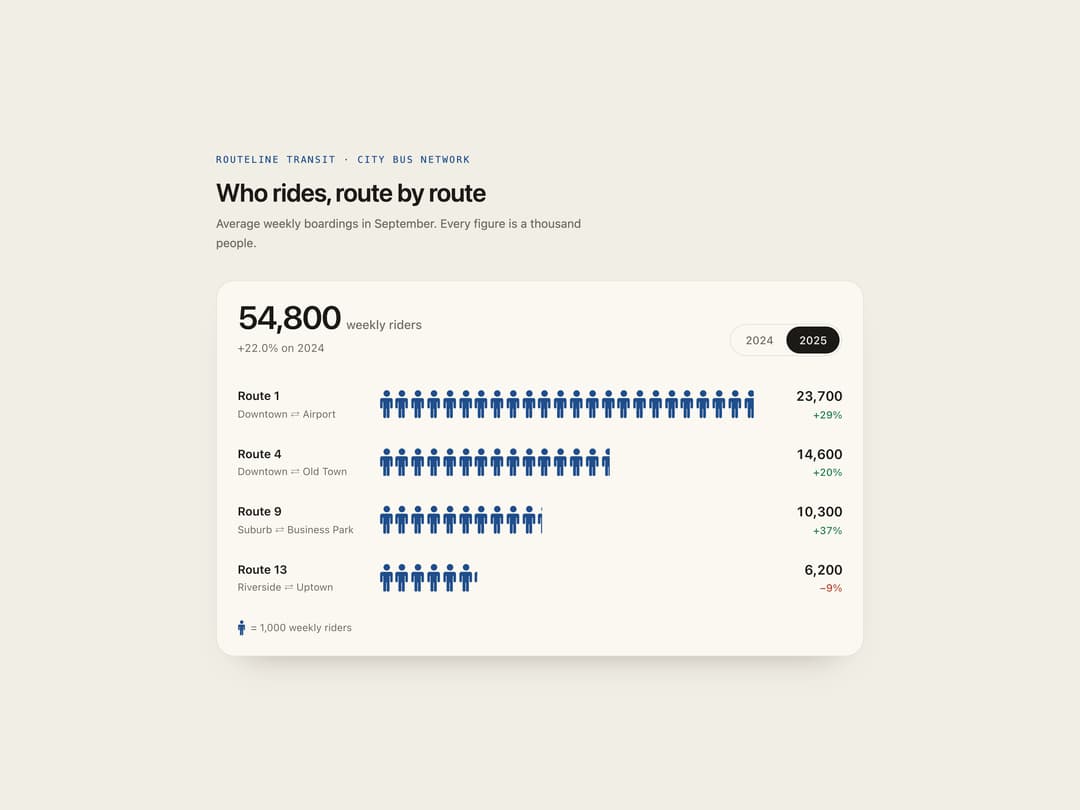
A pictogram statistics panel that counts quantities as rows of repeated figure icons, each figure worth a fixed unit, animating in as it scrolls into view and comparing two time periods.
Built with React and Tailwind. Copy the prompt and paste it into Claude Code, Cursor or Lovable: your agent adds Isotype Stats to your project and fits it to your theme.
Code
How Isotype Stats is used: the demo's code. The component's own source comes with a free account.
Usage.tsx
"use client";

import IsotypeStats from "@/components/ui/isotype-stats";

export default function IsotypeStatsDemo() {
  return (
    <div className="flex min-h-full w-full items-center justify-center px-4 py-12 bg-[#f1eee6] text-[#1b1a17]">
      <div className="w-full max-w-3xl">
        <p className="font-mono text-[11px] uppercase tracking-[0.16em] text-[#1f4e8c]">
          Routeline Transit · City bus network
        </p>
        <h2 className="mt-3 text-2xl font-semibold tracking-tight sm:text-3xl">
          Who rides, route by route
        </h2>
        <p className="mt-2 max-w-md text-sm leading-relaxed text-[#6f6a62]">
          Average weekly boardings in September. Every figure is a thousand
          people.
        </p>
        <IsotypeStats
          className="mt-8"
          theme="paper"
          title="Weekly riders by route"
          periods={["2024", "2025"]}
          unit={1000}
          noun="weekly riders"
          rows={[
            {
              label: "Route 1",
              note: "Downtown ⇄ Airport",
              values: { "2024": 18400, "2025": 23700 },
            },
            {
              label: "Route 4",
              note: "Downtown ⇄ Old Town",
              values: { "2024": 12200, "2025": 14600 },
            },
            {
              label: "Route 9",
              note: "Suburb ⇄ Business Park",
              values: { "2024": 7500, "2025": 10300 },
            },
            {
              label: "Route 13",
              note: "Riverside ⇄ Uptown",
              values: { "2024": 6800, "2025": 6200 },
            },
          ]}
        />
      </div>
    </div>
  );
}
More by ham7a311
View all
Route Globe
12
Wave Mesh
7
Uptime Ribbon
6
Glass Carousel
6
Glass Tiles
6
Streak Field Stats
5
Wind Map
5
Time Window
4