
About
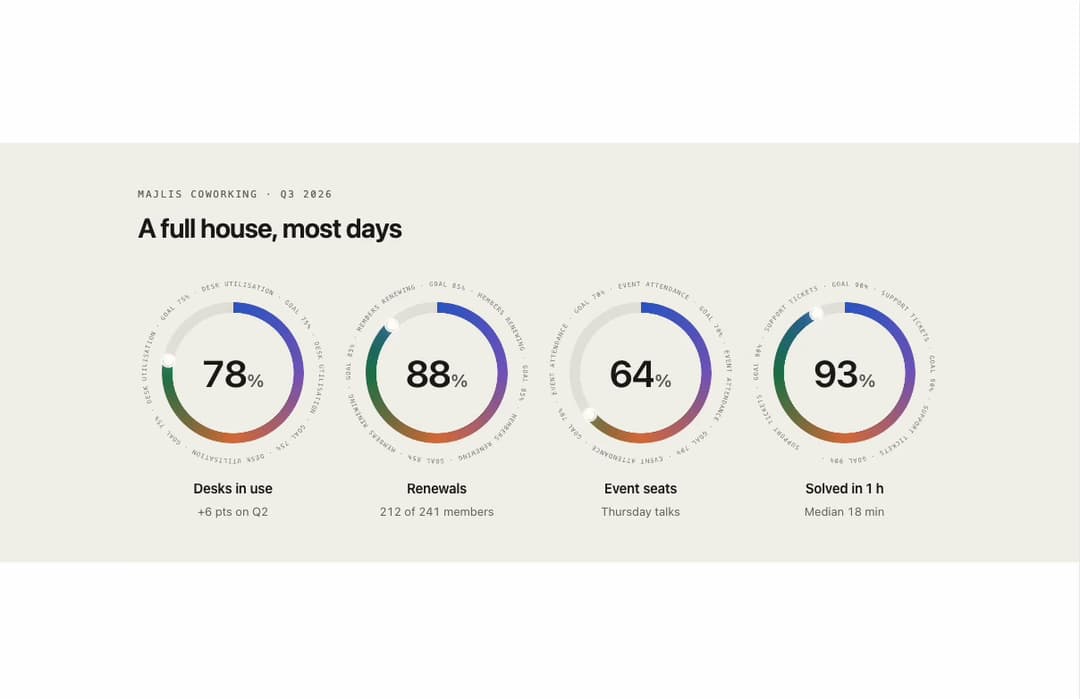
A row of animated ring-gauge stat cards whose arcs sweep in on scroll, with orbiting metric labels and a hover flood that inverts the number inside the ring.
Built with React and Tailwind. Copy the prompt and paste it into Claude Code, Cursor or Lovable: your agent adds Orbit Ring Stats to your project and fits it to your theme.
Code
How Orbit Ring Stats is used: the demo's code. The component's own source comes with a free account.
Usage.tsx
"use client";

import OrbitRingStats from "@/components/ui/orbit-ring-stats";

export default function OrbitRingStatsPaperDemo() {
  return (
    <div className="flex min-h-full w-full items-center justify-center px-4 py-12 bg-[#f3f1ec] text-[#1b1a17]">
      <div className="w-full max-w-4xl">
        <p className="font-mono text-[11px] uppercase tracking-[0.16em] text-[#6f6a62]">
          Majlis Coworking · Q3 2026
        </p>
        <h2 className="mt-3 text-2xl font-semibold tracking-tight sm:text-3xl">
          A full house, most days
        </h2>
        <OrbitRingStats
          className="mt-10"
          theme="paper"
          label="Q3 figures"
          rings={[
            {
              label: "Desks in use",
              value: 78,
              unit: "%",
              note: "+6 pts on Q2",
              orbit: "Desk utilisation · goal 75%",
            },
            {
              label: "Renewals",
              value: 88,
              unit: "%",
              note: "212 of 241 members",
              orbit: "Members renewing · goal 85%",
            },
            {
              label: "Event seats",
              value: 64,
              unit: "%",
              note: "Thursday talks",
              orbit: "Event attendance · goal 70%",
            },
            {
              label: "Solved in 1 h",
              value: 93,
              unit: "%",
              note: "Median 18 min",
              orbit: "Support tickets · goal 90%",
            },
          ]}
        />
      </div>
    </div>
  );
}
More by ham7a311
View all
Route Globe
18
Wave Mesh
11
Glass Tiles
9
Uptime Ribbon
7
Wind Map
7
Glass Carousel
7
Time Window
6
Streak Field Stats
5