
About
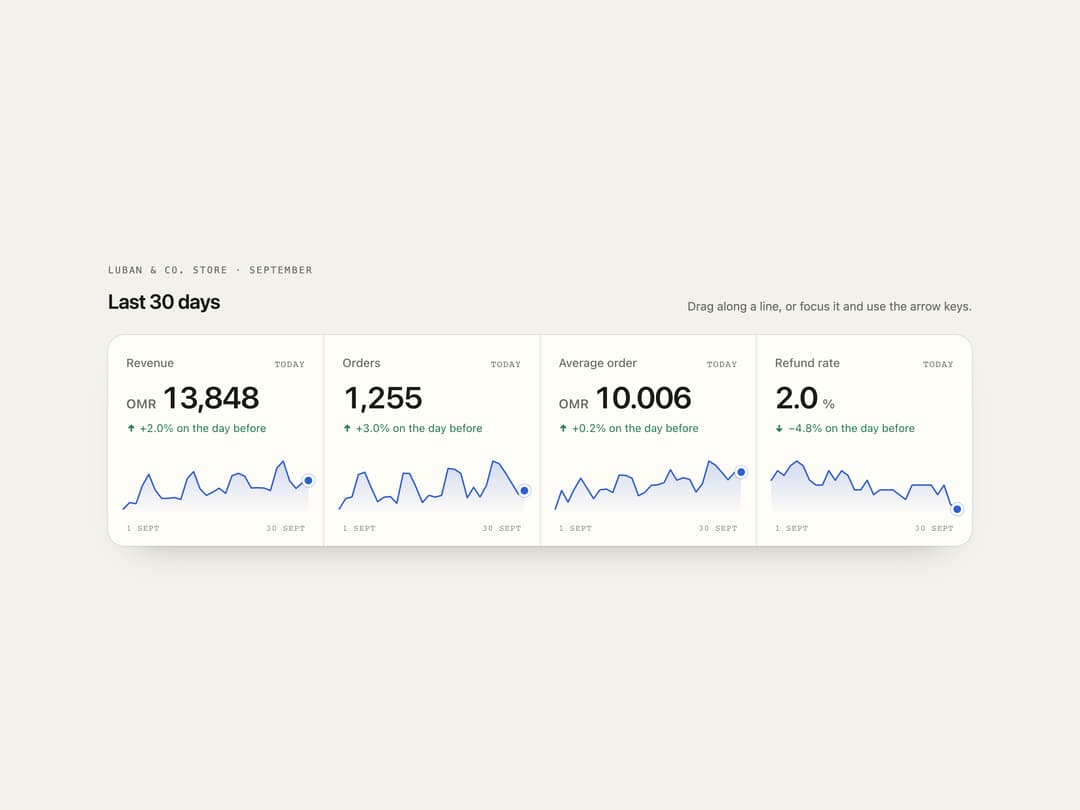
A KPI tile strip where dragging a finger or pointer along a 30-day sparkline rewinds the big number to that day, rolling only the digits that change, while the date and day-over-day delta update, springing back to today on release.
Built with React and Tailwind. Copy the prompt and paste it into Claude Code, Cursor or Lovable: your agent adds Scrub Sparkline Stats to your project and fits it to your theme.
Code
How Scrub Sparkline Stats is used: the demo's code. The component's own source comes with a free account.
Usage.tsx
"use client";

import { ScrubSparklineStats } from "@/components/ui/scrub-sparkline-stats";

/** A repeatable month of data: a trend, a weekly rhythm (busy weekends) and some noise. */
function month(
  seed: number,
  base: number,
  trend: number,
  week: number,
  noise: number,
  decimals = 0,
) {
  let s = seed;
  const rnd = () => (s = (s * 16807) % 2147483647) / 2147483647 - 0.5;
  const f = 10 ** decimals;
  return Array.from({ length: 30 }, (_, i) => {
    const day = (i + 1) % 7; // 30 Sep 2026 is a Wednesday
    const v =
      base *
      (1 +
        trend * (i / 29) +
        week * (day === 4 || day === 5 ? 1 : day === 6 ? 0.4 : -0.2) +
        noise * rnd());
    return Math.round(v * f) / f;
  });
}

export default function Demo({ variant = "paper" }: { variant?: string }) {
  const night = variant === "night";
  return (
    <div
      className={`flex min-h-full w-full items-center justify-center px-4 py-12 ${night ? "bg-[#0b0a0d] text-[#efe8dc]" : "bg-[#f3f1ec] text-[#1b1a17]"}`}
    >
      <div className="w-full max-w-5xl">
        <div className="flex flex-wrap items-end justify-between gap-3">
          <div>
            <p
              className={`font-mono text-[11px] uppercase tracking-[0.16em] ${night ? "text-[#9c96a1]" : "text-[#6f6a62]"}`}
            >
              Luban & Co. store · September
            </p>
            <h2 className="mt-3 text-2xl font-semibold tracking-tight">
              Last 30 days
            </h2>
          </div>
          <p
            className={`text-sm ${night ? "text-[#9c96a1]" : "text-[#6f6a62]"}`}
          >
            Drag along a line, or focus it and use the arrow keys.
          </p>
        </div>
        <ScrubSparklineStats
          className="mt-6"
          theme={night ? "night" : "paper"}
          end={new Date(Date.UTC(2026, 8, 30))}
          metrics={[
            {
              label: "Revenue",
              prefix: "OMR ",
              series: month(11, 11800, 0.18, 0.16, 0.12),
            },
            { label: "Orders", series: month(29, 1180, 0.12, 0.2, 0.1) },
            {
              label: "Average order",
              prefix: "OMR ",
              decimals: 3,
              series: month(7, 9.4, 0.05, 0.03, 0.05, 3),
            },
            {
              label: "Refund rate",
              suffix: "%",
              decimals: 1,
              better: "down",
              series: month(3, 2.9, -0.22, 0.04, 0.18, 1),
            },
          ]}
        />
      </div>
    </div>
  );
}
More by ham7a311
View all
Route Globe
17
Wave Mesh
11
Glass Tiles
8
Wind Map
7
Glass Carousel
7
Uptime Ribbon
6
Streak Field Stats
5
Time Window
5
More in Dashboards
View all
Dashboard with Collapsible Sidebar
2.4K

Sidebar
226

SaaS Template
2.4K
Stats Bento
1.1K

Financial Bento Grid
68

Course Design Cards
1.1K
Stats cards with links
79
Card Tabs
99


