
About
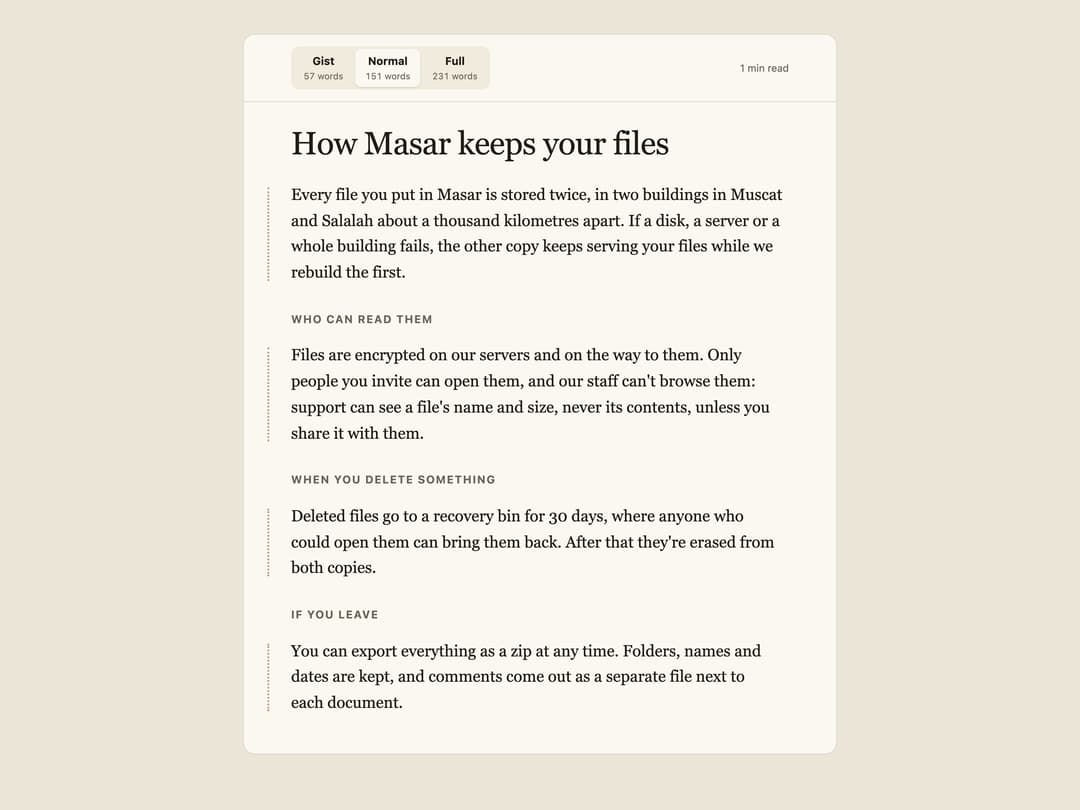
A long-form article reader where readers pick a depth (Gist, Normal, Full) and extra detail grows inside the same sentences, briefly highlighted, while scroll position and layout stay stable.
Built with React and Tailwind. Copy the prompt and paste it into Claude Code, Cursor or Lovable: your agent adds Stretchtext to your project and fits it to your theme.
Code
How Stretchtext is used: the demo's code. The component's own source comes with a free account.
Usage.tsx
"use client";
import { Less, More, Stretchtext } from "@/components/ui/stretchtext";

export default function StretchtextDemo() {
  return (
    <div className="min-h-screen w-full px-4 py-10 bg-[#ebe5d8]">
      <div className="mx-auto w-full max-w-[44rem]">
        <Stretchtext title="How Masar keeps your files" theme="light">
          <p>
            Every file you put in Masar is stored twice
            <More level={1}>
              , in two buildings in Muscat and Salalah about a thousand
              kilometres apart
            </More>
            <More level={2}>
              , and the second copy is written before we tell your app the
              upload finished
            </More>
            . <Less below={1}>If one copy is lost, we use the other.</Less>
            <More level={1}>
              If a disk, a server or a whole building fails, the other copy
              keeps serving your files while we rebuild the first.
            </More>
          </p>
          <h3>Who can read them</h3>
          <p>
            Files are encrypted
            <More level={1}> on our servers and on the way to them</More>
            <More level={2}>
              , with keys that change every 90 days and are kept in separate
              hardware from the files themselves
            </More>
            . Only people you invite can open them<Less below={1}>.</Less>
            <More level={1}>
              , and our staff can't browse them: support can see a file's name
              and size, never its contents, unless you share it with them
            </More>
            <More level={2}> from the file's menu, for a time you choose</More>
            <More level={1}>.</More>
          </p>
          <h3>When you delete something</h3>
          <p>
            <Less below={1}>Deleted files can be recovered for 30 days.</Less>
            <More level={1}>
              Deleted files go to a recovery bin for 30 days, where anyone who
              could open them can bring them back. After that they're erased
              from both copies
            </More>
            <More level={2}>
              {" "}
              within 48 hours, and from our backups when those backups expire,
              at most 35 days later
            </More>
            <More level={1}>.</More>
          </p>
          <h3>If you leave</h3>
          <p>
            You can export everything as a zip at any time.
            <More level={1}>
              {" "}
              Folders, names and dates are kept, and comments come out as a
              separate file next to each document.
            </More>
            <More level={2}>
              {" "}
              Closing your account starts the same 30-day bin for everything at
              once, so a mistaken closure can still be undone by writing to us.
            </More>
          </p>
        </Stretchtext>
      </div>
    </div>
  );
}
More by ham7a311
View all
Route Globe
13
Wave Mesh
8
Uptime Ribbon
6
Glass Carousel
6
Glass Tiles
6
Streak Field Stats
5
Wind Map
5
Time Window
4