
About
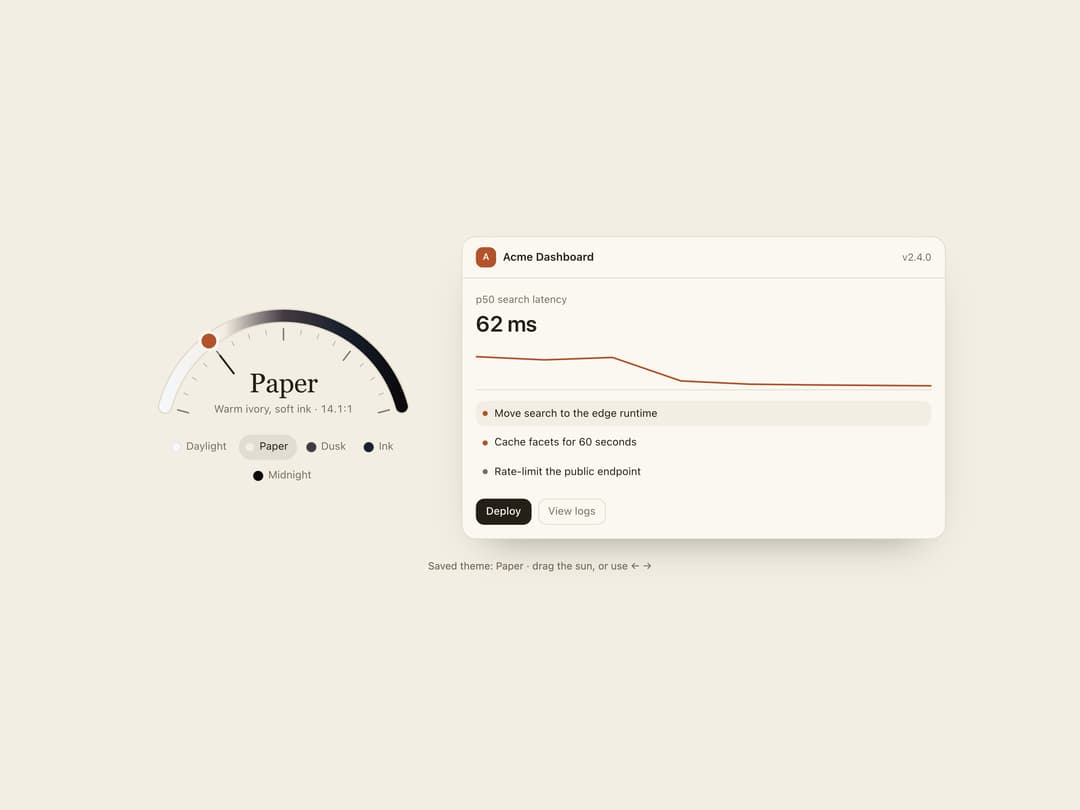
A theme picker shaped like a sun-path instrument: drag a needle along a half-dial to continuously blend five time-of-day colour themes, with the UI recolouring live and settling into the nearest theme on release.
Built with React and Tailwind. Copy the prompt and paste it into Claude Code, Cursor or Lovable: your agent adds Theme Dial to your project and fits it to your theme.
Code
How Theme Dial is used: the demo's code. The component's own source comes with a free account.
Usage.tsx
"use client";

import {
  ThemeDial,
  DAY_THEMES,
  type ThemeTokens,
} from "@/components/ui/theme-dial";
import { useState } from "react";

function Preview({ t }: { t: ThemeTokens }) {
  return (
    <div
      className="overflow-hidden rounded-2xl"
      style={{
        background: t.surface,
        color: t.ink,
        boxShadow: `0 0 0 1px ${t.line}, 0 24px 50px -30px rgb(0 0 0 / 0.45)`,
      }}
      aria-label="Theme preview"
      role="img"
    >
      <div
        className="flex items-center gap-2 px-4 py-3"
        style={{ borderBottom: `1px solid ${t.line}` }}
      >
        <span
          className="grid size-6 place-items-center rounded-md text-[11px] font-semibold"
          style={{ background: t.accent, color: t.surface }}
        >
          A
        </span>
        <span className="text-[13px] font-semibold">Acme Dashboard</span>
        <span className="ml-auto text-[12px]" style={{ color: t.muted }}>
          v2.4.0
        </span>
      </div>
      <div className="grid gap-3 p-4">
        <div>
          <p className="m-0 text-[12px]" style={{ color: t.muted }}>
            p50 search latency
          </p>
          <p className="m-0 text-[26px] font-semibold tracking-[-0.02em] tabular-nums">
            62 ms
          </p>
        </div>
        <svg
          viewBox="0 0 200 50"
          className="h-12 w-full"
          preserveAspectRatio="none"
          aria-hidden="true"
        >
          <polyline
            points="0,8 30,12 60,9 90,38 120,42 150,43 200,44"
            fill="none"
            stroke={t.accent}
            strokeWidth="2"
            vectorEffect="non-scaling-stroke"
            strokeLinejoin="round"
          />
          <line
            x1="0"
            x2="200"
            y1="49"
            y2="49"
            stroke={t.line}
            vectorEffect="non-scaling-stroke"
          />
        </svg>
        <div className="grid gap-1">
          {[
            "Move search to the edge runtime",
            "Cache facets for 60 seconds",
            "Rate-limit the public endpoint",
          ].map((s, i) => (
            <div
              key={s}
              className="flex items-center gap-2 rounded-lg px-2 py-1.5 text-[12.5px]"
              style={{ background: i === 0 ? t.bg : "transparent" }}
            >
              <span
                className="size-1.5 shrink-0 rounded-full"
                style={{ background: i === 2 ? t.muted : t.accent }}
              />
              <span className="truncate">{s}</span>
            </div>
          ))}
        </div>
        <div className="flex gap-2 pt-1">
          <span
            className="rounded-lg px-3 py-1.5 text-[12.5px] font-medium"
            style={{ background: t.ink, color: t.surface }}
          >
            Deploy
          </span>
          <span
            className="rounded-lg px-3 py-1.5 text-[12.5px]"
            style={{ boxShadow: `inset 0 0 0 1px ${t.line}`, color: t.muted }}
          >
            View logs
          </span>
        </div>
      </div>
    </div>
  );
}

export default function Demo() {
  const [page, setPage] = useState<ThemeTokens>(DAY_THEMES[1].tokens);
  const [chosen, setChosen] = useState("paper");
  return (
    <div
      className="flex h-full min-h-[600px] w-full items-center justify-center overflow-auto px-5 py-10"
      style={{
        background: page.bg,
        containerType: "inline-size",
        fontFamily: "Geist, ui-sans-serif, system-ui",
      }}
    >
      <div className="flex w-full flex-col items-center gap-6">
        <ThemeDial
          defaultValue="paper"
          onPreview={setPage}
          onChange={(id) => setChosen(id)}
        >
          {(t) => <Preview t={t} />}
        </ThemeDial>
        <p
          className="m-0 text-[12px]"
          style={{ color: page.muted }}
          aria-live="polite"
        >
          Saved theme: {DAY_THEMES.find((s) => s.id === chosen)?.name} · drag
          the sun, or use ← →
        </p>
      </div>
    </div>
  );
}
More by ham7a311
View all
Route Globe
13
Wave Mesh
8
Uptime Ribbon
6
Glass Carousel
6
Glass Tiles
6
Streak Field Stats
5
Wind Map
5
Time Window
4