
About
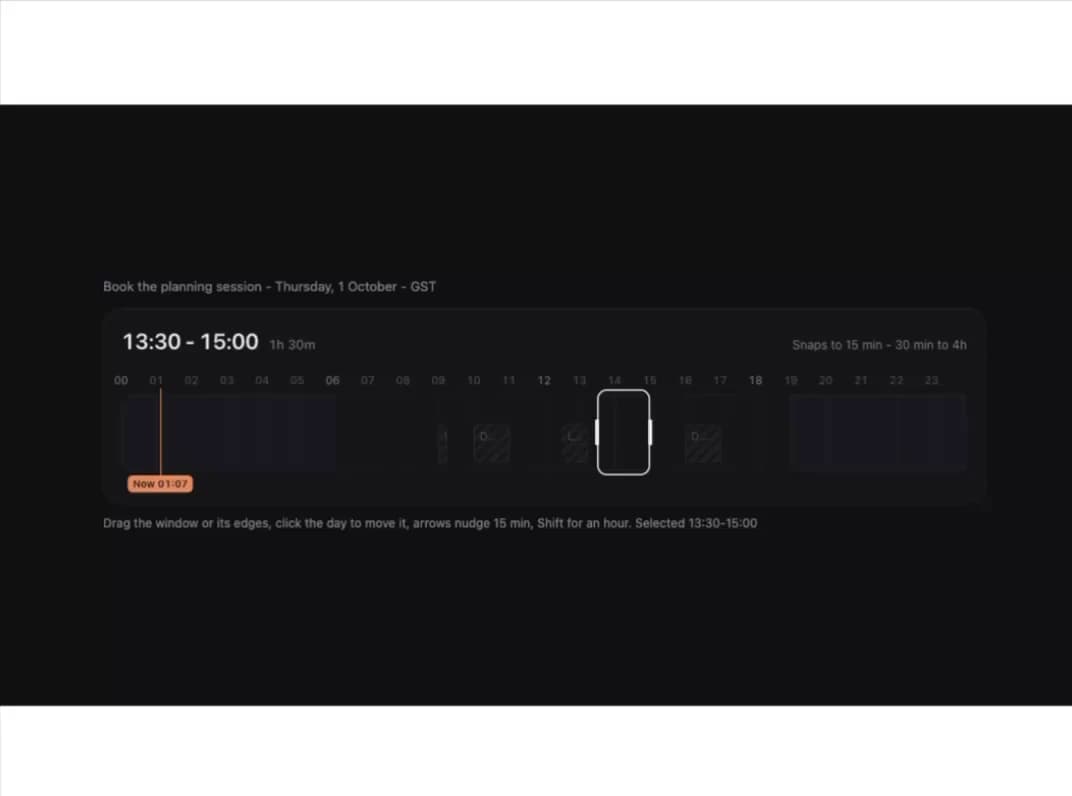
A drag-to-select time range picker for a single day, where the chosen window stays visually dominant while busy blocks, night hours and the current time fade into context behind it; collapses to a vertical day column on narrow screens.
Built with React and Tailwind. Copy the prompt and paste it into Claude Code, Cursor or Lovable: your agent adds Time Window to your project and fits it to your theme.
Code
How Time Window is used: the demo's code. The component's own source comes with a free account.
Usage.tsx
import * as React from "react";
import TimeWindow, { fmtTime } from "@/components/ui/time-window";

const BUSY = [
  { start: 9 * 60, end: 9 * 60 + 15, label: "Standup" },
  { start: 10 * 60, end: 11 * 60, label: "Design review" },
  { start: 12 * 60 + 30, end: 13 * 60 + 15, label: "Lunch" },
  { start: 16 * 60, end: 17 * 60, label: "Deploy window" },
];

export default function TimeWindowNightDemo() {
  const [range, setRange] = React.useState({
    start: 13 * 60 + 30,
    end: 15 * 60,
  });
  const [now, setNow] = React.useState(undefined);

  React.useEffect(() => {
    const tick = () => {
      const d = new Date();
      setNow(d.getHours() * 60 + d.getMinutes());
    };
    tick();
    const t = window.setInterval(tick, 30000);
    return () => window.clearInterval(t);
  }, []);

  return (
    <div className="flex h-full min-h-[600px] w-full items-center justify-center overflow-auto bg-[#0f1012] px-4 py-10 text-[#ececea]">
      <div className="w-full max-w-[880px]">
        <p className="mb-3 text-[13px] text-[#8b8d93]">
          Book the planning session - Thursday, 1 October - GST
        </p>
        <TimeWindow
          theme="night"
          label="Planning session"
          value={range}
          onChange={setRange}
          busy={BUSY}
          now={now}
          step={15}
          minDuration={30}
          maxDuration={240}
        />
        <p className="mt-3 text-[12px] text-[#8b8d93]">
          Drag the window or its edges, click the day to move it, arrows nudge
          15 min, Shift for an hour. Selected {fmtTime(range.start)}-
          {fmtTime(range.end)}
        </p>
      </div>
    </div>
  );
}
More by ham7a311
View all
Route Globe
18
Wave Mesh
11
Glass Tiles
8
Uptime Ribbon
7
Wind Map
7
Glass Carousel
7
Streak Field Stats
5
Ruler Picker
5