
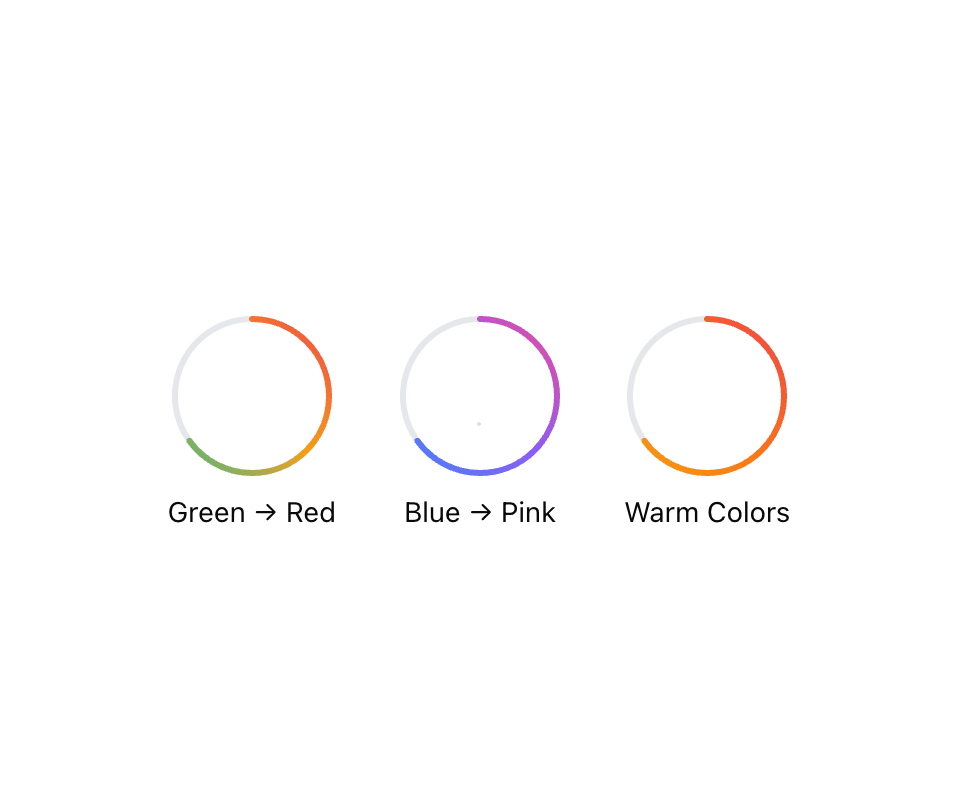
CircleProgress displays progress, completion status, or usage metrics in a circular format. It provides visual feedback about processes, tasks completion, or resource utilization. ## When to use - To show completion percentage of a task or process - To display resource usage (disk space, memory, CPU) - To create countdown or elapsed time indicators - For data visualization that needs to show parts of a whole ## Accessibility - Progress indicator includes ARIA attributes for screen readers - Value text provides detailed information about current progress value - Ensure sufficient color contrast for the progress indicator - Consider providing text alternatives that describe the progress value
Built with React and Tailwind. Copy the prompt and paste it into Claude Code, Cursor or Lovable: your agent adds Circle Progress to your project and fits it to your theme.
Code
How Circle Progress is used: the demo's code. The component's own source comes with a free account.
Usage.tsx
import * as React from "react";
import { CircleProgress } from "@/components/ui/circle-progress";

export function GradientVariants() {
  return (
    <div className="flex flex-wrap gap-8 justify-center">
      <div className="flex flex-col items-center">
        <CircleProgress
          value={65}
          maxValue={100}
          size={80}
          useGradient={true}
          gradientColors={["#10b981", "#f59e0b", "#ef4444"]}
        />
        <span className="mt-2 text-sm">Green → Red</span>
      </div>
      <div className="flex flex-col items-center">
        <CircleProgress
          value={65}
          maxValue={100}
          size={80}
          useGradient={true}
          gradientColors={["#3b82f6", "#8b5cf6", "#ec4899"]}
        />
        <span className="mt-2 text-sm">Blue → Pink</span>
      </div>
      <div className="flex flex-col items-center">
        <CircleProgress
          value={65}
          maxValue={100}
          size={80}
          useGradient={true}
          gradientColors={["#f59e0b", "#f97316", "#ef4444"]}
          gradientId="warm-gradient"
        />
        <span className="mt-2 text-sm">Warm Colors</span>
      </div>
    </div>
  );
}More by oc tung
View all
useItemOverflow
68