
About
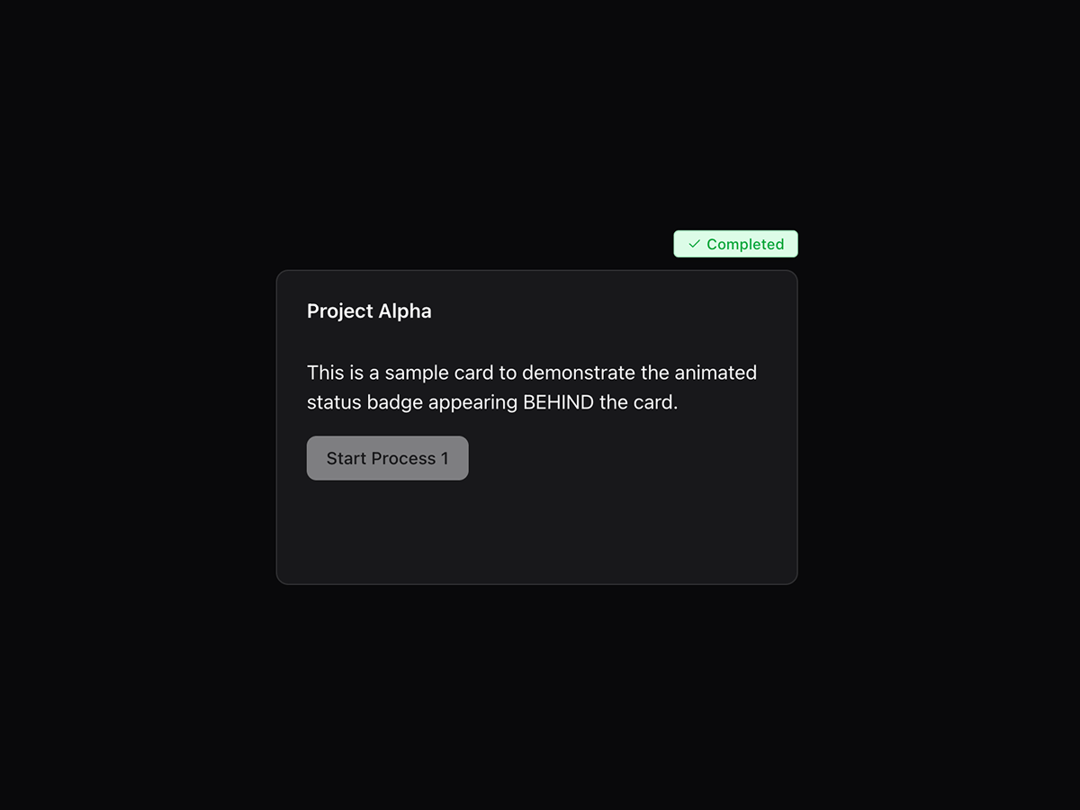
This interactive status card features an animated "Running" badge with smooth transitions and a delayed "Completed" confirmation, triggered by a single action button. Perfect for displaying real-time process feedback in dashboards, onboarding flows, or transactional UI components.
Built with React and Tailwind. Copy the prompt and paste it into Claude Code, Cursor or Lovable: your agent adds Animated Status Badge to your project and fits it to your theme.
Code
How Animated Status Badge is used: the demo's code. The component's own source comes with a free account.
Usage.tsx
"use client";
import { useState } from "react"
import { Button } from "@/components/ui/button"
import { Card, CardContent, CardHeader, CardTitle } from "@/components/ui/card"
import { AnimatedStatusBadge } from "@/components/ui/animated-status-badge"
export default function Page() {
const [triggerAnimation1, setTriggerAnimation1] = useState(false)
const [triggerAnimation2, setTriggerAnimation2] = useState(false)
const handleStartAnimation1 = () => {
setTriggerAnimation1(true)
}
const handleStartAnimation2 = () => {
setTriggerAnimation2(true)
}
const handleAnimationComplete1 = () => {
// Reset the trigger after completed badge shows for a bit
setTimeout(() => setTriggerAnimation1(false), 2000)
}
const handleAnimationComplete2 = () => {
// Reset the trigger after completed badge shows for a bit
setTimeout(() => setTriggerAnimation2(false), 2000)
}
return (
<div className="min-h-screen p-8">
<div className="max-w-4xl mx-auto space-y-8">
<h1 className="text-3xl mt-10 pb-5 font-bold text-center text-primary mb-8">Reusable Animated Status Badge Demo</h1>
{/*
DEMO INSTRUCTIONS:
- Each card is wrapped in a relative container
- The AnimatedStatusBadge is positioned absolutely and appears BEHIND the card (z-0)
- Cards have relative z-10 positioning to appear above the badge
- Animation runs once per trigger and auto-resets after completion
*/}
<div className="grid grid-cols-1 md:grid-cols-2 gap-12">
{/* First Card */}
<div className="relative">
<AnimatedStatusBadge
trigger={triggerAnimation1}
onAnimationComplete={handleAnimationComplete1}
/>
<Card className="w-full h-64 overflow-hidden rounded-lg relative z-10">
<CardHeader>
<CardTitle>Project Alpha</CardTitle>
</CardHeader>
<CardContent className="space-y-4">
<p className="text-foreground">This is a sample card to demonstrate the animated status badge appearing BEHIND the card.</p>
<Button onClick={handleStartAnimation1} disabled={triggerAnimation1}>
Start Process 1
</Button>
</CardContent>
</Card>
</div>
{/* Second Card */}
<div className="relative">
<AnimatedStatusBadge
trigger={triggerAnimation2}
onAnimationComplete={handleAnimationComplete2}
/>
<Card className="w-full h-64 overflow-hidden rounded-lg relative z-10">
<CardHeader>
<CardTitle>Project Beta</CardTitle>
</CardHeader>
<CardContent className="space-y-4">
<p className="text-foreground">Another card showing how the badge can be reused across different components while staying behind the card.</p>
<Button onClick={handleStartAnimation2} disabled={triggerAnimation2} variant="secondary">
Start Process 2
</Button>
</CardContent>
</Card>
</div>
</div>
<div className="text-center text-gray-600">
<p>Click the buttons to see the animated status badges appear BEHIND the cards!</p>
<p className="text-sm mt-2">Each badge runs once per trigger: “Running” → disappears → “Completed” → auto-reset</p>
</div>
</div>
</div>
);
}
Dependencies
More by Isaiah
View all
Agent Plan
2.2K
Video Scroll Hero
1.4K
Voice Powered Orb
1.3K
Reveal Text
1.1K
Leads Data Table
935
Portfolio Gallery
923
Message Dock
833
Ruler Carousel
618
More in Buttons
View all
Button Save
46

Button
20

Eclipse Button
5

Button
6

Button
14

Button Group
37

Button
32
Split Button
32

