
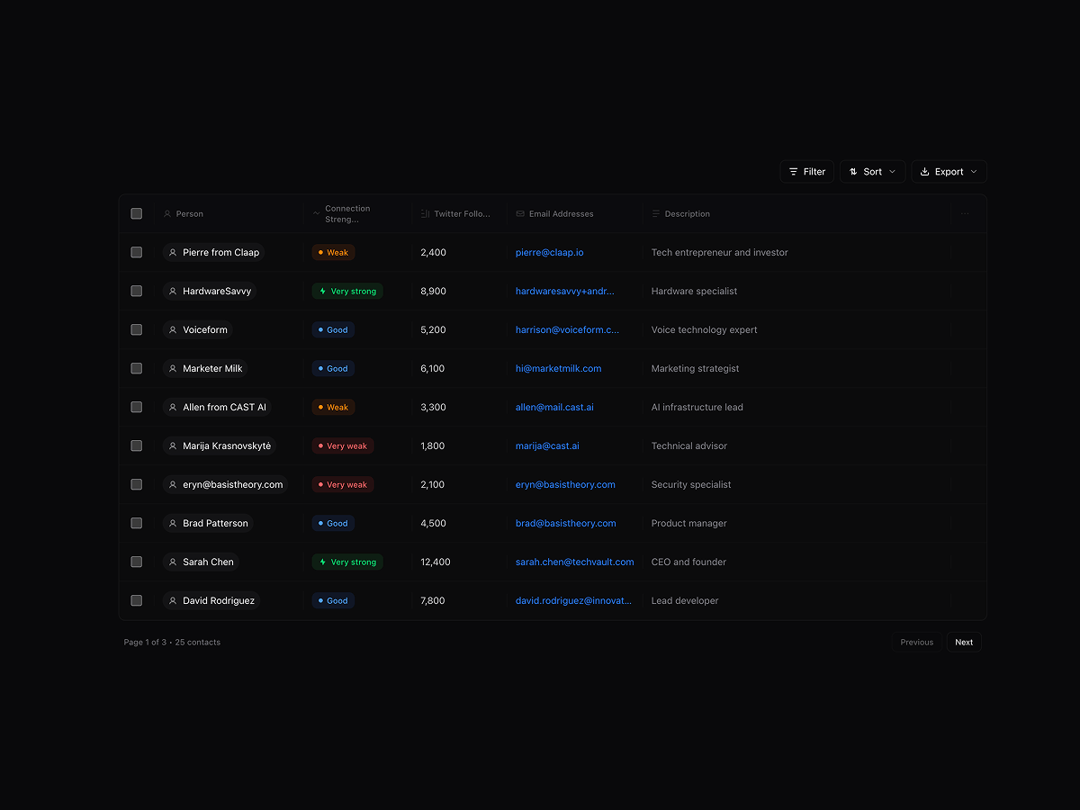
The ContactsTable component is a production-ready data table that displays a list of contacts with advanced filtering, sorting, and selection capabilities. It features a grid-style layout with multi-select checkboxes, connection strength indicators, Twitter follower counts, and email information, allowing users to quickly browse and identify key contacts. The component includes a detail modal for viewing full contact information, export functionality for CSV and JSON formats, and pagination support, making it ideal for CRM applications, outreach platforms, and contact management systems.
Built with React and Tailwind. Copy the prompt and paste it into Claude Code, Cursor or Lovable: your agent adds Contacts Table With Modal to your project and fits it to your theme.
Code
How Contacts Table With Modal is used: the demo's code. The component's own source comes with a free account.
Usage.tsx
"use client";

import {
  ContactsTable,
  type Contact,
} from "@/components/ui/contacts-table-with-modal";

export default function ContactsTableDemo() {
  const handleContactSelect = (contactId: string) => {
    console.log(`Selected contact:`, contactId);
  };

  return (
    <div className="min-h-screen bg-background py-6 md:py-12">
      <div className="container mx-auto px-2 sm:px-4">
        <div className="mb-8 md:mb-12">
          <ContactsTable title="Person" onContactSelect={handleContactSelect} />
        </div>
      </div>
    </div>
  );
}
Dependencies
More by Isaiah
View all
Agent Plan
2.2K
Video Scroll Hero
1.4K
Voice Powered Orb
1.3K
Reveal Text
1.1K
Leads Data Table
935
Portfolio Gallery
922
Message Dock
833
Ruler Carousel
617