
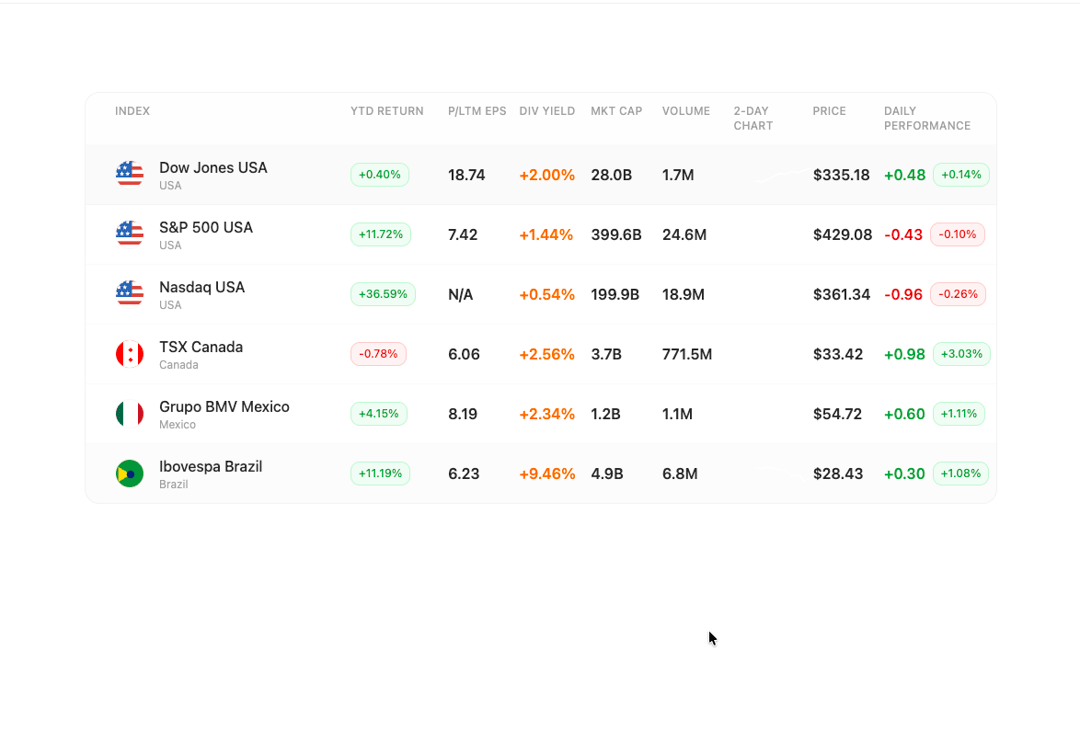
The FinancialTable component is a comprehensive data table designed for displaying market indices and financial data with interactive features and smooth animations. It features circular country flag icons, color-coded performance badges, sparkline charts, and responsive grid layout that adapts to different screen sizes while maintaining proper spacing. The component includes hover effects, selection states, and Framer Motion animations for enhanced user experience, making it ideal for financial dashboards, trading platforms, or investment tracking applications where users need to quickly scan and compare market performance data.
Built with React and Tailwind. Copy the prompt and paste it into Claude Code, Cursor or Lovable: your agent adds Financial Markets Table to your project and fits it to your theme.
Code
How Financial Markets Table is used: the demo's code. The component's own source comes with a free account.
Usage.tsx
"use client";

import { useState, useEffect } from "react";
import { FinancialTable, type MarketIndex } from "@/components/ui/financial-markets-table";

const initialIndices: MarketIndex[] = [
  {
    id: "1",
    name: "Dow Jones USA",
    country: "USA",
    countryCode: "US",
    ytdReturn: 0.40,
    pltmEps: 18.74,
    divYield: 2.00,
    marketCap: 28.04,
    volume: 1.7,
    chartData: [330.5, 331.2, 330.8, 331.5, 332.1, 331.8, 332.4, 333.2, 333.9, 333.7],
    price: 333.90,
    dailyChange: -0.20,
    dailyChangePercent: -0.06
  },
  {
    id: "2",
    name: "S&P 500 USA",
    country: "USA",
    countryCode: "US",
    ytdReturn: 11.72,
    pltmEps: 7.42,
    divYield: 1.44,
    marketCap: 399.6,
    volume: 24.6,
    chartData: [425.1, 426.3, 427.8, 428.1, 429.2, 428.9, 429.5, 429.1, 428.7, 428.9],
    price: 428.72,
    dailyChange: -0.82,
    dailyChangePercent: -0.19
  },
  {
    id: "3",
    name: "Nasdaq USA",
    country: "USA",
    countryCode: "US",
    ytdReturn: 36.59,
    pltmEps: null,
    divYield: 0.54,
    marketCap: 199.9,
    volume: 18.9,
    chartData: [360.2, 361.8, 362.4, 363.1, 364.3, 363.8, 364.1, 363.5, 363.2, 362.97],
    price: 362.97,
    dailyChange: -1.73,
    dailyChangePercent: -0.47
  },
  {
    id: "4",
    name: "TSX Canada",
    country: "Canada",
    countryCode: "CA",
    ytdReturn: -0.78,
    pltmEps: 6.06,
    divYield: 2.56,
    marketCap: 3.67,
    volume: 771.5,
    chartData: [32.1, 32.3, 32.5, 32.4, 32.7, 32.8, 32.9, 33.0, 32.9, 32.96],
    price: 32.96,
    dailyChange: 0.19,
    dailyChangePercent: 0.58
  },
  {
    id: "5",
    name: "Grupo BMV Mexico",
    country: "Mexico",
    countryCode: "MX",
    ytdReturn: 4.15,
    pltmEps: 8.19,
    divYield: 2.34,
    marketCap: 1.22,
    volume: 1.1,
    chartData: [52.1, 52.8, 53.2, 53.5, 53.9, 54.1, 54.3, 54.0, 53.8, 53.7],
    price: 53.70,
    dailyChange: -1.01,
    dailyChangePercent: -1.85
  },
  {
    id: "6",
    name: "Ibovespa Brazil",
    country: "Brazil",
    countryCode: "BR",
    ytdReturn: 11.19,
    pltmEps: 6.23,
    divYield: 9.46,
    marketCap: 4.87,
    volume: 6.8,
    chartData: [28.5, 28.8, 29.1, 29.3, 29.5, 29.4, 29.6, 29.5, 29.3, 29.28],
    price: 29.28,
    dailyChange: -0.06,
    dailyChangePercent: -0.22
  }
];

export default function FinancialTableDemo() {
  const [indices, setIndices] = useState<MarketIndex[]>(initialIndices);

  const handleIndexSelect = (indexId: string) => {
    console.log(`Selected market index:`, indexId);
  };

  // Simulate live data updates for sparklines every 3 seconds
  useEffect(() => {
    const interval = setInterval(() => {
      setIndices(prev => prev.map(index => {
        // Generate new price point with slight random variation
        const lastPrice = index.chartData[index.chartData.length - 1];
        const variation = (Math.random() - 0.5) * 2; // ±1 point variation
        const newPrice = Math.max(1, lastPrice + variation);

        // Update chart data (shift array and add new point)
        const newChartData = [...index.chartData.slice(1), newPrice];

        // Update current price and daily change
        const priceChange = newPrice - lastPrice;
        const priceChangePercent = (priceChange / lastPrice) * 100;

        return {
          ...index,
          chartData: newChartData,
          price: newPrice,
          dailyChange: priceChange,
          dailyChangePercent: priceChangePercent
        };
      }));
    }, 3000);

    return () => clearInterval(interval);
  }, []);

  return (
    <div className="min-h-screen bg-background py-6 md:py-12">
      <div className="container mx-auto px-2 sm:px-4 mt-12">
        <FinancialTable
          title="Index"
          indices={indices}
          onIndexSelect={handleIndexSelect}
        />
      </div>
    </div>
  );
}
Dependencies
More by Isaiah
View all
Agent Plan
2.2K
Video Scroll Hero
1.4K
Voice Powered Orb
1.3K
Reveal Text
1.1K
Leads Data Table
935
Portfolio Gallery
922
Message Dock
833
Ruler Carousel
617