
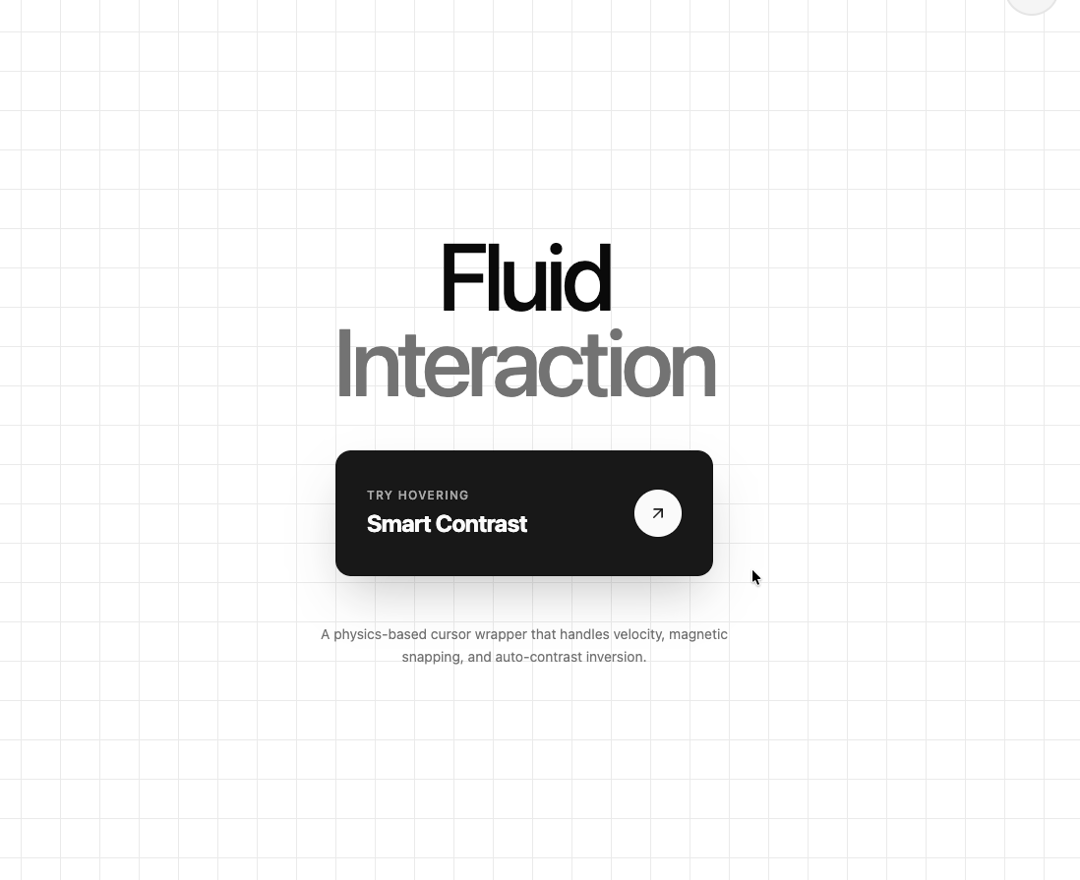
Magnetic Cursor - Interactive Physics-Based Cursor A highly interactive cursor component built with React, GSAP, and Vecteur. Unlike standard cursors, this uses a spring-physics model for true magnetic resistance and smooth blob-like morphing. It solves common accessibility issues with a smart contrast filter that ensures the cursor never washes out text, even on low-contrast backgrounds. ✨ Key Features: True Spring Physics: Elastic magnetic attraction that feels "alive" (no linear drifting). Smart Contrast: Auto-applies backdrop-filter: contrast() to make text legible in exclusion mode. Gooey Detachment: Smooth, velocity-based morphing when pulling away from elements. Zero-Layout-Shift: Locks to element centers prevents "padding drift." Particle Effects: satisfying explosion effects on click. Production Ready: Touch detection, Reduced Motion support, and TypeScript. 🎯 Perfect for: High-end portfolios, SaaS landing pages, and agency websites requiring agency-grade micro-interactions. 📦 Stack: React, GSAP, Vecteur, Tailwind CSS.
Built with React and Tailwind. Copy the prompt and paste it into Claude Code, Cursor or Lovable: your agent adds Fluid Magnetic Cursor to your project and fits it to your theme.
Code
How Fluid Magnetic Cursor is used: the demo's code. The component's own source comes with a free account.
Usage.tsx
import React from "react";
import { MagneticCursor } from "@/components/ui/magnetic-cursor";
import { ArrowUpRight, Menu } from "lucide-react";

export default function MagneticCursorDemo() {
  return (
    <MagneticCursor
      magneticFactor={0.55}
      blendMode="exclusion"
      cursorSize={40}
    >
      <div className="relative w-full h-screen bg-background text-foreground overflow-hidden font-sans selection:bg-primary selection:text-background flex flex-col">

        {/* Subtle Grid Background using CSS Variables from your config */}
        <div
            className="absolute inset-0 z-0 opacity-80 pointer-events-none"
            style={{
                backgroundImage: `linear-gradient(var(--color-border) 1px, transparent 1px), linear-gradient(90deg, var(--color-border) 1px, transparent 1px)`,
                backgroundSize: '40px 40px'
            }}
        />

        {/* Header */}
        <header className="relative z-10 flex items-center justify-between p-8 md:p-12">
          <div data-magnetic className="text-xl font-bold tracking-tighter mix-blend-difference">
            21st.dev
          </div>

          <button
            data-magnetic
            className="group relative flex h-14 w-14 items-center justify-center rounded-full border border-2 border-border bg-secondary backdrop-blur-sm transition-colors hover:bg-secondary"
          >
            <Menu className="h-6 w-6 stroke-1 pointer-events-none text-foreground" />
          </button>
        </header>

        {/* Main Content */}
        <main className="relative z-10 flex flex-1 flex-col items-center justify-center gap-12 p-6">

          {/* Typography Section */}
          <div className="text-center space-y-4">
            <h1 className="text-6xl md:text-8xl font-medium tracking-tighter leading-[0.9]">
              Fluid <br />
              <span className="text-muted-foreground">Interaction</span>
            </h1>
          </div>

          {/* The "Killer Feature" Demo Block: High Contrast Test */}
          {/* Using bg-primary (White in dark mode) to contrast against bg-background (Black in dark mode) */}
          <div
            data-magnetic
            className="relative flex h-32 w-full max-w-sm items-center justify-between overflow-hidden rounded-2xl bg-primary px-8 text-primary-foreground shadow-2xl transition-transform hover:scale-[1.02]"
          >
            <div className="flex flex-col gap-1">
              <span className="text-xs font-medium uppercase tracking-widest opacity-60">
                Try Hovering
              </span>
              <span className="text-2xl font-bold tracking-tight">
                Smart Contrast
              </span>
            </div>
            {/* Inverted icon circle */}
            <div className="flex h-12 w-12 items-center justify-center rounded-full bg-primary-foreground text-primary">
               <ArrowUpRight className="h-5 w-5 pointer-events-none" />
            </div>
          </div>

          <p className="max-w-md text-center text-sm text-muted-foreground leading-relaxed">
            A physics-based cursor wrapper that handles velocity, magnetic snapping, and auto-contrast inversion.
          </p>

        </main>

        {/* Footer */}
        <footer className="relative z-10 flex w-full justify-between p-8 text-xs text-muted-foreground md:p-12 uppercase tracking-widest">
          <span>GSAP Power</span>
          <span>React Three Fiber</span>
        </footer>
      </div>
    </MagneticCursor>
  );
}
Dependencies
More by Hossain Jahed
View all

Spotlight Card
8.8K
Cinematic landing Hero
5.6K
Motion Footer
5.6K
Sign In
4.6K
AI prompt Box
3K
Glassmorphism Trust Hero
2.8K
Limelight Nav
2K
Ai chat input
1.7K