
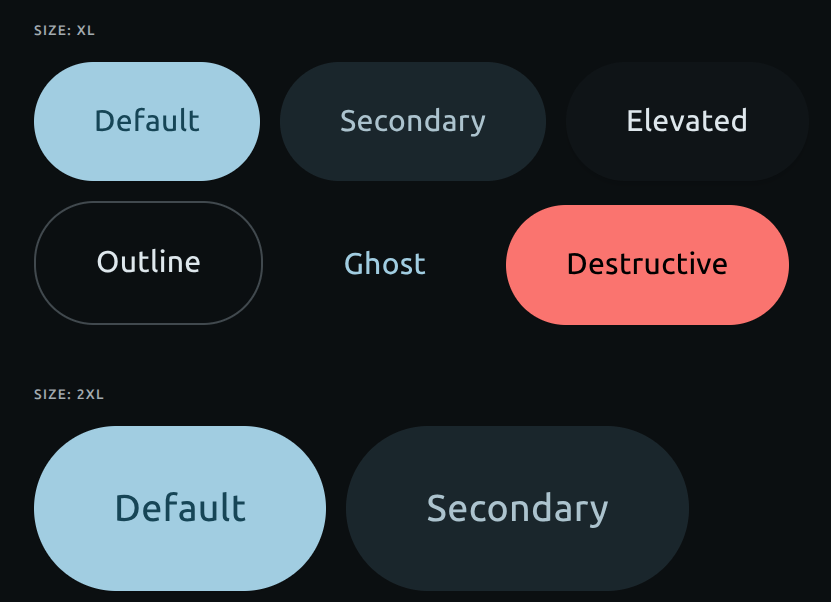
A high-fidelity implementation of the Google Material Design 3 (M3) button, architected specifically for shadcn/ui and Tailwind CSS. Unlike standard buttons, this component includes a custom physics-based Ripple engine (ported from Google's web components), dual-layer elevation shadows (Key + Ambient), and mathematically accurate state layers (hover/press opacity). Features: True M3 Physics: "Standard Easing" motion curves and "Press Hold" ripple logic. 5 Official Variants: Filled, Elevated, Tonal, Outlined, and Text. Tailwind Native: Styled entirely with utility classes and CSS variables (no heavy JS libraries). Radix Slot Support: Fully polymorphic (use as Link, a, or div) via the asChild prop. The perfect choice for developers who want the tactile feel of Android/Google apps within a modern React codebase.
Built with React and Tailwind. Copy the prompt and paste it into Claude Code, Cursor or Lovable: your agent adds Material Design 3 Button to your project and fits it to your theme.
Code
How Material Design 3 Button is used: the demo's code. The component's own source comes with a free account.
Usage.tsx
import React, { useState } from "react";
import { Button, SplitButton } from "@/components/ui/material-design-3-button";
import { Plus, ChevronDown, Send, MoreVertical, LayoutGrid, Volume2 } from "lucide-react";

const VARIANTS = ["default", "secondary", "elevated", "outline", "ghost", "destructive"] as const;
const SIZES = ["sm", "default", "lg", "xl", "2xl"] as const;

const cap = (s: string) => s.charAt(0).toUpperCase() + s.slice(1);

export default function M3ExpressiveDemo() {
  const [tab, setTab] = useState<"variants" | "sizes" | "advanced">("variants");

  return (
    <div className="min-h-screen w-full bg-background p-8 md:p-12 font-sans text-foreground flex justify-center">
      <div className="w-full max-w-5xl">
        {/* Header */}
        <div className="mb-10">
          <h1 className="text-3xl font-medium tracking-tight mb-2">
            Material 3 Expressive Button
          </h1>
          <p className="text-muted-foreground text-sm flex items-center gap-2">
            Click or hold — shapes snap inward then spring back.
            <span className="flex items-center gap-1 bg-primary/10 text-primary px-2 py-0.5 rounded-full text-xs font-medium ml-2">
              <Volume2 className="w-3 h-3" /> Audio on XL sizes
            </span>
          </p>
        </div>

        {/* Tabs */}
        <div className="flex flex-wrap gap-2 mb-10">
          {(["variants", "sizes", "advanced"] as const).map((t) => (
            <button
              key={t}
              onClick={() => setTab(t)}
              className={`
                px-5 py-2 rounded-full text-sm font-medium transition-all duration-200
                ${tab === t
                  ? "bg-primary text-primary-foreground shadow-sm"
                  : "bg-transparent border border-border text-muted-foreground hover:bg-secondary/50 hover:text-foreground"
                }
              `}
            >
              {cap(t)}
            </button>
          ))}
        </div>

        {/* TAB 1: VARIANTS */}
        {tab === "variants" && (
          <div className="flex flex-col gap-12 animate-in fade-in slide-in-from-bottom-4 duration-500">
            {[
              {
                label: "Text Only",
                render: (v: any) => (
                  <Button key={v} variant={v}>
                    {cap(v)}
                  </Button>
                ),
              },
              {
                label: "Leading Icon",
                render: (v: any) => (
                  <Button key={v} variant={v}>
                    <Plus className="w-4 h-4 shrink-0" />
                    {cap(v)}
                  </Button>
                ),
              },
              {
                label: "Disabled State",
                render: (v: any) => (
                  <Button key={v} variant={v} disabled>
                    {cap(v)}
                  </Button>
                ),
              },
            ].map(({ label, render }) => (
              <div key={label}>
                <span className="block text-[11px] font-semibold text-muted-foreground tracking-widest uppercase mb-4">
                  {label}
                </span>
                <div className="flex flex-wrap gap-4 items-center">
                  {VARIANTS.map(render)}
                </div>
              </div>
            ))}
          </div>
        )}

        {/* TAB 2: SIZES */}
        {tab === "sizes" && (
          <div className="flex flex-col gap-12 animate-in fade-in slide-in-from-bottom-4 duration-500">
            {SIZES.map((s) => (
              <div key={s}>
                <span className="block text-[11px] font-semibold text-muted-foreground tracking-widest uppercase mb-4">
                  Size: {s}
                </span>
                <div className="flex flex-wrap gap-4 items-end">
                  {VARIANTS.map((v) => (
                    <Button key={`${v}-${s}`} variant={v} size={s}>
                      {cap(v)}
                    </Button>
                  ))}
                </div>
              </div>
            ))}
          </div>
        )}

        {/* TAB 3: ADVANCED (SPLIT & ICONS) */}
        {tab === "advanced" && (
          <div className="flex flex-col gap-12 animate-in fade-in slide-in-from-bottom-4 duration-500">

            {/* Split Buttons */}
            <div>
              <span className="block text-[11px] font-semibold text-muted-foreground tracking-widest uppercase mb-4">
                Connected Groups (Split Buttons)
              </span>
              <div className="flex flex-wrap gap-8 items-center">
                <SplitButton>
                  <Button variant="default" size="sm">
                    <Send className="w-4 h-4 shrink-0" /> Publish Now
                  </Button>
                  <Button variant="default" size="icon-sm">
                    <ChevronDown className="w-4 h-4" />
                  </Button>
                </SplitButton>

                <SplitButton>
                  <Button variant="secondary" size="default">
                    Schedule Post
                  </Button>
                  <Button variant="secondary" size="icon">
                    <MoreVertical className="w-4 h-4" />
                  </Button>
                </SplitButton>

                <SplitButton>
                  <Button variant="outline" size="lg">
                    Save Draft
                  </Button>
                  <Button variant="outline" size="icon-lg">
                    <ChevronDown className="w-5 h-5" />
                  </Button>
                </SplitButton>

                <SplitButton>
                  <Button variant="elevated" size="xl">
                    Deploy
                  </Button>
                  <Button variant="elevated" size="icon-xl">
                    <Send className="w-6 h-6" />
                  </Button>
                </SplitButton>
              </div>
            </div>

            {/* Expressive Icons */}
            <div>
              <span className="block text-[11px] font-semibold text-muted-foreground tracking-widest uppercase mb-4">
                Expressive Icon Scale
              </span>
              <div className="flex flex-wrap gap-6 items-end">
                <Button variant="secondary" size="icon-sm">
                  <LayoutGrid className="w-4 h-4" />
                </Button>
                <Button variant="default" size="icon">
                  <LayoutGrid className="w-5 h-5" />
                </Button>
                <Button variant="elevated" size="icon-lg">
                  <LayoutGrid className="w-6 h-6" />
                </Button>
                <Button variant="outline" size="icon-xl">
                  <LayoutGrid className="w-8 h-8" />
                </Button>
                <Button variant="default" size="icon-2xl">
                  <LayoutGrid className="w-10 h-10" />
                </Button>
              </div>
            </div>

          </div>
        )}

        {/* Mechanics Info Box */}
        <div className="mt-16 p-6 bg-secondary/30 rounded-2xl border border-border/50 text-sm text-foreground/80 leading-relaxed shadow-sm">
          <strong className="block text-foreground font-medium mb-2">
            Engineered Mechanics
          </strong>
          <ul className="space-y-2 list-disc list-inside marker:text-primary">
            <li>
              <strong>Press:</strong> Tailwind variants instantly transition corner radii and scale to compressed physical bounds.
            </li>
            <li>
              <strong>Release:</strong> A custom <code className="bg-secondary px-1.5 py-0.5 rounded text-[11px] font-mono text-primary">cubic-bezier(0.2, 0.8, 0.2, 1.2)</code> handles the spring-back overshoot.
            </li>
            <li>
              <strong>Split Physics:</strong> The <code className="bg-secondary px-1.5 py-0.5 rounded text-[11px] font-mono text-primary">SplitButton</code> component safely overrides nested styles, ensuring outer corners morph expressively while inner connections remain perfectly sharp.
            </li>
            <li>
              <strong>Auditory Feedback:</strong> A procedurally generated Web Audio sine wave plays on <code className="bg-secondary px-1.5 py-0.5 rounded text-[11px] font-mono text-primary">xl</code> and <code className="bg-secondary px-1.5 py-0.5 rounded text-[11px] font-mono text-primary">2xl</code> sizes to emulate mechanical switch actuation.
            </li>
          </ul>
        </div>
      </div>
    </div>
  );
}
Dependencies
More by Hossain Jahed
View all

Spotlight Card
8.8K
Cinematic landing Hero
5.6K
Motion Footer
5.6K
Sign In
4.6K
AI prompt Box
3K
Glassmorphism Trust Hero
2.8K
Limelight Nav
2K
Ai chat input
1.7K
More in Buttons
View all
Button Save
46

Button
20

Eclipse Button
5

Button
32

Button
6

Button
14

Button Group
37
Split Button
32

