
About
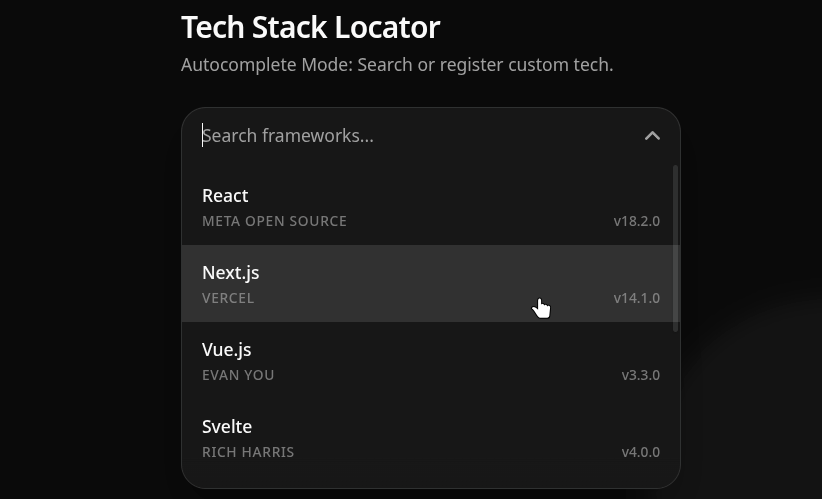
A high-fidelity Material Design 3 Autocomplete and Multi-select Combobox built for shadcn/ui. Features a custom physics-based ripple engine, cinematic staggered entrance animations, and a luxurious floating scroll area with smooth fade masks. Built-in advanced multi-select suppor
Built with React and Tailwind. Copy the prompt and paste it into Claude Code, Cursor or Lovable: your agent adds Material UI Autocomplete / Combobox / Multi-select to your project and fits it to your theme.
Code
How Material UI Autocomplete / Combobox / Multi-select is used: the demo's code. The component's own source comes with a free account.
Usage.tsx
"use client";

import * as React from "react";
import { Autocomplete } from "@/components/ui/material-ui-autocomplete-combobox-multi-select";
import { Sparkles, ArrowRight } from "lucide-react";
import { cn } from "@/lib/utils";

const TECH_STACKS = [
  { value: "react", label: "React", description: "Meta Open Source", tag: "v18.2.0" },
  { value: "nextjs", label: "Next.js", description: "Vercel", tag: "v14.1.0" },
  { value: "vue", label: "Vue.js", description: "Evan You", tag: "v3.3.0" },
  { value: "svelte", label: "Svelte", description: "Rich Harris", tag: "v4.0.0" },
  { value: "astro", label: "Astro", description: "Fred K. Schott", tag: "v4.2.0" },
  { value: "tailwind", label: "Tailwind CSS", description: "Tailwind Labs", tag: "v3.4.1" },
  { value: "solid", label: "SolidJS", description: "Ryan Carniato", tag: "v1.8.0" },
  { value: "angular", label: "Angular", description: "Google", tag: "v17.0.0" },
];

export default function AutocompleteDemo() {
  const [items, setItems] = React.useState(TECH_STACKS);

  // Single select mode starts with no pre-selected item
  const [selectedValue, setSelectedValue] = React.useState<string>("");

  const handleCreate = (newLabel: string) => {
    const newValue = newLabel.toLowerCase().replace(/\s+/g, "-");
    const newItem = {
      value: newValue,
      label: newLabel,
      description: "Custom Entry",
      tag: "v1.0.0",
    };

    setItems((prev) => [newItem, ...prev]);
    setSelectedValue(newValue);
  };

  return (
    <div className="flex flex-col items-center justify-center min-h-screen w-full bg-background/50 p-4 md:p-8 relative overflow-hidden font-sans">

      {/* Background decoration with the requested 10px blur */}
      <div className="absolute inset-0 z-0 pointer-events-none opacity-40 dark:opacity-20">
        <div className="absolute top-[-10%] left-[-10%] w-[40%] h-[40%] rounded-full bg-primary/20 blur-[10px]" />
        <div className="absolute bottom-[-10%] right-[-10%] w-[40%] h-[40%] rounded-full bg-primary/20 blur-[10px]" />
      </div>

      <div className="w-full max-w-[400px] relative z-10 flex flex-col">
        <div className="mb-6 space-y-1 text-center md:text-left">
          <h2 className="text-2xl font-semibold tracking-tight text-foreground">
            Tech Stack Locator
          </h2>
          <p className="text-sm text-muted-foreground">
            Autocomplete Mode: Search or register custom tech.
          </p>
        </div>

        <Autocomplete
          items={items}
          value={selectedValue}
          onValueChange={setSelectedValue}
          placeholder="Search frameworks..."
          emptyMessage="No framework found."
          isCreatable={true}
          onCreate={handleCreate}
        />

        {/* Layout Shift Fix: Fixed height block so it never alters standard DOM flow */}
        <div className="h-8 mt-4 relative w-full flex justify-center">
          <div
            className={cn(
              "absolute top-0 text-center text-xs text-muted-foreground transition-all duration-300 ease-[cubic-bezier(0.2,0.8,0.2,1)]",
              selectedValue ? "opacity-100 translate-y-0" : "opacity-0 -translate-y-2 pointer-events-none"
            )}
          >
            Selected value: <span className="font-medium text-foreground">{selectedValue || "none"}</span>
          </div>
        </div>
      </div>

      {/* Expanding Promo Card (Fixed Bottom Left) */}
      <a
        href="https://img2m3.vercel.app/"
        target="_blank"
        rel="noopener noreferrer"
        className={cn(
          "fixed bottom-4 right-4 z-50 group flex flex-col",
          "bg-card/80 backdrop-blur-md border border-border shadow-sm hover:shadow-2xl rounded-2xl overflow-hidden cursor-pointer",
          "transition-all duration-500 ease-[cubic-bezier(0.2,0.8,0.2,1)]",
          "w-[160px] hover:w-[280px]"
        )}
      >
        <div
          className="grid grid-rows-[0fr] opacity-0 group-hover:grid-rows-[1fr] group-hover:opacity-100 transition-all duration-500 ease-[cubic-bezier(0.2,0.8,0.2,1)]"
        >
          <div className="overflow-hidden">
            <div className="p-2 pb-0 flex flex-col gap-3 min-w-[280px]">
              <img
                src="https://cdn.21st.dev/assets/mirror/7a/7a9683dfe605d3b671dda8ea1721d44f6548e7a7c0850a635a26d30f4c410c2d.png"
                alt="IMG2M3 Theme Generator"
                className="aspect-video object-cover rounded-lg border border-border/40 shadow-sm"
              />
              <p className="text-xs text-muted-foreground leading-relaxed pr-2">
                Create full Customized shadcn theme's instantly.
              </p>
            </div>
          </div>
        </div>

        {/* Default / Collapsed state UI */}
        <div className="p-2 flex items-center justify-between">
          <div className="flex items-center gap-2 text-sm font-medium text-foreground">
            <Sparkles className="w-4 h-4 text-primary" />
            <span className="whitespace-nowrap">Get extra bonus</span>
          </div>
          <ArrowRight className="w-4 h-4 text-muted-foreground opacity-0 -translate-x-4 transition-all duration-500 ease-[cubic-bezier(0.2,0.8,0.2,1)] group-hover:opacity-100 group-hover:translate-x-0 flex-shrink-0" />
        </div>
      </a>

    </div>
  );
}More by Hossain Jahed
View all

Spotlight Card
8.8K
Cinematic landing Hero
5.6K
Motion Footer
5.6K
Sign In
4.6K
AI prompt Box
3K
Glassmorphism Trust Hero
2.8K
Limelight Nav
2K
Ai chat input
1.7K