
About
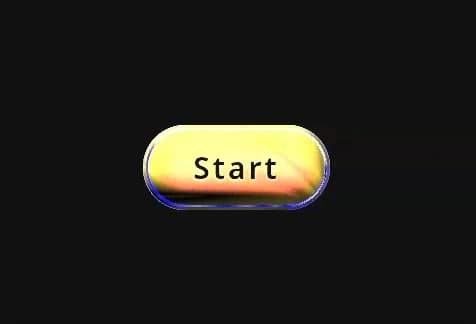
Exact optical blend-mode shader button with rotating multi-layer difference filters, specular light pulse, and smooth native button interaction.
Built with React and Tailwind. Copy the prompt and paste it into Claude Code, Cursor or Lovable: your agent adds Shader Button to your project and fits it to your theme.
Code
How Shader Button is used: the demo's code. The component's own source comes with a free account.
Usage.tsx
import * as React from "react";
import { GradientButton } from "@/components/ui/shader-button";

export default function GradientButtonDemo() {
  return (
    <div className="relative flex min-h-screen w-full flex-col items-center justify-center gap-6 bg-background p-8 text-foreground">
       <div className="mt-4 flex items-center justify-center gap-4">
        <GradientButton onClick={() => console.log("Standard button click!")}>
          Start
        </GradientButton>
      </div>
    </div>
  );
}More by Hossain Jahed
View all

Spotlight Card
8.7K
Cinematic landing Hero
5.6K
Motion Footer
5.6K
Sign In
4.6K
AI prompt Box
3K
Glassmorphism Trust Hero
2.8K
Limelight Nav
2K
Ai chat input
1.7K
More in Shaders
View all
Glass Fold
202

Wave
683
Neural Noise
714

Line Shader Homlu UI
48
LightSpeed
206

Background Shader
303
Stripe like gradient-shader
265
Black Hole
21

