
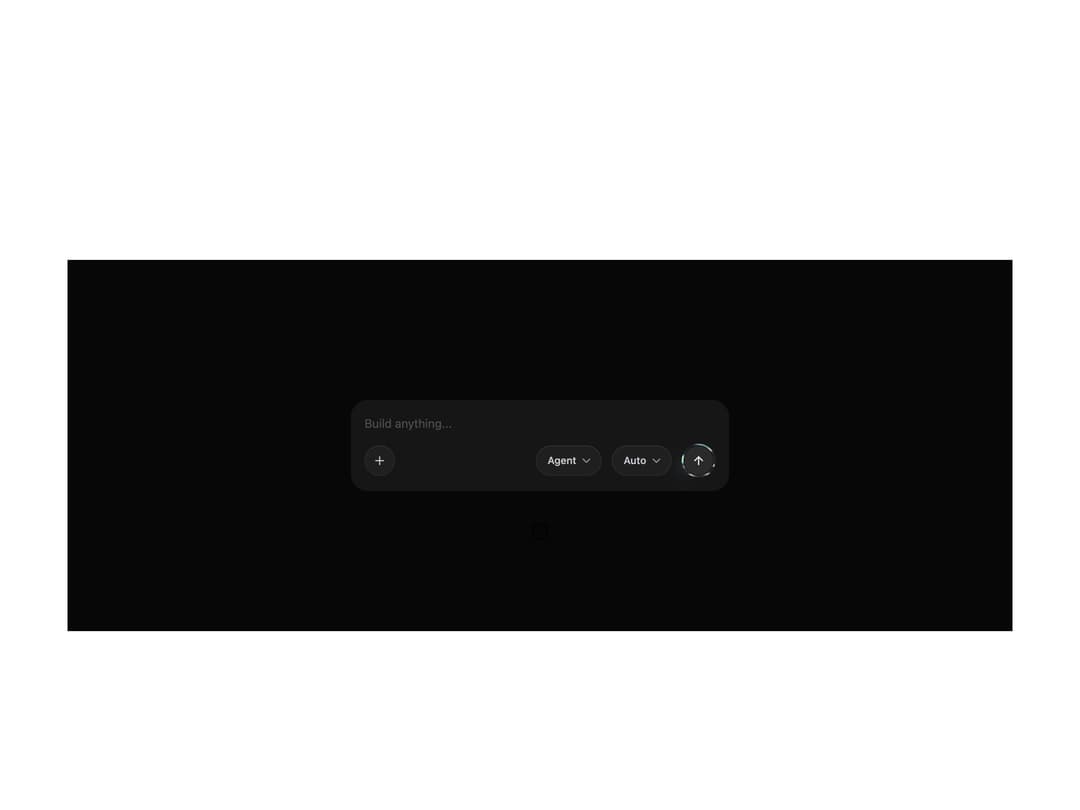
About
Animated liquid-metal border effect (metal-fx). Wrap any element — a button, link, or icon — with a live metallic ring driven by a shared WebGL renderer. Three presets (chromatic, silver, gold), button and circle variants, adjustable strength, glow and proximity reflections, theme-aware (auto/dark/light).
Built with React and Tailwind. Copy the prompt and paste it into Claude Code, Cursor or Lovable: your agent adds Liquid Metal to your project and fits it to your theme.
Code
How Liquid Metal is used: the demo's code. The component's own source comes with a free account.
Usage.tsx
import { ArrowUp, ChevronDown, Plus } from "lucide-react"
import { MetalFx } from "@/components/ui/metal-fx"

// The canonical showcase: MetalFx on the send button of a chat composer,
// alongside the other controls — exactly as on metal.jakubantalik.com.
const chip =
  "inline-flex items-center gap-1 h-9 rounded-full bg-white/[0.04] text-[#caccd2] text-xs leading-[14px] font-medium shadow-[inset_0_0_0_1px_#ffffff0d,inset_0_1px_0_0_#ffffff0a]"

export default function MetalFxComposerDemo() {
  return (
    <div className="flex min-h-[440px] w-full items-center justify-center bg-[#070707] p-8">
      <div className="flex w-[448px] max-w-full flex-col rounded-[20px] bg-[#1d1d1db3] px-4 pb-4 pt-5">
        <textarea
          rows={1}
          readOnly
          aria-label="Build anything..."
          placeholder="Build anything..."
          className="mb-4 w-full resize-none border-none bg-transparent p-0 text-sm leading-4 text-[#fbfbfb] outline-none placeholder:text-[#4e4e4e]"
        />
        <div className="mt-auto flex items-center gap-3">
          <button
            aria-label="Add"
            className="flex size-9 min-w-9 items-center justify-center rounded-full bg-white/[0.04] text-[#caccd2] shadow-[inset_0_0_0_1px_#ffffff0d,inset_0_1px_0_0_#ffffff0a]"
          >
            <Plus className="size-4" />
          </button>
          <div className="flex-1" />
          <button className={`${chip} pl-3.5 pr-2.5`}>
            <span>Agent</span>
            <ChevronDown className="size-4 text-[#8e8e8e]" />
          </button>
          <button className={`${chip} pl-3.5 pr-2.5`}>
            <span>Auto</span>
            <ChevronDown className="size-4 text-[#8e8e8e]" />
          </button>
          <MetalFx preset="chromatic" variant="circle" strength={1} theme="dark">
            <button
              aria-label="Send"
              className="flex size-10 items-center justify-center rounded-full bg-[#1d1d1d] text-[#fbfbfb]"
            >
              <ArrowUp className="size-4" />
            </button>
          </MetalFx>
        </div>
      </div>
    </div>
  )
}
Dependencies
More by 21st
View all

Futuristic Hero
2.7K
Hero ASCII one
1.4K
Hero ASCII
1.3K
Admit One Ticket
961
Navigation Menu
916
Border Beam
890
Border Beam Search
545
Thinking Orbs
438
More in Shaders
View all
Glass Fold
212

Neural Noise
717
Wave
685
LightSpeed
207
animated pattern cloud
616

Background Shader
304
Shader Background
2K

Line Shader Homlu UI
48


