
About
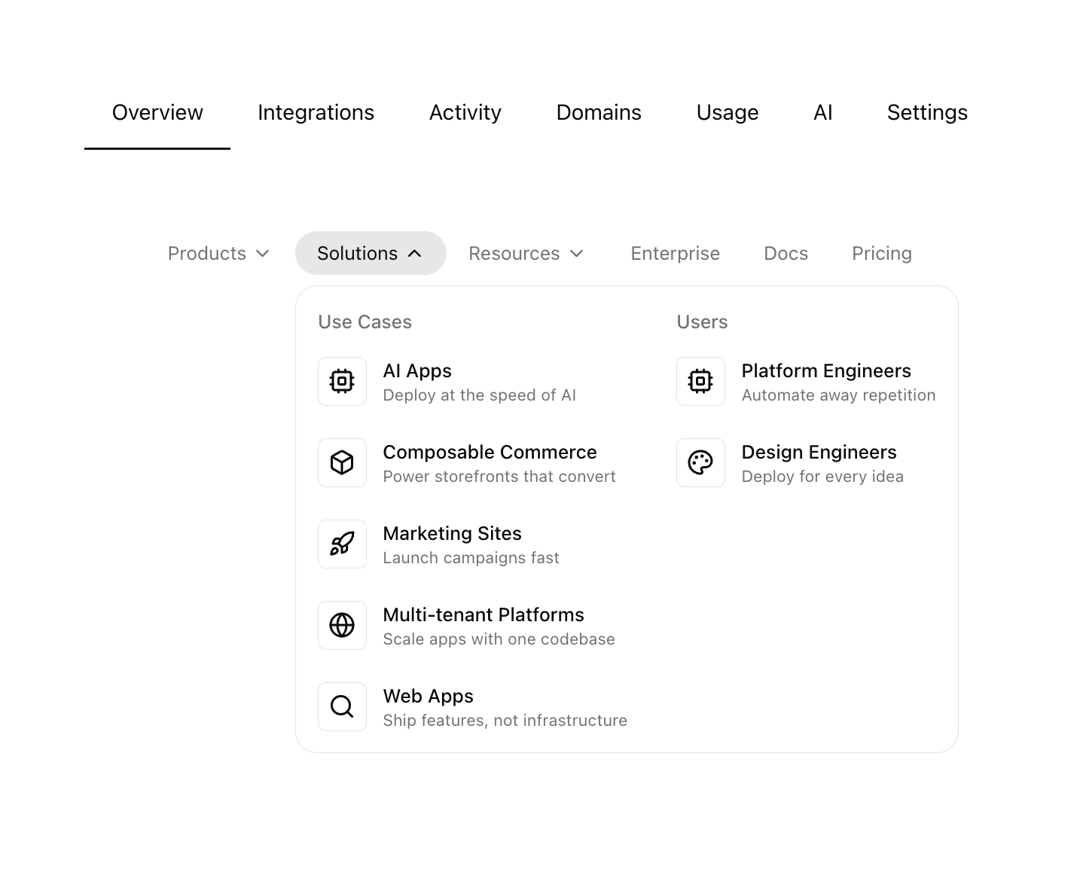
A dynamic and interactive multi-level navigation menu with dropdown submenus and hover effects.
Built with React and Tailwind. Copy the prompt and paste it into Claude Code, Cursor or Lovable: your agent adds Dorpdown Navigation to your project and fits it to your theme.
Code
How Dorpdown Navigation is used: the demo's code. The component's own source comes with a free account.
Usage.tsx
import { DropdownNavigation } from "@/components/ui/dorpdown-navigation"
import {
  Cpu,
  Globe,
  Eye,
  Shield,
  Rocket,
  Box,
  Search,
  Palette,
  BookOpen,
  FileText,
  Newspaper,
} from "lucide-react";
import { useState } from "react";
import { motion } from "framer-motion";

function Demo() {
  return (
    <div className="relative top-20 gap-5 flex flex-col items-center justify-center">
      <TabsDemo />
      <NavigationDemo />
    </div>
  );
}

function TabsDemo() {
  const ITEMS = [
    { id: 1, tile: "Overview" },
    { id: 2, tile: "Integrations" },
    { id: 3, tile: "Activity" },
    { id: 4, tile: "Domains" },
    { id: 5, tile: "Usage" },
    { id: 6, tile: "AI" },
    { id: 7, tile: "Settings" },
  ];

  const [active, setActive] = useState(ITEMS[0]);
  const [isHover, setIsHover] = useState<typeof ITEMS[0] | null>(null);

  return (
    <ul className="flex items-center justify-center">
      {ITEMS.map((item) => (
        <button
          key={item.id}
          className="py-2 relative duration-300 transition-colors hover:text-foreground"
          onClick={() => setActive(item)}
          onMouseEnter={() => setIsHover(item)}
          onMouseLeave={() => setIsHover(null)}
        >
          <div className="px-5 py-2 relative">
            {item.tile}
            {isHover?.id === item.id && (
              <motion.div
                layoutId="hover-bg"
                className="absolute bottom-0 left-0 right-0 w-full h-full bg-primary/10"
                style={{ borderRadius: 6 }}
              />
            )}
          </div>
          {active.id === item.id && (
            <motion.div
              layoutId="active"
              className="absolute bottom-0 left-0 right-0 w-full h-0.5 bg-primary"
            />
          )}
          {isHover?.id === item.id && (
            <motion.div
              layoutId="hover"
              className="absolute bottom-0 left-0 right-0 w-full h-0.5 bg-primary"
            />
          )}
        </button>
      ))}
    </ul>
  );
}

function NavigationDemo() {
  const NAV_ITEMS = [
    {
      id: 1,
      label: "Products",
      subMenus: [
        {
          title: "DX Platform",
          items: [
            {
              label: "Previews",
              description: "Helping teams ship 6× faster",
              icon: Cpu,
            },
            {
              label: "AI",
              description: "Powering breakthroughs",
              icon: Search,
            },
          ],
        },
        {
          title: "Managed Infrastructure",
          items: [
            {
              label: "Rendering",
              description: "Fast, scalable, and reliable",
              icon: Globe,
            },
            {
              label: "Observability",
              description: "Trace every step",
              icon: Eye,
            },
            {
              label: "Security",
              description: "Scale without compromising",
              icon: Shield,
            },
          ],
        },
        {
          title: "Open Source",
          items: [
            {
              label: "Next.js",
              description: "The native Next.js platform",
              icon: Rocket,
            },
            {
              label: "Turborepo",
              description: "Speed with Enterprise scale",
              icon: Box,
            },
            {
              label: "AI SDK",
              description: "The AI Toolkit for TypeScript",
              icon: Palette,
            },
          ],
        },
      ],
    },
    {
      id: 2,
      label: "Solutions",
      subMenus: [
        {
          title: "Use Cases",
          items: [
            {
              label: "AI Apps",
              description: "Deploy at the speed of AI",
              icon: Cpu,
            },
            {
              label: "Composable Commerce",
              description: "Power storefronts that convert",
              icon: Box,
            },
            {
              label: "Marketing Sites",
              description: "Launch campaigns fast",
              icon: Rocket,
            },
            {
              label: "Multi-tenant Platforms",
              description: "Scale apps with one codebase",
              icon: Globe,
            },
            {
              label: "Web Apps",
              description: "Ship features, not infrastructure",
              icon: Search,
            },
          ],
        },
        {
          title: "Users",
          items: [
            {
              label: "Platform Engineers",
              description: "Automate away repetition",
              icon: Cpu,
            },
            {
              label: "Design Engineers",
              description: "Deploy for every idea",
              icon: Palette,
            },
          ],
        },
      ],
    },
    {
      id: 3,
      label: "Resources",
      subMenus: [
        {
          title: "Tools",
          items: [
            {
              label: "Resource Center",
              description: "Today's best practices",
              icon: BookOpen,
            },
            {
              label: "Marketplace",
              description: "Extend and automate workflows",
              icon: Search,
            },
            {
              label: "Templates",
              description: "Jumpstart app development",
              icon: FileText,
            },
            {
              label: "Guides",
              description: "Find help quickly",
              icon: BookOpen,
            },
            {
              label: "Partner Finder",
              description: "Get help from solution partners",
              icon: Search,
            },
          ],
        },
        {
          title: "Company",
          items: [
            {
              label: "Customers",
              description: "Trusted by the best teams",
              icon: Newspaper,
            },
            {
              label: "Blog",
              description: "The latest posts and changes",
              icon: FileText,
            },
            {
              label: "Changelog",
              description: "See what shipped",
              icon: BookOpen,
            },
            {
              label: "Press",
              description: "Read the latest news",
              icon: Newspaper,
            },
          ],
        },
      ],
    },
    {
      id: 4,
      label: "Enterprise",
      link: "#",
    },
    {
      id: 5,
      label: "Docs",
      link: "#",
    },
    {
      id: 6,
      label: "Pricing",
      link: "#",
    },
  ];

  return <DropdownNavigation navItems={NAV_ITEMS} />;
}

export { Demo }
Dependencies
More by LN
View all
Pricing Interaction
1.4K
Visualize Booking
615
Assisted Password Confirmation
585
Tags Selector
531
Mega Menu
385
Feedback Slider
325
FlipButton
286
Dynamic Action
217
More in Navigation
View all

Sidebar
231

Tabs
60
Progress Bar Stepper
36
Newsletter Signup Footer
15

Footer 2
200
Navbar with Theme Toggle
43
Numberless Pagination with Text
11

Navbar
71
