
About
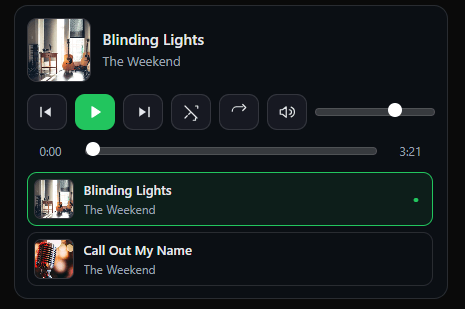
Customizable music player with playlist display, album art, playback controls and an optional waveform display. fully customizable through props
Built with React and Tailwind. Copy the prompt and paste it into Claude Code, Cursor or Lovable: your agent adds Music Player to your project and fits it to your theme.
Code
How Music Player is used: the demo's code. The component's own source comes with a free account.
Usage.tsx
import React, { useRef } from "react";
import { MusicPlayer, MusicPlayerRef } from "@/components/ui/music-player";

const demoTracks = [
    {
      src: "https://bato-web-agency.github.io/bato-shared/music/blinding-lights.mp3",
      title: "Blinding Lights",
      artist: "The Weekend",
      artwork: "https://cdn.21st.dev/assets/mirror/7b/7b803eace3a2c13139472ce7f6f62867c5fbc8243a34830df6009bacf06baca2.jpg",
    },
    {
      src: "https://bato-web-agency.github.io/bato-shared/music/call-out-my-name.mp3",
      title: "Call Out My Name",
      artist: "The Weekend",
      artwork: "https://cdn.21st.dev/assets/mirror/3b/3b7a6e90fe54fd768f0b29569ff488363fc5a22317cf6da015e18e9ebc2dbe79.jpg",
    },
  ];


export default function DemoOne() {
  const ref = React.useRef<MusicPlayerRef>(null);

  return (
    <div className="mx-auto max-w-xl p-4">
      <div className="mb-3 flex items-center gap-2">
        <button
          className="inline-flex items-center gap-2 rounded-md border px-3 py-1.5 text-sm hover:bg-[hsl(var(--accent)/0.07)]"
          onClick={() => ref.current?.prev()}
        >
          Prev
        </button>
        <button
          className="inline-flex items-center gap-2 rounded-md border px-3 py-1.5 text-sm hover:bg-[hsl(var(--accent)/0.07)]"
          onClick={() => ref.current?.toggle()}
        >
          Play/Pause
        </button>
        <button
          className="inline-flex items-center gap-2 rounded-md border px-3 py-1.5 text-sm hover:bg-[hsl(var(--accent)/0.07)]"
          onClick={() => ref.current?.next()}
        >
          Next
        </button>
      </div>

      <MusicPlayer
        ref={ref}
        tracks={demoTracks}
        autoPlay={false}
        initialVolume={0.8}
        showPlaylist={true}
        keyboardShortcuts={true}
        waveform={{ enabled: false, replaceSeekBar: true, height: 76 }}
        controls={{ shuffle: true, repeat: true, volume: true, prevNext: true, time: true }}
      />
    </div>
  );
}More by scott clayton
View all
Horizon Hero Section
4K
Full Screen Scroll FX
2K
Music Portfolio
677
Scroll Animated Video
562
Revolution Hero
455
Ethereal
404
Iphone Mockup
400
Music Reactive Hero Section
358