
About
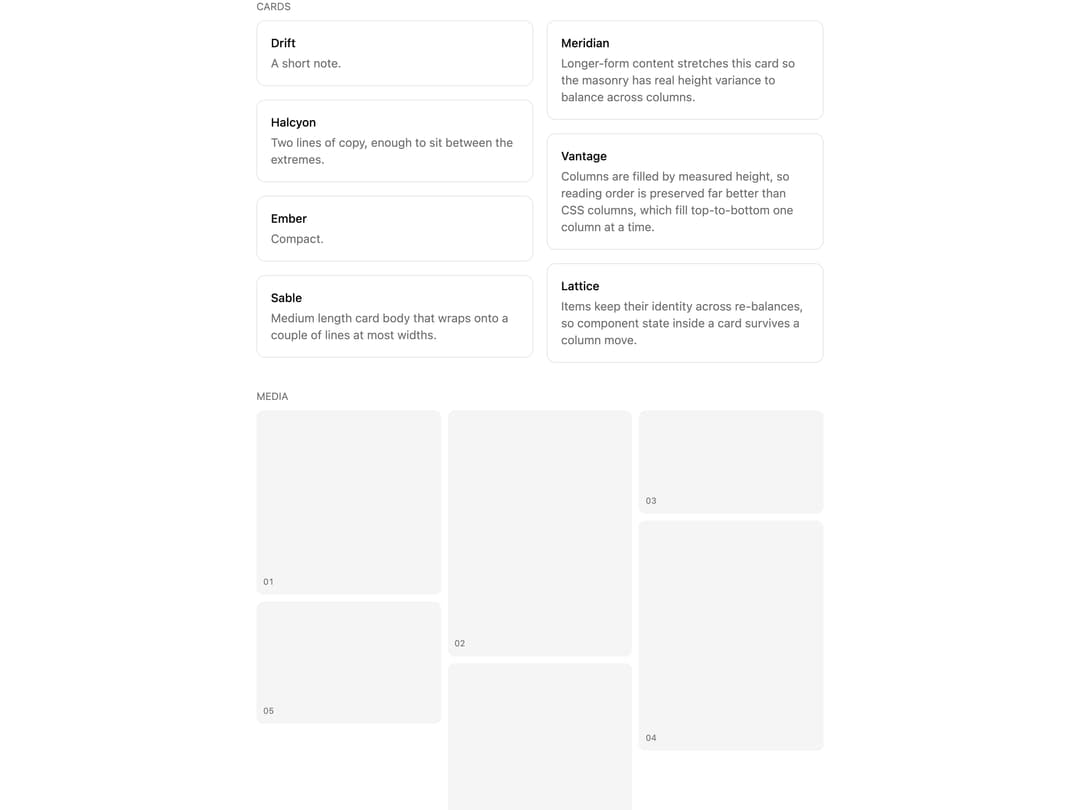
True masonry layout that balances children into the shortest column by measured height, order-preserving, responsive, dependency-free.
Built with React and Tailwind. Copy the prompt and paste it into Claude Code, Cursor or Lovable: your agent adds Masonry to your project and fits it to your theme.
Code
How Masonry is used: the demo's code. The component's own source comes with a free account.
Usage.tsx
'use client';

import { Masonry, MasonryItem } from '@/components/ui/masonry';

const aspects = ['aspect-square', 'aspect-[3/4]', 'aspect-video', 'aspect-[4/5]', 'aspect-[3/2]', 'aspect-[2/3]'];

export default function MasonryDemo() {
  const cards = [
    {
      title: 'Drift',
      body: 'A short note.',
    },
    {
      title: 'Meridian',
      body: 'Longer-form content stretches this card so the masonry has real height variance to balance across columns.',
    },
    {
      title: 'Halcyon',
      body: 'Two lines of copy, enough to sit between the extremes.',
    },
    {
      title: 'Vantage',
      body: 'Columns are filled by measured height, so reading order is preserved far better than CSS columns, which fill top-to-bottom one column at a time.',
    },
    {
      title: 'Ember',
      body: 'Compact.',
    },
    {
      title: 'Lattice',
      body: 'Items keep their identity across re-balances, so component state inside a card survives a column move.',
    },
    {
      title: 'Sable',
      body: 'Medium length card body that wraps onto a couple of lines at most widths.',
    },
  ];

  return (
    <div className="grid w-full max-w-2xl gap-8">
      <div className="grid min-w-0 gap-2">
        <p className="text-xs text-muted-foreground uppercase">Cards</p>
        <Masonry>
          {cards.map((card) => (
            <MasonryItem key={card.title}>
              <div className="rounded-lg border border-border bg-card p-4">
                <p className="text-sm font-medium text-foreground">{card.title}</p>
                <p className="mt-1 text-sm text-muted-foreground">{card.body}</p>
              </div>
            </MasonryItem>
          ))}
        </Masonry>
      </div>

      <div className="grid min-w-0 gap-2">
        <p className="text-xs text-muted-foreground uppercase">Media</p>
        <Masonry columns={{ base: 2, sm: 3 }} gap={8}>
          {aspects.map((aspect, i) => (
            <div key={aspect} className={`${aspect} flex items-end rounded-md bg-muted p-2`}>
              <span className="text-[10px] text-muted-foreground tabular-nums">{String(i + 1).padStart(2, '0')}</span>
            </div>
          ))}
        </Masonry>
      </div>

      <div className="grid min-w-0 gap-2">
        <p className="text-xs text-muted-foreground uppercase">Compact</p>
        <Masonry columns={{ base: 2, sm: 4 }} gap={8}>
          {['Alpha', 'Beta', 'Gamma', 'Delta', 'Epsilon', 'Zeta', 'Eta', 'Theta'].map((label, i) => (
            <MasonryItem key={label}>
              <div className="rounded-md border border-border bg-card px-3 py-2">
                <p className="text-xs font-medium text-foreground">{label}</p>
                {i % 3 === 1 ? (
                  <p className="mt-1 text-xs text-muted-foreground">Extra line for height variance.</p>
                ) : null}
              </div>
            </MasonryItem>
          ))}
        </Masonry>
      </div>
    </div>
  );
}
More by Mohammad Shehadeh
View all
Feature Problem Cards
84
Feature Grid Spotlight Cards
70
Dithered Shader CTA
63
Ecommerce Category Page
61
Split Login
60
FAQ Two Column
59
Comparison Table
58
Comparison Section
57