
About
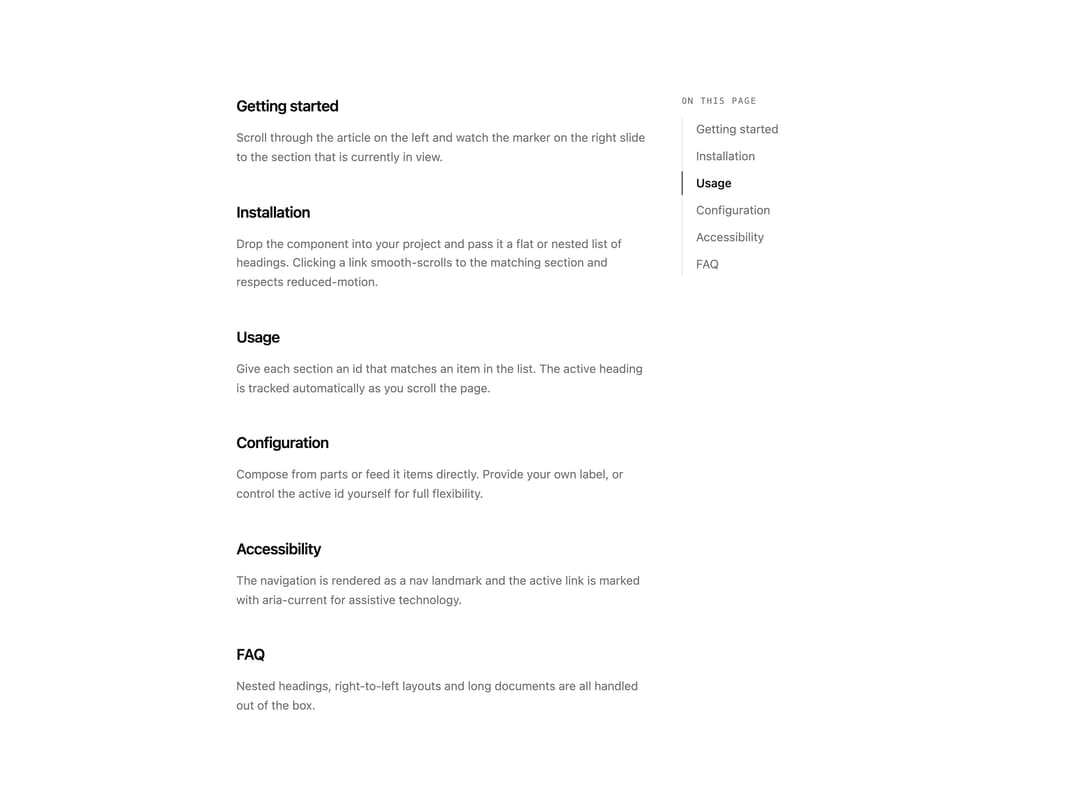
On-this-page navigation that tracks the active heading as you scroll and highlights it with a moving border marker. Takes a flat or nested items list, or composes from parts. Smooth scroll respects reduced-motion.
Built with React and Tailwind. Copy the prompt and paste it into Claude Code, Cursor or Lovable: your agent adds Table of Contents to your project and fits it to your theme.
Code
How Table of Contents is used: the demo's code. The component's own source comes with a free account.
Usage.tsx
"use client";

import * as React from "react";

import { TableOfContents, type TocItem } from "@/components/ui/toc";

const sections: { id: string; title: string; body: string }[] = [
  {
    id: "getting-started",
    title: "Getting started",
    body: "Scroll through the article on the left and watch the marker on the right slide to the section that is currently in view.",
  },
  {
    id: "installation",
    title: "Installation",
    body: "Drop the component into your project and pass it a flat or nested list of headings. Clicking a link smooth-scrolls to the matching section and respects reduced-motion.",
  },
  {
    id: "usage",
    title: "Usage",
    body: "Give each section an id that matches an item in the list. The active heading is tracked automatically as you scroll the page.",
  },
  {
    id: "configuration",
    title: "Configuration",
    body: "Compose from parts or feed it items directly. Provide your own label, or control the active id yourself for full flexibility.",
  },
  {
    id: "accessibility",
    title: "Accessibility",
    body: "The navigation is rendered as a nav landmark and the active link is marked with aria-current for assistive technology.",
  },
  {
    id: "faq",
    title: "FAQ",
    body: "Nested headings, right-to-left layouts and long documents are all handled out of the box.",
  },
];

const items: TocItem[] = sections.map((section) => ({
  id: section.id,
  text: section.title,
  level: 2,
}));

export default function TableOfContentsDemo() {
  return (
    <div className="mx-auto flex w-full max-w-3xl gap-10 bg-background px-6 py-10 text-foreground">
      <article className="min-w-0 flex-1 space-y-10">
        {sections.map((section) => (
          <section
            key={section.id}
            id={section.id}
            className="scroll-mt-16 space-y-3"
          >
            <h2 className="text-lg font-semibold tracking-tight">
              {section.title}
            </h2>
            <p className="text-sm leading-relaxed text-muted-foreground">
              {section.body}
            </p>
          </section>
        ))}
      </article>

      <aside className="sticky top-16 hidden h-fit w-48 shrink-0 md:block">
        <TableOfContents items={items} />
      </aside>
    </div>
  );
}
More by Mohammad Shehadeh
View all
Feature Problem Cards
84
Feature Grid Spotlight Cards
70
Dithered Shader CTA
63
Ecommerce Category Page
61
Split Login
60
Comparison Table
59
FAQ Two Column
59
Comparison Section
57
More in Navigation
View all

Sidebar
234

Tabs
60
Newsletter Signup Footer
16
Progress Bar Stepper
36

Footer 2
201
Navbar with Theme Toggle
43

Navbar
71

Pagination
86
