
About
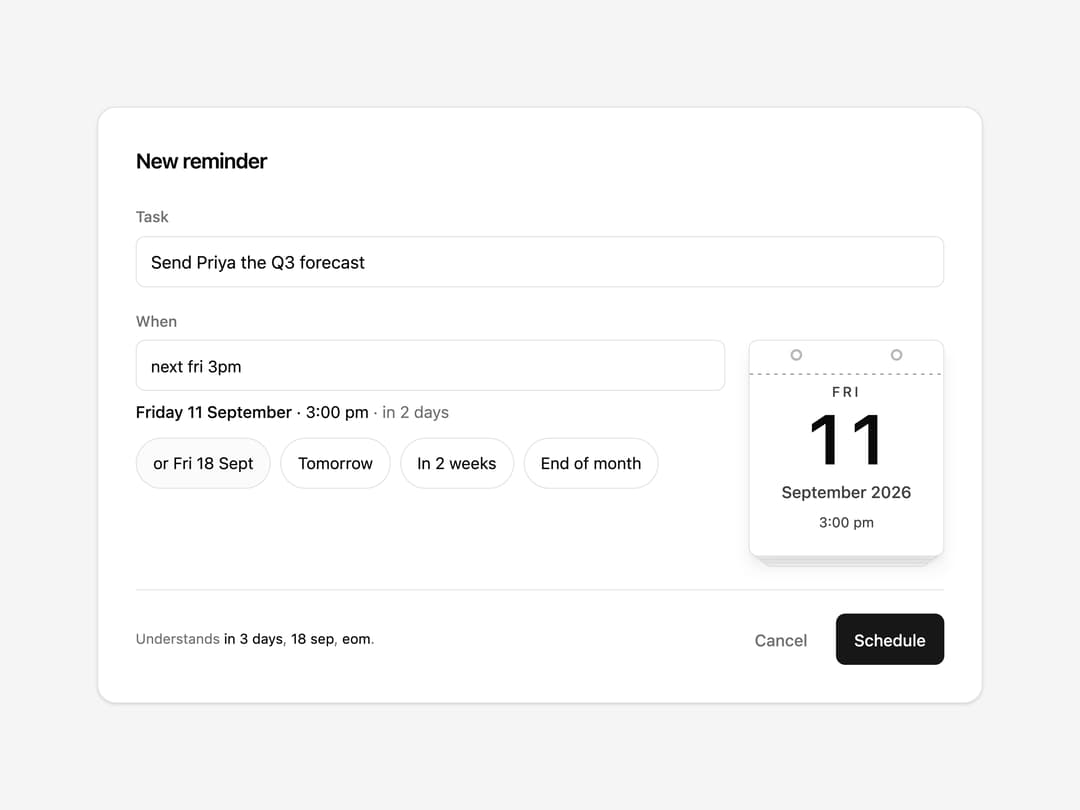
Date field that reads plain English — 'next fri 3pm', 'in 2 weeks', 'end of month' — and answers on a tear-off calendar that riffles one leaf per day it moved, so you see the day it heard before you commit. Zero dependencies, keyboard accessible, static under reduced motion.
Built with React and Tailwind. Copy the prompt and paste it into Claude Code, Cursor or Lovable: your agent adds Tearaway Date to your project and fits it to your theme.
Code
How Tearaway Date is used: the demo's code. The component's own source comes with a free account.
Usage.tsx
"use client"

import { TearawayDate } from "@/components/ui/tearaway-date"

const settings = {
  heading: "New reminder",
  task: "Send Priya the Q3 forecast",
  defaultText: "next fri 3pm",
  placeholder: "next fri 3pm",
  use24HourClock: false,
  weekStartsOnSunday: false,
  showLeaf: true,
  paperOnSurface: false,
  maxTear: 6,
  showPresets: true,
}

export default function Demo(props: Partial<typeof settings>) {
  const s = { ...settings, ...props }

  return (
    <div className="bg-muted flex min-h-[max(560px,100svh)] w-full items-center justify-center p-6">
      <div className="border-border bg-background w-full max-w-[760px] rounded-2xl border p-6 shadow-sm sm:p-8">
        <h2 className="text-foreground text-lg font-semibold tracking-tight">{s.heading}</h2>

        <label
          htmlFor="reminder-task"
          className="text-muted-foreground mt-6 block text-[13px] font-medium"
        >
          Task
        </label>
        <input
          id="reminder-task"
          data-slot="task-title"
          type="text"
          defaultValue={s.task}
          className="border-input bg-background text-foreground focus-visible:ring-ring/50 focus-visible:border-ring mt-1.5 h-11 w-full rounded-md border px-3 text-[15px] outline-none focus-visible:ring-[3px]"
        />

        <label
          htmlFor="reminder-when"
          className="text-muted-foreground mt-5 block text-[13px] font-medium"
        >
          When
        </label>
        <div className="mt-1.5">
          <TearawayDate
            id="reminder-when"
            className="max-w-none"
            defaultText={s.defaultText}
            placeholder={s.placeholder}
            hourCycle={s.use24HourClock ? 24 : 12}
            weekStartsOn={s.weekStartsOnSunday ? 0 : 1}
            showLeaf={s.showLeaf}
            paperTone={s.paperOnSurface ? "surface" : "paper"}
            maxTear={s.maxTear}
            presets={
              s.showPresets
                ? [
                    { label: "Tomorrow", text: "tomorrow at 9am" },
                    { label: "In 2 weeks", text: "in 2 weeks at 9am", slot: "cta-primary" },
                    { label: "End of month", text: "end of month" },
                  ]
                : []
            }
          />
        </div>

        <div className="border-border mt-7 flex items-center justify-between gap-3 border-t pt-5">
          <p className="text-muted-foreground text-[12px]">
            Understands <span className="text-foreground">in 3 days</span>,{" "}
            <span className="text-foreground">18 sep</span>,{" "}
            <span className="text-foreground">eom</span>.
          </p>
          <div className="flex gap-2">
            <button
              type="button"
              data-slot="cancel"
              className="text-muted-foreground hover:text-foreground focus-visible:ring-ring/50 h-11 rounded-md px-4 text-[14px] font-medium transition-colors outline-none focus-visible:ring-[3px]"
            >
              Cancel
            </button>
            <button
              type="button"
              data-slot="submit"
              className="bg-primary text-primary-foreground hover:bg-primary/90 focus-visible:ring-ring/50 h-11 rounded-md px-4 text-[14px] font-medium transition-colors outline-none focus-visible:ring-[3px]"
            >
              Schedule
            </button>
          </div>
        </div>
      </div>
    </div>
  )
}
More by NIMA MZ
View all
Agent Trace
685
Sonar Grid
584
Receipt Pricing
147
Import Patchbay
122
Lookout
82
Moiré Field
31
Meridian Rail
2
Split Flap Button
1
More in Forms
View all

Premium Auth
496

Login 2
7
Authentication Card
45

Login 1
52

Form
136

Contact Card
1K

Form
16

Card Studio
41
