
About
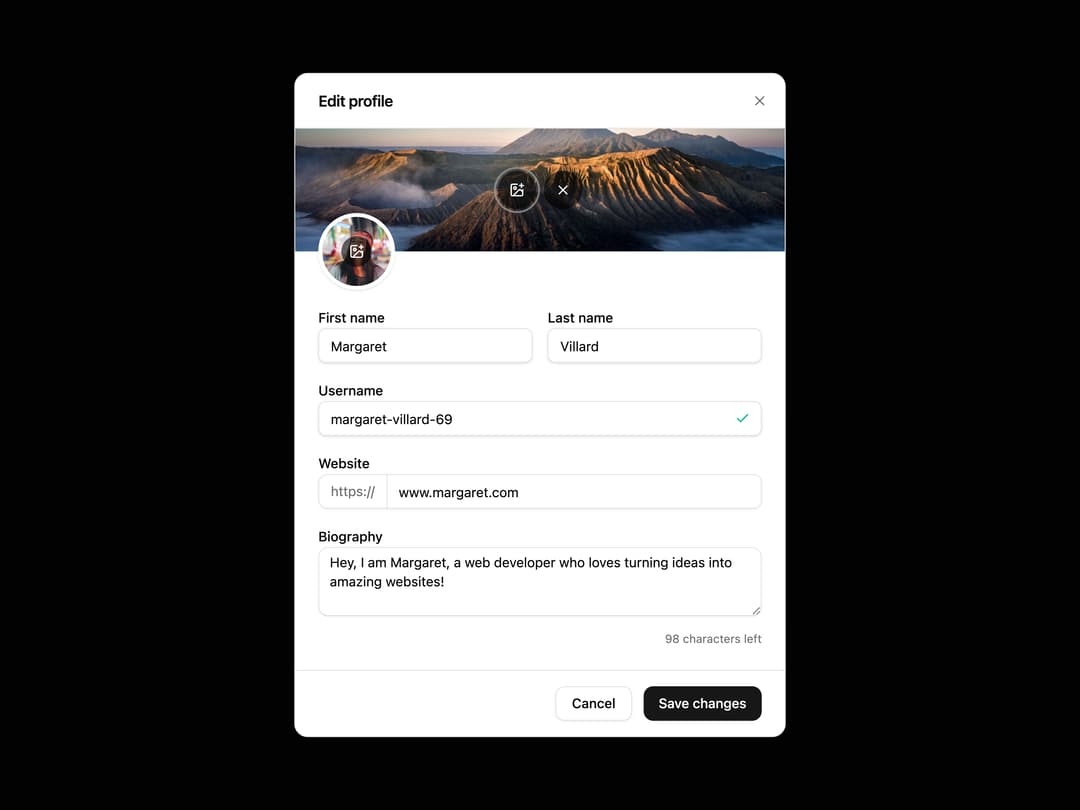
Enhanced shadcn/ui dialog
Built with React and Tailwind. Copy the prompt and paste it into Claude Code, Cursor or Lovable: your agent adds Dialog to your project and fits it to your theme.
Code
How Dialog is used: the demo's code. The component's own source comes with a free account.
Usage.tsx
"use client";

import { useCharacterLimit } from "@/components/ui/dialog-utils/use-character-limit";
import { useImageUpload } from "@/components/ui/dialog-utils/use-image-upload";
import { Button } from "@/components/ui/button";
import {
  Dialog,
  DialogClose,
  DialogContent,
  DialogDescription,
  DialogFooter,
  DialogHeader,
  DialogTitle,
  DialogTrigger,
} from "@/components/ui/dialog";
import { Input } from "@/components/ui/input";
import { Label } from "@/components/ui/label";
import { Textarea } from "@/components/ui/textarea";
import { Check, ImagePlus, X } from "lucide-react";
import { useId, useState } from "react";

function Component() {
  const id = useId();

  const maxLength = 180;
  const {
    value,
    characterCount,
    handleChange,
    maxLength: limit,
  } = useCharacterLimit({
    maxLength,
    initialValue:
      "Hey, I am Margaret, a web developer who loves turning ideas into amazing websites!",
  });

  return (
    <Dialog>
      <DialogTrigger asChild>
        <Button variant="outline">Edit profile</Button>
      </DialogTrigger>
      <DialogContent className="flex flex-col gap-0 overflow-y-visible p-0 sm:max-w-lg [&>button:last-child]:top-3.5">
        <DialogHeader className="contents space-y-0 text-left">
          <DialogTitle className="border-b border-border px-6 py-4 text-base">
            Edit profile
          </DialogTitle>
        </DialogHeader>
        <DialogDescription className="sr-only">
          Make changes to your profile here. You can change your photo and set a
          username.
        </DialogDescription>
        <div className="overflow-y-auto">
          <ProfileBg defaultImage="https://cdn.21st.dev/assets/localized/feb98d05c4c252d9b9bb86b4cf80d14b38e69ea16b404e219f36a53f252b1f1c.jpg" />
          <Avatar defaultImage="https://cdn.21st.dev/assets/localized/8d83e28e14ccb2140152662c91092e7696fada2802b4e1bb82d1d363f6723ed4.jpg" />
          <div className="px-6 pb-6 pt-4">
            <form className="space-y-4">
              <div className="flex flex-col gap-4 sm:flex-row">
                <div className="flex-1 space-y-2">
                  <Label htmlFor={`${id}-first-name`}>First name</Label>
                  <Input
                    id={`${id}-first-name`}
                    placeholder="Matt"
                    defaultValue="Margaret"
                    type="text"
                    required
                  />
                </div>
                <div className="flex-1 space-y-2">
                  <Label htmlFor={`${id}-last-name`}>Last name</Label>
                  <Input
                    id={`${id}-last-name`}
                    placeholder="Welsh"
                    defaultValue="Villard"
                    type="text"
                    required
                  />
                </div>
              </div>
              <div className="space-y-2">
                <Label htmlFor={`${id}-username`}>Username</Label>
                <div className="relative">
                  <Input
                    id={`${id}-username`}
                    className="peer pe-9"
                    placeholder="Username"
                    defaultValue="margaret-villard-69"
                    type="text"
                    required
                  />
                  <div className="pointer-events-none absolute inset-y-0 end-0 flex items-center justify-center pe-3 text-muted-foreground/80 peer-disabled:opacity-50">
                    <Check
                      size={16}
                      strokeWidth={2}
                      className="text-emerald-500"
                      aria-hidden="true"
                    />
                  </div>
                </div>
              </div>
              <div className="space-y-2">
                <Label htmlFor={`${id}-website`}>Website</Label>
                <div className="flex rounded-lg shadow-sm shadow-black/5">
                  <span className="-z-10 inline-flex items-center rounded-s-lg border border-input bg-background px-3 text-sm text-muted-foreground">
                    https://
                  </span>
                  <Input
                    id={`${id}-website`}
                    className="-ms-px rounded-s-none shadow-none"
                    placeholder="yourwebsite.com"
                    defaultValue="www.margaret.com"
                    type="text"
                  />
                </div>
              </div>
              <div className="space-y-2">
                <Label htmlFor={`${id}-bio`}>Biography</Label>
                <Textarea
                  id={`${id}-bio`}
                  placeholder="Write a few sentences about yourself"
                  defaultValue={value}
                  maxLength={maxLength}
                  onChange={handleChange}
                  aria-describedby={`${id}-description`}
                />
                <p
                  id={`${id}-description`}
                  className="mt-2 text-right text-xs text-muted-foreground"
                  role="status"
                  aria-live="polite"
                >
                  <span className="tabular-nums">{limit - characterCount}</span>{" "}
                  characters left
                </p>
              </div>
            </form>
          </div>
        </div>
        <DialogFooter className="border-t border-border px-6 py-4">
          <DialogClose asChild>
            <Button type="button" variant="outline">
              Cancel
            </Button>
          </DialogClose>
          <DialogClose asChild>
            <Button type="button">Save changes</Button>
          </DialogClose>
        </DialogFooter>
      </DialogContent>
    </Dialog>
  );
}

function ProfileBg({ defaultImage }: { defaultImage?: string }) {
  const [hideDefault, setHideDefault] = useState(false);
  const {
    previewUrl,
    fileInputRef,
    handleThumbnailClick,
    handleFileChange,
    handleRemove,
  } = useImageUpload();

  const currentImage = previewUrl || (!hideDefault ? defaultImage : null);

  const handleImageRemove = () => {
    handleRemove();
    setHideDefault(true);
  };

  return (
    <div className="h-32">
      <div className="relative flex h-full w-full items-center justify-center overflow-hidden bg-muted">
        {currentImage && (
          <img
            className="h-full w-full object-cover"
            src={currentImage}
            alt={
              previewUrl
                ? "Preview of uploaded image"
                : "Default profile background"
            }
            width={512}
            height={96}
          />
        )}
        <div className="absolute inset-0 flex items-center justify-center gap-2">
          <button
            type="button"
            className="z-50 flex size-10 cursor-pointer items-center justify-center rounded-full bg-black/60 text-white outline-offset-2 transition-colors hover:bg-black/80 focus-visible:outline focus-visible:outline-2 focus-visible:outline-ring/70"
            onClick={handleThumbnailClick}
            aria-label={currentImage ? "Change image" : "Upload image"}
          >
            <ImagePlus size={16} strokeWidth={2} aria-hidden="true" />
          </button>
          {currentImage && (
            <button
              type="button"
              className="z-50 flex size-10 cursor-pointer items-center justify-center rounded-full bg-black/60 text-white outline-offset-2 transition-colors hover:bg-black/80 focus-visible:outline focus-visible:outline-2 focus-visible:outline-ring/70"
              onClick={handleImageRemove}
              aria-label="Remove image"
            >
              <X size={16} strokeWidth={2} aria-hidden="true" />
            </button>
          )}
        </div>
      </div>
      <input
        type="file"
        ref={fileInputRef}
        onChange={handleFileChange}
        className="hidden"
        accept="image/*"
        aria-label="Upload image file"
      />
    </div>
  );
}

function Avatar({ defaultImage }: { defaultImage?: string }) {
  const { previewUrl, fileInputRef, handleThumbnailClick, handleFileChange } =
    useImageUpload();

  const currentImage = previewUrl || defaultImage;

  return (
    <div className="-mt-10 px-6">
      <div className="relative flex size-20 items-center justify-center overflow-hidden rounded-full border-4 border-background bg-muted shadow-sm shadow-black/10">
        {currentImage && (
          <img
            src={currentImage}
            className="h-full w-full object-cover"
            width={80}
            height={80}
            alt="Profile image"
          />
        )}
        <button
          type="button"
          className="absolute flex size-8 cursor-pointer items-center justify-center rounded-full bg-black/60 text-white outline-offset-2 transition-colors hover:bg-black/80 focus-visible:outline focus-visible:outline-2 focus-visible:outline-ring/70"
          onClick={handleThumbnailClick}
          aria-label="Change profile picture"
        >
          <ImagePlus size={16} strokeWidth={2} aria-hidden="true" />
        </button>
        <input
          type="file"
          ref={fileInputRef}
          onChange={handleFileChange}
          className="hidden"
          accept="image/*"
          aria-label="Upload profile picture"
        />
      </div>
    </div>
  );
}

export { Component };

export default Component;
Dependencies
More by Origin UI
View all
Avatar
951
useImageUpload
926
usePagination
622
Popover
384
Button
364
Command
321
Accordion
258![Calendar [React Day Picker]](https://cdn.21st.dev/cdn-cgi/image/fit=scale-down,width=640,quality=75,format=webp/https://cdn.21st.dev/user_originui/calendar/default/preview.1737991983843.png)
Calendar [React Day Picker]
256
More in Forms
View all

Premium Auth
500

Login 2
7
Authentication Card
47

Login 1
52

Contact Card
1K
Login Form
6

Form
16

Book A Demo 3
83
