
About
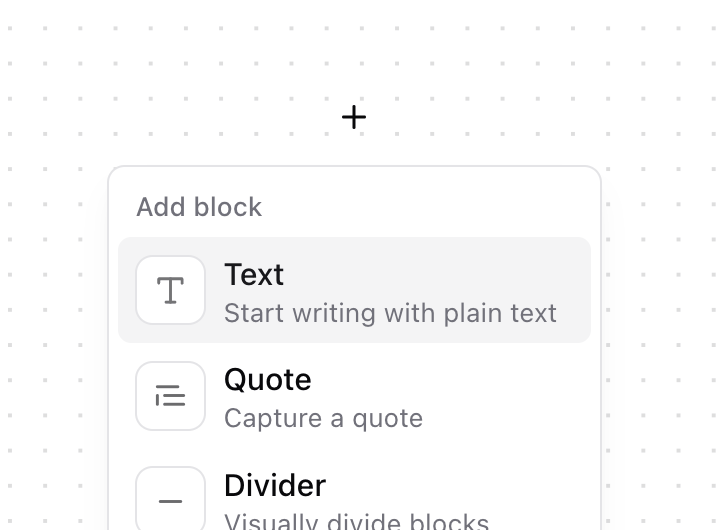
Enhanced shadcn/ui dropdown menu
Built with React and Tailwind. Copy the prompt and paste it into Claude Code, Cursor or Lovable: your agent adds Dropdown Menu to your project and fits it to your theme.
Code
How Dropdown Menu is used: the demo's code. The component's own source comes with a free account.
Usage.tsx
import { Button } from "@/components/ui/button";
import {
  DropdownMenu,
  DropdownMenuContent,
  DropdownMenuItem,
  DropdownMenuLabel,
  DropdownMenuTrigger,
} from "@/components/ui/dropdown-menu";
import { Plus } from "lucide-react";

import { Heading1, Heading2, Minus, TextQuote, Type } from "lucide-react";

function Component() {
  return (
    <DropdownMenu>
      <DropdownMenuTrigger asChild>
        <Button
          size="icon"
          variant="ghost"
          className="rounded-full shadow-none"
          aria-label="Open edit menu"
        >
          <Plus size={16} strokeWidth={2} aria-hidden="true" />
        </Button>
      </DropdownMenuTrigger>
      <DropdownMenuContent className="pb-2">
        <DropdownMenuLabel>Add block</DropdownMenuLabel>
        <DropdownMenuItem>
          <div
            className="flex size-8 items-center justify-center rounded-lg border border-border bg-background"
            aria-hidden="true"
          >
            <Type size={16} strokeWidth={2} className="opacity-60" />
          </div>
          <div>
            <div className="text-sm font-medium">Text</div>
            <div className="text-xs text-muted-foreground">Start writing with plain text</div>
          </div>
        </DropdownMenuItem>
        <DropdownMenuItem>
          <div
            className="flex size-8 items-center justify-center rounded-lg border border-border bg-background"
            aria-hidden="true"
          >
            <TextQuote size={16} strokeWidth={2} className="opacity-60" />
          </div>
          <div>
            <div className="text-sm font-medium">Quote</div>
            <div className="text-xs text-muted-foreground">Capture a quote</div>
          </div>
        </DropdownMenuItem>
        <DropdownMenuItem>
          <div
            className="flex size-8 items-center justify-center rounded-lg border border-border bg-background"
            aria-hidden="true"
          >
            <Minus size={16} strokeWidth={2} className="opacity-60" />
          </div>
          <div>
            <div className="text-sm font-medium">Divider</div>
            <div className="text-xs text-muted-foreground">Visually divide blocks</div>
          </div>
        </DropdownMenuItem>
        <DropdownMenuItem>
          <div
            className="flex size-8 items-center justify-center rounded-lg border border-border bg-background"
            aria-hidden="true"
          >
            <Heading1 size={16} strokeWidth={2} className="opacity-60" />
          </div>
          <div>
            <div className="text-sm font-medium">Heading 1</div>
            <div className="text-xs text-muted-foreground">Big section heading</div>
          </div>
        </DropdownMenuItem>
        <DropdownMenuItem>
          <div
            className="flex size-8 items-center justify-center rounded-lg border border-border bg-background"
            aria-hidden="true"
          >
            <Heading2 size={16} strokeWidth={2} className="opacity-60" />
          </div>
          <div>
            <div className="text-sm font-medium">Heading 2</div>
            <div className="text-xs text-muted-foreground">Medium section subheading</div>
          </div>
        </DropdownMenuItem>
      </DropdownMenuContent>
    </DropdownMenu>
  );
}

export { Component };
Dependencies
More by Origin UI
View all
Dialog
1.2K
Avatar
952
useImageUpload
926
usePagination
622
Popover
384
Button
364
Command
322
Accordion
258
More in Buttons
View all
Button Save
46

Button
20

Eclipse Button
5

Button
6

Button
14

Button Group
37

Button
32
Split Button
32

