
About
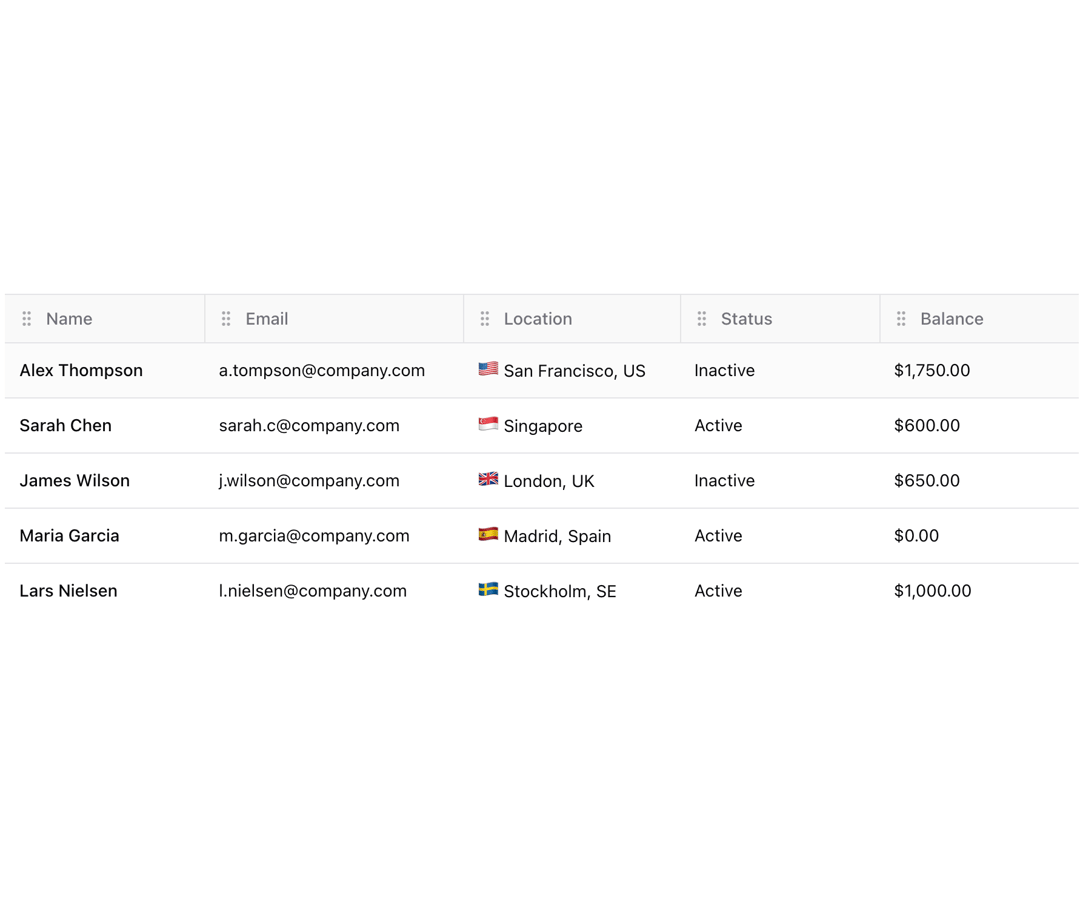
Shadcn table with enhanced appearance
Built with React and Tailwind. Copy the prompt and paste it into Claude Code, Cursor or Lovable: your agent adds Table to your project and fits it to your theme.
Code
How Table is used: the demo's code. The component's own source comes with a free account.
Usage.tsx
"use client";

import { Button } from "@/components/ui/button";
import {
  Table,
  TableBody,
  TableCell,
  TableHead,
  TableHeader,
  TableRow,
} from "@/components/ui/table";
import {
  DndContext,
  KeyboardSensor,
  MouseSensor,
  TouchSensor,
  closestCenter,
  useSensor,
  useSensors,
  type DragEndEvent,
} from "@dnd-kit/core";
import { restrictToHorizontalAxis } from "@dnd-kit/modifiers";
import {
  SortableContext,
  arrayMove,
  horizontalListSortingStrategy,
  useSortable,
} from "@dnd-kit/sortable";
import { CSS } from "@dnd-kit/utilities";
import {
  Cell,
  ColumnDef,
  Header,
  SortingState,
  flexRender,
  getCoreRowModel,
  getSortedRowModel,
  useReactTable,
} from "@tanstack/react-table";
import { ChevronDown, ChevronUp, GripVertical } from "lucide-react";
import { CSSProperties, useEffect, useId, useState } from "react";

type Item = {
  id: string;
  name: string;
  email: string;
  location: string;
  flag: string;
  status: "Active" | "Inactive" | "Pending";
  balance: number;
};

const columns: ColumnDef<Item>[] = [
  {
    id: "name",
    header: "Name",
    accessorKey: "name",
    cell: ({ row }) => <div className="truncate font-medium">{row.getValue("name")}</div>,
    sortUndefined: "last",
    sortDescFirst: false,
  },
  {
    id: "email",
    header: "Email",
    accessorKey: "email",
  },
  {
    id: "location",
    header: "Location",
    accessorKey: "location",
    cell: ({ row }) => (
      <div className="truncate">
        <span className="text-lg leading-none">{row.original.flag}</span> {row.getValue("location")}
      </div>
    ),
  },
  {
    id: "status",
    header: "Status",
    accessorKey: "status",
  },
  {
    id: "balance",
    header: "Balance",
    accessorKey: "balance",
    cell: ({ row }) => {
      const amount = parseFloat(row.getValue("balance"));
      const formatted = new Intl.NumberFormat("en-US", {
        style: "currency",
        currency: "USD",
      }).format(amount);
      return formatted;
    },
  },
];

export default function Component() {
  const [data, setData] = useState<Item[]>([]);
  const [sorting, setSorting] = useState<SortingState>([]);
  const [columnOrder, setColumnOrder] = useState<string[]>(
    columns.map((column) => column.id as string),
  );

  useEffect(() => {
    async function fetchPosts() {
      const res = await fetch(
        "https://res.cloudinary.com/dlzlfasou/raw/upload/users-01_fertyx.json",
      );
      const data = await res.json();
      setData(data.slice(0, 5)); // Limit to 5 items
    }
    fetchPosts();
  }, []);

  const table = useReactTable({
    data,
    columns,
    columnResizeMode: "onChange",
    getCoreRowModel: getCoreRowModel(),
    getSortedRowModel: getSortedRowModel(),
    onSortingChange: setSorting,
    state: {
      sorting,
      columnOrder,
    },
    onColumnOrderChange: setColumnOrder,
    enableSortingRemoval: false,
  });

  // reorder columns after drag & drop
  function handleDragEnd(event: DragEndEvent) {
    const { active, over } = event;
    if (active && over && active.id !== over.id) {
      setColumnOrder((columnOrder) => {
        const oldIndex = columnOrder.indexOf(active.id as string);
        const newIndex = columnOrder.indexOf(over.id as string);
        return arrayMove(columnOrder, oldIndex, newIndex); //this is just a splice util
      });
    }
  }

  const sensors = useSensors(
    useSensor(MouseSensor, {}),
    useSensor(TouchSensor, {}),
    useSensor(KeyboardSensor, {}),
  );

  return (
    <DndContext
      id={useId()}
      collisionDetection={closestCenter}
      modifiers={[restrictToHorizontalAxis]}
      onDragEnd={handleDragEnd}
      sensors={sensors}
    >
      <Table className="bg-background max-w-[1000px]">
        <TableHeader>
          {table.getHeaderGroups().map((headerGroup) => (
            <TableRow key={headerGroup.id} className="bg-muted/50">
              <SortableContext items={columnOrder} strategy={horizontalListSortingStrategy}>
                {headerGroup.headers.map((header) => (
                  <DraggableTableHeader key={header.id} header={header} />
                ))}
              </SortableContext>
            </TableRow>
          ))}
        </TableHeader>
        <TableBody>
          {table.getRowModel().rows?.length ? (
            table.getRowModel().rows.map((row) => (
              <TableRow key={row.id} data-state={row.getIsSelected() && "selected"}>
                {row.getVisibleCells().map((cell) => (
                  <SortableContext
                    key={cell.id}
                    items={columnOrder}
                    strategy={horizontalListSortingStrategy}
                  >
                    <DragAlongCell key={cell.id} cell={cell} />
                  </SortableContext>
                ))}
              </TableRow>
            ))
          ) : (
            <TableRow>
              <TableCell colSpan={columns.length} className="h-24 text-center">
                No results.
              </TableCell>
            </TableRow>
          )}
        </TableBody>
      </Table>
    </DndContext>
  );
}

const DraggableTableHeader = ({ header }: { header: Header<Item, unknown> }) => {
  const { attributes, isDragging, listeners, setNodeRef, transform, transition } = useSortable({
    id: header.column.id,
  });

  const style: CSSProperties = {
    opacity: isDragging ? 0.8 : 1,
    position: "relative",
    transform: CSS.Translate.toString(transform),
    transition,
    whiteSpace: "nowrap",
    width: header.column.getSize(),
    zIndex: isDragging ? 1 : 0,
  };

  return (
    <TableHead
      ref={setNodeRef}
      className="relative h-10 border-t before:absolute before:inset-y-0 before:start-0 before:w-px before:bg-border first:before:bg-transparent"
      style={style}
      aria-sort={
        header.column.getIsSorted() === "asc"
          ? "ascending"
          : header.column.getIsSorted() === "desc"
            ? "descending"
            : "none"
      }
    >
      <div className="flex items-center justify-start gap-0.5">
        <Button
          size="icon"
          variant="ghost"
          className="-ml-2 size-7 shadow-none"
          {...attributes}
          {...listeners}
          aria-label="Drag to reorder"
        >
          <GripVertical className="opacity-60" size={16} strokeWidth={2} aria-hidden="true" />
        </Button>
        <span className="grow truncate">
          {header.isPlaceholder
            ? null
            : flexRender(header.column.columnDef.header, header.getContext())}
        </span>
        <Button
          size="icon"
          variant="ghost"
          className="group -mr-1 size-7 shadow-none"
          onClick={header.column.getToggleSortingHandler()}
          onKeyDown={(e) => {
            // Enhanced keyboard handling for sorting
            if (header.column.getCanSort() && (e.key === "Enter" || e.key === " ")) {
              e.preventDefault();
              header.column.getToggleSortingHandler()?.(e);
            }
          }}
        >
          {{
            asc: (
              <ChevronUp
                className="shrink-0 opacity-60"
                size={16}
                strokeWidth={2}
                aria-hidden="true"
              />
            ),
            desc: (
              <ChevronDown
                className="shrink-0 opacity-60"
                size={16}
                strokeWidth={2}
                aria-hidden="true"
              />
            ),
          }[header.column.getIsSorted() as string] ?? (
            <ChevronUp
              className="shrink-0 opacity-0 group-hover:opacity-60"
              size={16}
              strokeWidth={2}
              aria-hidden="true"
            />
          )}
        </Button>
      </div>
    </TableHead>
  );
};

const DragAlongCell = ({ cell }: { cell: Cell<Item, unknown> }) => {
  const { isDragging, setNodeRef, transform, transition } = useSortable({
    id: cell.column.id,
  });

  const style: CSSProperties = {
    opacity: isDragging ? 0.8 : 1,
    position: "relative",
    transform: CSS.Translate.toString(transform),
    transition,
    width: cell.column.getSize(),
    zIndex: isDragging ? 1 : 0,
  };

  return (
    <TableCell ref={setNodeRef} className="truncate" style={style}>
      {flexRender(cell.column.columnDef.cell, cell.getContext())}
    </TableCell>
  );
};

export { Component }
Dependencies
More by Origin UI
View all
Dialog
1.2K
Avatar
951
useImageUpload
926
usePagination
622
Popover
384
Button
364
Command
321
Accordion
258